Azure Synapse Analytics
An Azure analytics service that brings together data integration, enterprise data warehousing, and big data analytics. Previously known as Azure SQL Data Warehouse.
This browser is no longer supported.
Upgrade to Microsoft Edge to take advantage of the latest features, security updates, and technical support.
' cx='32' cy='32' r='32' /%3E%3Ctext x='50%25' y='55%25' dominant-baseline='middle' text-anchor='middle' fill='%23FFF' %3EVS%3C/text%3E%3C/svg%3E)
I have a local application that I package as a whl file and upload to my Synapse Spark Clusters.
In the application, I use a logger like this:
logger = logging.getLogger(__name__)
logger.setLevel(logging.INFO)
logger.info("This is a logging line.")
I noticed that once I import my module and execute it in Synapse, there are no logging messages displayed. I also tried to change the logger to output the messages to stdout:
stdout_handler = logging.StreamHandler(sys.stdout)
logger.addHandler(stdout_handler)
and while it works locally (instead of logging-messages I see the "This is a logging line" in my normal stdout) - I still don't see any logging messages in Synapse.
What do I have to configure to be able to see the logger.info messages below the Synapse Notebook cells when I import and execute the module in Synapse?
I tried the following solution from the comments, but it didn't get anywhere.
 log4jLogger = sc._jvm.org.apache.log4j
 LOGGER = log4jLogger.LogManager.getLogger(__name__)
 LOGGER.info("pyspark script logger initialized")
I also tried the following (replaced <packagename> with the name of my package in which I log messages):
 import logging
 logger = logging.getLogger("<packagename>")
 logger.setLevel(logging.INFO)
and it works the first time I run the code with "Run all" - but once I re-run a cell , I get an error (probably because Synapse closed the logging file??)
 Traceback (most recent call last):
   File "/home/trusted-service-user/cluster-env/env/lib/python3.8/logging/__init__.py", line 1088, in emit
     stream.write(msg + self.terminator)
   File "/mnt/var/hadoop/tmp/nm-local-dir/usercache/trusted-service-user/appcache/application_<appnumber>/container_<container_number/tmp/<number>", line         565, in write
     super(PipeOutput, self).write(message)
   File "/mnt/var/hadoop/tmp/nm-local-dir/usercache/trusted-service-user/appcache/application_<appnumber>/container_<container_number/tmp/<number>", line 555, in write
     super(UnicodeDecodingStringIO, self).write(s)
 ValueError: I/O operation on closed file
I get the same error if I execute functionality from my package that tries to log something - the first time it works, the second time I execute it in the same notebook (even the same cell) it crashes with the error above.

I am not expert on logger thing. But what about using println ? or you want to avoid and use only logger approach?
Found below thread that should help too
https://stackoverflow.com/questions/25407550/how-do-i-log-from-my-python-spark-script
I could potentially use everything with print() (and that works too), but I'd really like to use the logger module - its especially useful with the different levels of logging (INFO, WARN, ERROR) etc.
Try below code provided in stackoverflow thread and see if that works
log4jLogger = sc._jvm.org.apache.log4j
LOGGER = log4jLogger.LogManager.getLogger(name)
LOGGER.info("pyspark script logger initialized")
Does not work :/
log4jLogger = sc._jvm.org.apache.log4j
LOGGER = log4jLogger.LogManager.getLogger(__name__)
LOGGER.info("pyspark script logger initialized")
I also tried the following (replaced <packagename> with the name of my package in which I log messages)
import logging
logger = logging.getLogger("<packagename>")
logger.setLevel(logging.INFO)
and it works the first time I run the code with "Run all" - but once I re-run a cell , I get an error (probably because Synapse closed the logging file??)
Traceback (most recent call last):
  File "/home/trusted-service-user/cluster-env/env/lib/python3.8/logging/__init__.py", line 1088, in emit
    stream.write(msg + self.terminator)
  File "/mnt/var/hadoop/tmp/nm-local-dir/usercache/trusted-service-user/appcache/application_<appnumber>/container_<container_number/tmp/<number>", line         565, in write
    super(PipeOutput, self).write(message)
  File "/mnt/var/hadoop/tmp/nm-local-dir/usercache/trusted-service-user/appcache/application_<appnumber>/container_<container_number/tmp/<number>", line 555, in write
    super(UnicodeDecodingStringIO, self).write(s)
ValueError: I/O operation on closed file
I'd let Microsoft moderators to comment here.

Hello @Victor Seifert ,
We are reaching out to the product team to get more details on this issue. I will update you once I hear back from the team.
Hello @Victor Seifert ,
Thanks for the question and using MS Q&A platform.
(UPDATE:14/3/2022): As per the discussion with the internal team, the reason that you are facing this IO clothing issue is because of these codes:
 stdout_handler = logging.StreamHandler(sys.stdout)
 logger.addHandler(stdout_handler)
For this issue, as you are trying to use StreamHandler(), by default it’s sys.stderr, please check this: https://docs.python.org/3/library/logging.handlers.html#logging.StreamHandler, now you are using sys.stdout
sys.stdout and sys.stderr for every cell, thus when you run the cell for another time, the last stream for log writing is actually already closed. That’s why you’ll get errors like that: https://github.com/apache/incubator-livy/blob/master/repl/src/main/resources/fake_shell.py#L537 So as a summary, you should avoid using code like logging.StreamHandler(sys.stdout/sys.stderr) which will have issue caused by livy’s original design.
You should directly use the logging method we provided as the example below. The log messages could be found within both cell output and driver log directly.
--------------------------------------------------------
You may try with below sample code for python logging with different format and customized log level.
import logging

# Customize the logging format for all loggers
FORMAT = "%(asctime)s - %(name)s - %(levelname)s - %(message)s"
formatter = logging.Formatter(fmt=FORMAT)
for handler in logging.getLogger().handlers:
    handler.setFormatter(formatter)

# Customize log level for all loggers
logging.getLogger().setLevel(logging.INFO)

# Customize the log level for a specific logger
customizedLogger = logging.getLogger('customized')
customizedLogger.setLevel(logging.WARNING)

# logger that use the default global log level
defaultLogger = logging.getLogger('default')

defaultLogger.debug("default debug message")
defaultLogger.info("default info message")
defaultLogger.warning("default warning message")
defaultLogger.error("default error message")
defaultLogger.critical("default critical message")

# logger that use the customized log level
customizedLogger.debug("customized debug message")
customizedLogger.info("customized info message")
customizedLogger.warning("customized warning message")
customizedLogger.error("customized error message")
customizedLogger.critical("customized critical message")
Here is the expected output for the above sample code for python logging with different format and customized log level.
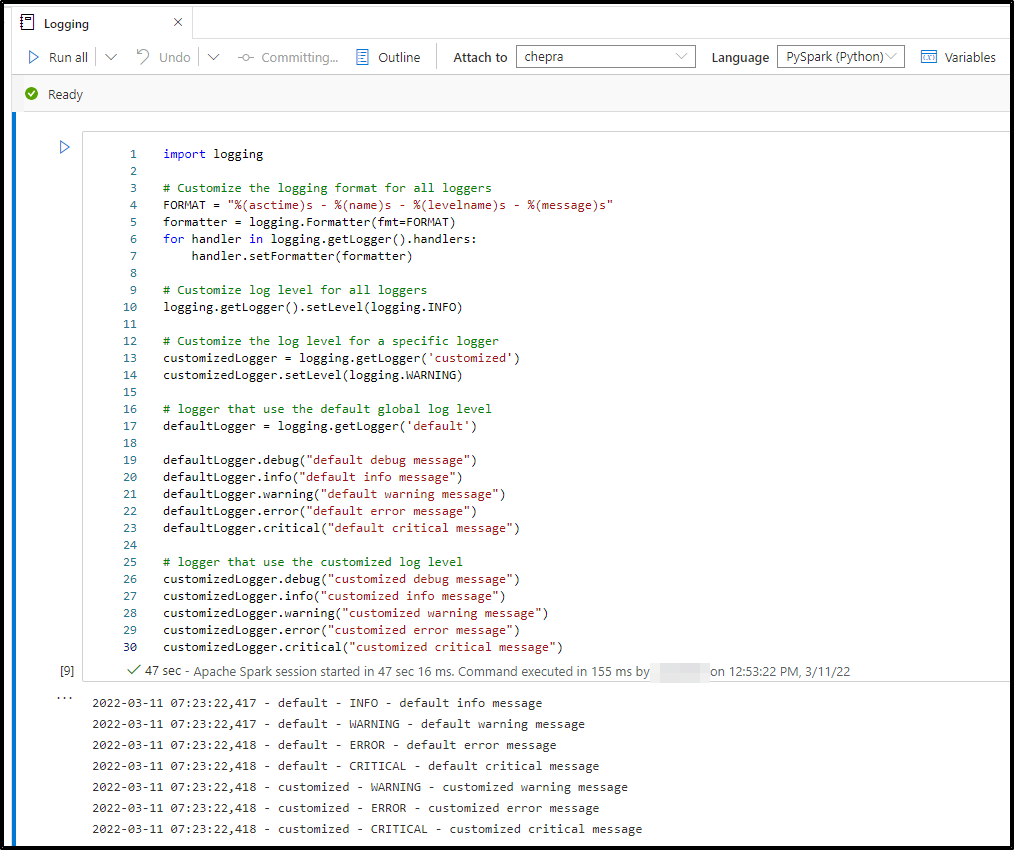
Hope this will help. Please let us know if any further queries.
------------------------------
 or upvote
  button whenever the information provided helps you. Original posters help the community find answers faster by identifying the correct answer. Here is how
Thanks for explaining how logging works... ?!
The code you supplied:
 # Customize log level for all loggers
 logging.getLogger().setLevel(logging.INFO)
works just as my code from above does (the difference being that your code sets the logging level all loggers and not only for the package):
  import logging
  logger = logging.getLogger("<packagename>")
  logger.setLevel(logging.INFO)
But that does not solve my problem at all.
AGAIN: I get an error message the second time that I execute functionality from my package because Synapse seemingly closes the logging file! If you don't know how to solve this, don't answer.
Hello @Victor Seifert ,
We are reaching out to the product team to get more details on this issue. I will update you once I hear back from the team.
Hello @Victor Seifert ,
Please do check the updated answer. Please let us know if any further queries.
------------------------------
or upvote button whenever the information provided helps you.