Azure Functions
An Azure service that provides an event-driven serverless compute platform.
This browser is no longer supported.
Upgrade to Microsoft Edge to take advantage of the latest features, security updates, and technical support.
' cx='32' cy='32' r='32' /%3E%3Ctext x='50%25' y='55%25' dominant-baseline='middle' text-anchor='middle' fill='%23FFF' %3EAP%3C/text%3E%3C/svg%3E)
Hey
So I'm deploying using Visual Studio Code.
Other colleagues use Visual Studio but behavior of deployment is similar.
The function then tries to create and save information into a file. But I always run into exceptions. Not listing them here but to my understanding, it seems that the Function doesn't have read/write access to the local fileshare that is created during initial deploy of the application.
For the file and directory path I have used code like this:
string startPath = Path.Combine(Path.GetTempPath(), Guid.NewGuid().ToString());
this:
string startPath = System.IO.Path.GetTempPath(); -> points to /local/temp directory that doesnt really exists when looking into the FileShare using the Azure Portal
this:
string startPath = Path.GetDirectoryName(Assembly.GetExecutingAssembly().Location); -> points to it's "bin" directory
even hardcoding like this:
string startPath = "C:\site\wwwroot\result"; or string startPath = "C:\home\site\wwwroot\result";
I do get different error messages, but in the end it never allows the Function to save into its local fileshare directory under "wwwroot", which is what I think it can read/write to.
Any ideas on how to enable the Function to be able to save/create files? What is the best practice when trying to use the file directory access and the correct "paths" to use?
Is it any deployment setting I need to be aware of?
Have tried playing around with the WEBSITE_RUN_FROM_PACKAGE setting, but not sure I should modify that.
Many thanks for your feedback.
Best Regards
/Antonios
' cx='32' cy='32' r='32' /%3E%3Ctext x='50%25' y='55%25' dominant-baseline='middle' text-anchor='middle' fill='%23FFF' %3EMM%3C/text%3E%3C/svg%3E)
Thanks for reaching out to Q&A.
Every Azure Web App has a home directory stored/backed by Azure Storage. This network share is where applications store their content. This directory is available for the sandbox with read/write access. The file directory is either D:\ or C:\ , you can check this by opening the Kudu site of the function app (site is not available for Linux consumption app)
Functions Sandbox restrictions : https://github.com/projectkudu/kudu/wiki/Azure-Web-App-sandbox#file-system-restrictionsconsiderations
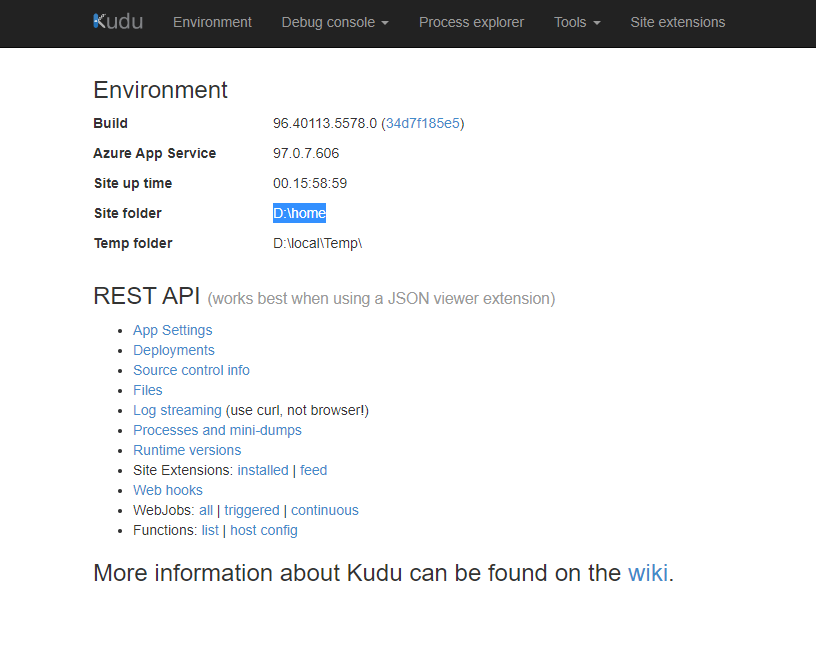
You should be able to write the files to the site folder directory (in my case D:\Home\Site\wwwroot) however its not recommended to write files in this directory. I would strongly recommend you to write the files to a storage account either using Storage SDK or functions storage output binding
I hope this helps!
Please 'Accept as answer' and ‘Upvote’ if it helped so that it can help others in the community looking for help on similar topics.
thanks. I guess using a separate storage account proper is the way to go. Thanks