Exchange Online
A cloud-based service included in Microsoft 365, delivering scalable messaging and collaboration features with simplified management and automatic updates.
This browser is no longer supported.
Upgrade to Microsoft Edge to take advantage of the latest features, security updates, and technical support.
' cx='32' cy='32' r='32' /%3E%3Ctext x='50%25' y='55%25' dominant-baseline='middle' text-anchor='middle' fill='%23FFF' %3EGM%3C/text%3E%3C/svg%3E)
Hi All
one of my user was unable to access SharePoint site, he was getting 404 error. i have checked and I could see home page was deleted so i have restored the homepage. After restoring home page In the left bar navigation; when user clicks home page he is still getting 404 error experts guide me how to fix it.

' cx='32' cy='32' r='32' /%3E%3Ctext x='50%25' y='55%25' dominant-baseline='middle' text-anchor='middle' fill='%23FFF' %3EED%3C/text%3E%3C/svg%3E)
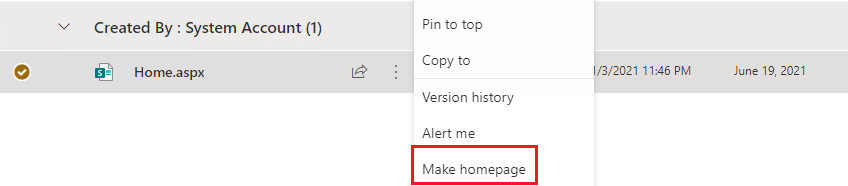
After restoring the Home page from recycle bin, you should go to Site contents -> Site pages -> Select the Home page -> Make it as homepage.
If the answer is helpful, please click "Accept Answer" and kindly upvote it. If you have extra questions about this answer, please click "Comment".
Note: Please follow the steps in our documentation to enable e-mail notifications if you want to receive the related email notification for this thread.
I’m checking how the things are going on about this issue. Whether the answer helps you?
If there is any problem with this issue, feel free to let me know.
' cx='32' cy='32' r='32' /%3E%3Ctext x='50%25' y='55%25' dominant-baseline='middle' text-anchor='middle' fill='%23FFF' %3EUF%3C/text%3E%3C/svg%3E)
It should work since URL is same as it was before deletion. But go to settings , navigation ( Or quick Launch) and check out if the link is correct for the navigation item. here you will see the URL user are directed to for each item in left pane.