Sounds like there is a DDL trigger. Check
SELECT * FROM sys.triggers WHERE parent_class_desc = 'DATABASE'
SELECT *FROM sys.server_triggers
Run these queries with an account that is sysadmin.
This browser is no longer supported.
Upgrade to Microsoft Edge to take advantage of the latest features, security updates, and technical support.
' cx='32' cy='32' r='32' /%3E%3Ctext x='50%25' y='55%25' dominant-baseline='middle' text-anchor='middle' fill='%23FFF' %3EC%3C/text%3E%3C/svg%3E)
We created a database user which has a default schema other than dbo in SQL Server 2016. It will only have DDL and DML permissions to the default schema. And this user will also be used in Azure DevOps to deploy a dacpac change using sqlpackage utility to the default schema. It has been given deny permissions in the dbo schema. Below are the current permissions of the user.
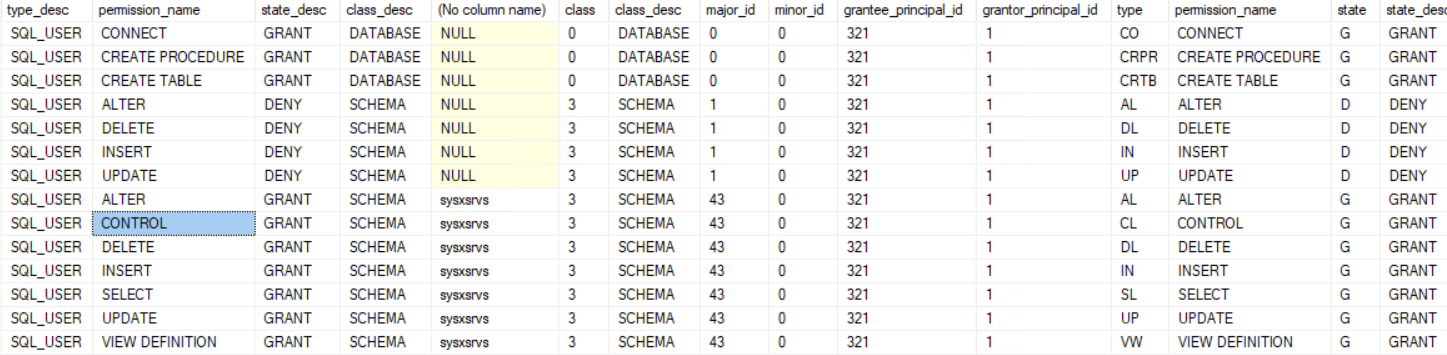
However, when trying to create a table within the default schema, it gave the following error:
"VIEW SERVER STATE permission was denied on object 'server', database 'master'.
The user does not have permission to perform this action."
Why would it need the VIEW SERVER STATE permission when it already has a CREATE permission granted to it?
Any suggestions to accomplish the requirements above is much appreciated.

Hi @cenko2 ,
Any update for this thread? Did the replies could help you? If a response helped, do "Accept Answer". If they all not help, please let us know.

Sounds like there is a DDL trigger. Check
SELECT * FROM sys.triggers WHERE parent_class_desc = 'DATABASE'
SELECT *FROM sys.server_triggers
Run these queries with an account that is sysadmin.
Running the queries above, we found out there are database and server level triggers that prevent us from creating a table without the VIEW SERVER STATE permission. For our purpose, we need to grant this permission.
Apparently sqlpackage performs an action which requires VIEW SERVER STATE. That's a server-level permission which does not come with CREATE permissions on a schema.
What action sqlpackage is attempting to perform, I don't know, and I don't use sqlpackage myself. But you could use Profiler to spy on it. Capture the events RPC:Starting, SQL:BatchStarting and Error:Exception.
Thanks for your response, @Erland Sommarskog .
But I was not using sqlpackage.exe to create the table, just running a simple CREATE TABLE statement on SSMS logged on as the user.
I ran the queries above and you are right, there are triggers in the database and server.
Thank you!
Hi @cenko2 ,
VIEW SERVER STATE Permission is high level server-level privilege which must not be granted to everybody. Only administrators must have privilege to use view server state permission but we can assign this permission to some users who want to see server level state of your SQL Server instance.
According to your error message, the login you are using to execute the script doesn’t have this permission. To fix this issue we will use admin account to grant view server state permission to the login name.
USE MASTER
GO
GRANT VIEW SERVER STATE TO [username]
If the answer is helpful, please click "Accept Answer" and kindly upvote it. If you have extra questions about this answer, please click "Comment".
Thank you for your reply @CathyJi-MSFT . We granted this permission to the user after finding out the there are database and server level triggers preventing the user to create a table.