Community Center | Not monitored
Tag not monitored by Microsoft.

This browser is no longer supported.
Upgrade to Microsoft Edge to take advantage of the latest features, security updates, and technical support.
' cx='32' cy='32' r='32' /%3E%3Ctext x='50%25' y='55%25' dominant-baseline='middle' text-anchor='middle' fill='%23FFF' %3EM%3C/text%3E%3C/svg%3E)
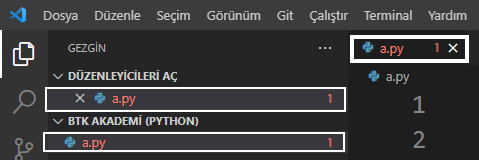
I have a problem. I don't want to see error notification in visual studio code. I don't want to see the error notification inside the square white line. How can I disable this feature? I am using microsoft python plugin in vs code. I disabled the yellow bulb feature without deleting and disabling the microsoft python plugin. Accordingly, How can I disable the error notification within the square white line without deleting and deactivating the microsoft python plugin?
' cx='32' cy='32' r='32' /%3E%3Ctext x='50%25' y='55%25' dominant-baseline='middle' text-anchor='middle' fill='%23FFF' %3ETS%3C/text%3E%3C/svg%3E)
Hi @Markoven ,
Thanks for taking time to post this issue in Microsoft Q&A forum.
VS Code(different from VS IDE) is currently not supported in Microsoft Q&A forums, the supported products are listed over here: https://learn.microsoft.com/en-us/answers/products/ (more to be added later on).
For the related questions about VS Code(technical support), you can post here: Stack Overflow - Visual Studio Code or here: GitHub - Visual Studio Code.
Thanks for your understanding, have a great day.
Best Regards,
Tianyu