Microsoft Security | Intune | Enrollment
Registering devices with Intune for management and policy enforcement

This browser is no longer supported.
Upgrade to Microsoft Edge to take advantage of the latest features, security updates, and technical support.

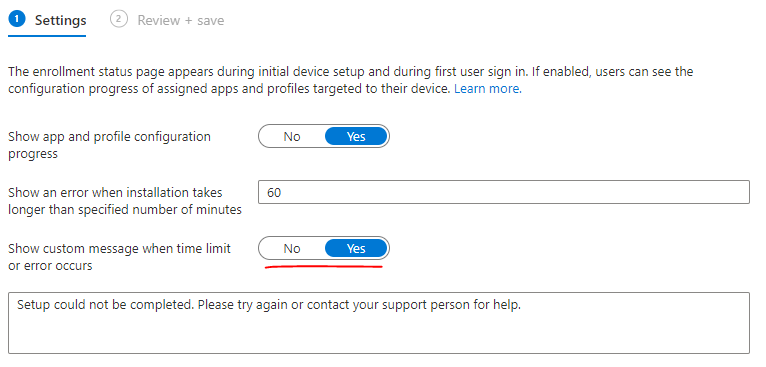
Is it possible, that if I select custom message to be displayed, I will left out from real error messages? Problem with Autopilot ESP is, that there is a lot of situations, where you can't understand what happended and you need to deep dive into logs. If the custom message would be disabled, would I get more technical details and info of the root cause in the ESP page?
' cx='32' cy='32' r='32' /%3E%3Ctext x='50%25' y='55%25' dominant-baseline='middle' text-anchor='middle' fill='%23FFF' %3ECM%3C/text%3E%3C/svg%3E)
@Pavel yannara Mirochnitchenko , For the setting "Show custom message when time limit or error occur.", it occurs when app installation time limit exceed. When we set no, it will show the default error message "Setup could not be completed. Please try again or contact your support person for help.". You can also set the custom error message you want. For the detailed error during app installation, you still need to look into IME log.
But if you want to know which phase during ESP is failed with what error, you can set "Show app and profile configuration progress" as yes which will show the error on each phase. Here is a link with more detailed description for the reference:
https://learn.microsoft.com/en-us/mem/intune/enrollment/windows-enrollment-status#create-new-profile
Hope it can help.
If the answer is helpful, please click "Accept Answer" and kindly upvote it. If you have extra questions about this answer, please click "Comment".
Note: Please follow the steps in our documentation to enable e-mail notifications if you want to receive the related email notification for this thread.
@Pavel yannara Mirochnitchenko , Hope things are going well. I am writing to see if there's anything unclear of the above information, If there's anything else we can help, feel free to let us know.
Thanks for your time and have a nice day!
thanks, this is fine I guess. I saw very new error message in ESP and checked, that custom message was disabled, but it seems I am wrong about this :)
@Pavel yannara Mirochnitchenko , Thanks for the response. we can still see the detailed error although we disable custom message. This is because the custom message is one will display on the screen when we get timeout to install app. So we can still see other error message when it is disabled.
Hope it can help you understand it.