Microsoft 365 and Office | SharePoint | Development
The process of building custom applications and tools that interact with Microsoft SharePoint, including SharePoint Online in Microsoft 365.

This browser is no longer supported.
Upgrade to Microsoft Edge to take advantage of the latest features, security updates, and technical support.
' cx='32' cy='32' r='32' /%3E%3Ctext x='50%25' y='55%25' dominant-baseline='middle' text-anchor='middle' fill='%23FFF' %3ECJ%3C/text%3E%3C/svg%3E)
I created a SharePoint Designer workflow that will send an email 30, 60, 90 days when an item is due. I'm having trouble creating a loop, and the one that is in my workflow isn't working. The email part works without any issues.
Can anyone assist?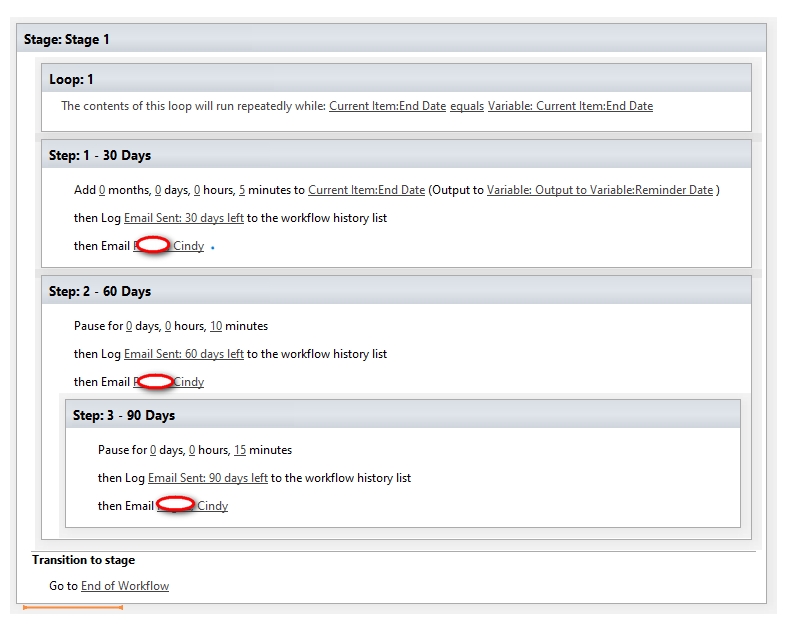

I am currently looking into this issue and will give you an update as soon as possible.
Thank you for your understanding and support.
Thanks!
Any updates?
Hi @cindy jones
As your actual need is to send emails 30, 60, 90 days before the end date, here I provide another workflow for you to refer to:
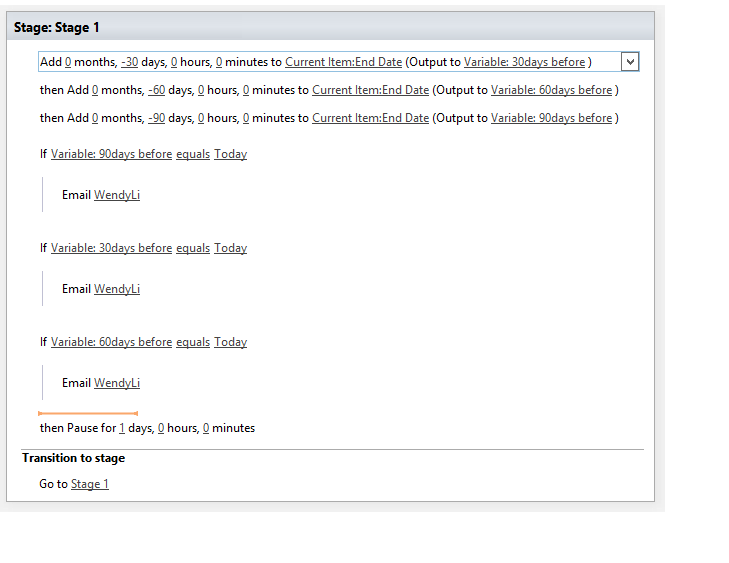
First, we need three variables:
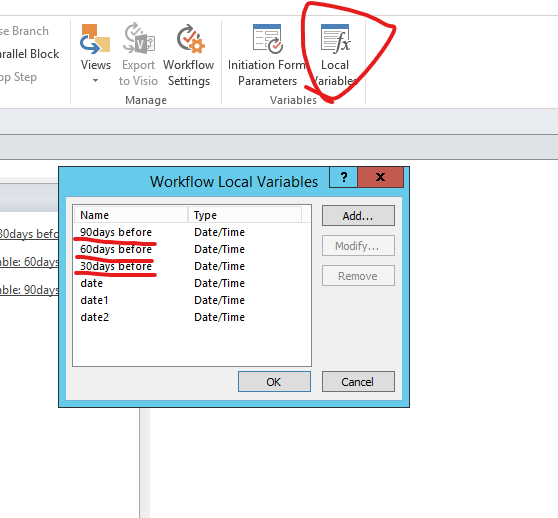
Then I set value for these three variables and set the condition (if Today equals variables), send email.
Last we need to pay attention, I add pause action and transition to stage1 is to let this workflow run every day, so that we could check if today equals to "30days before, 60days before and 90 days before" day by day.
If the answer is helpful, please click "Accept Answer" and kindly upvote it. If you have extra questions about this answer, please click "Comment".
Note: Please follow the steps in our documentation to enable e-mail notifications if you want to receive the related email notification for this thread.
Thanks! For testing purposes the workflow can be modified for 1 day, 2 days and 3 days?
Hi @cindy jones
I would suggest you to use "-1, -2, -3" for test, the test effect could be better and then change it into "-30, -60, -90".
Thanks! This worked on my test list. One last question, would the workflow work on the existing list that I have attached? Or would I need to make changes to the items that I have highlighted in order to start the workflow?
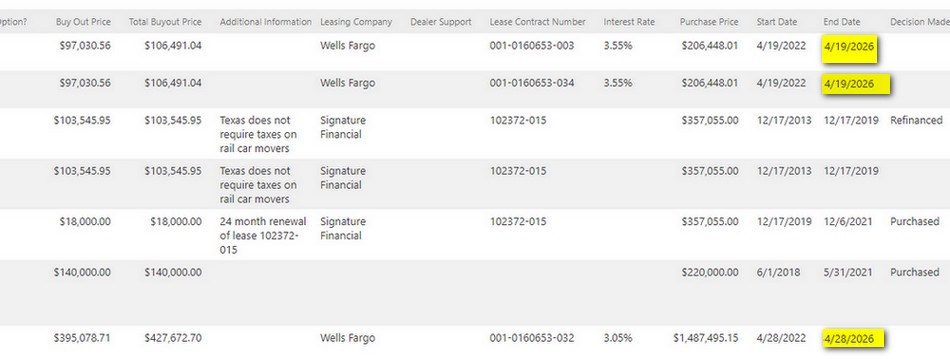
Hi @cindy jones
You could choose how to start the workflow in workflow settings, just choose one as you like:
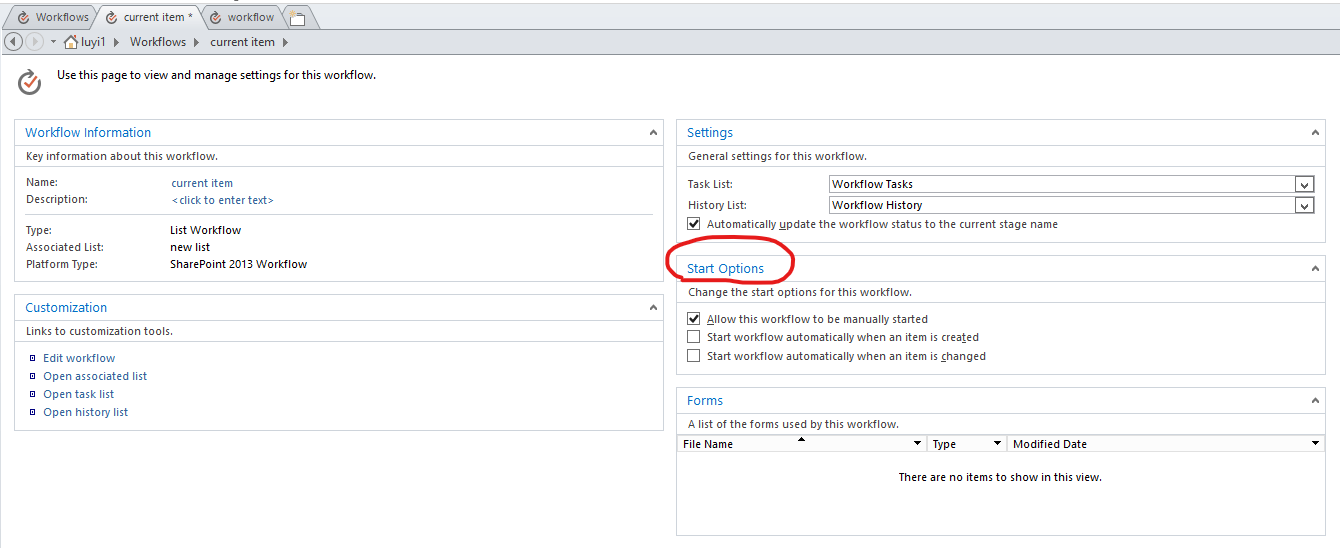
Sothis means I could manually start the workflow on the items that are currently in the list?
Yes, you could. If you choose to start it manually, you could start it when you click More options (...) > workflow. You could also ues "Start workflow if an item is changed", then after you change the value in the item, the workflow will start automatically.
Thanks!
Hi @cindy jones
I am checking to see if the problem has been resolved. If you have any questions or progress, you can contact me in time.
If the answer is helpful, please click "Accept Answer" and kindly upvote it. If you have extra questions about this answer, please click "Comment".
Note: Please follow the steps in our documentation to enable e-mail notifications if you want to receive the related email notification for this thread.
Thanks so much for your assistance!
Hi @cindy jones
Sorry for the delay, as in your screenshot there are two variables: "Current item:End deta" and "Reminder Date", the action "add date and time" actually will not change the value in "End Date" column, it will only change the value in variable "Reminder Date".
For example, you could refer to this workflow:
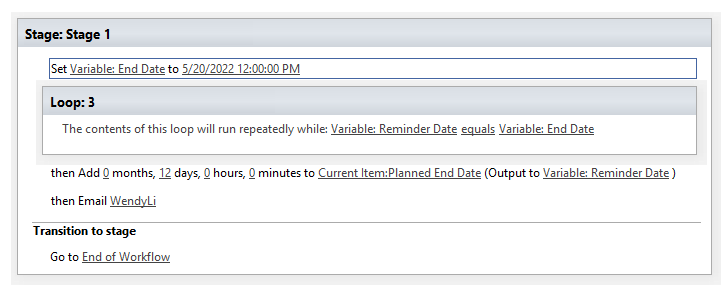
If I set the value in "Planned End Date" as 2022/5/19 12:00AM, then I will receive two emails, which tell you the loop runs twice:
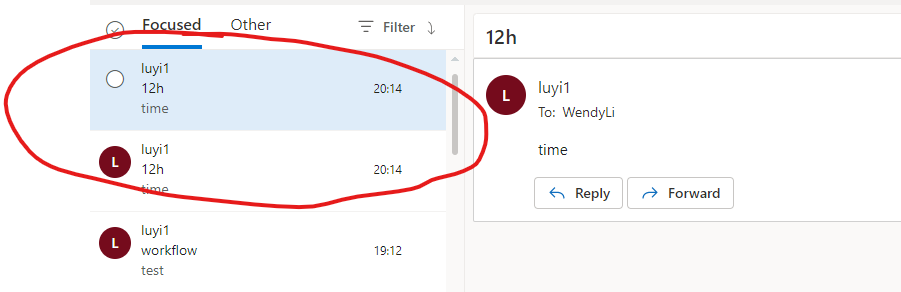
According to this, then you could add pause action during the loop as your need.
If the answer is helpful, please click "Accept Answer" and kindly upvote it. If you have extra questions about this answer, please click "Comment".
Note: Please follow the steps in our documentation to enable e-mail notifications if you want to receive the related email notification for this thread.
In my example I need to send an email, 30, 60, and 90 days, will this workflow work for this purpose?
I only have one variable which is the End Date, and I added the Reminder Date as a calculated column. Could this be a problem?
Hi @cindy jones
You could check how many variables you create in your workflow here, I think "Reminder Date" could be a variable:

As I said before, to run your workflow normally, you need change the loop to "variable "Reminder Date" equals to variable "End Date".
What's more, to run a loop, we don't need to add step below it, just add action. So you need to delete the step1,2,3 and retain the actions in the steps.
At last, in my opinion if you want to create a SharePoint Designer workflow that will send an email 30, 60, 90 days when an item is due. How about creating a workflow without using a loop:
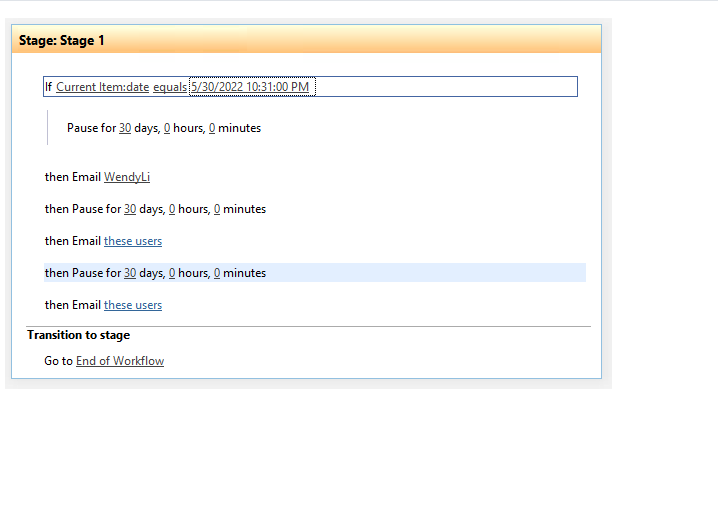
On the last workflow that is sending emails, can this be written on End Date and not a specific date?
Hi @cindy jones
Yes, you could change it into End Date column.
Would this work? If End Date equals End Date. The End Date column has different dates.
Hi @cindy jones
I could not get you clearly. Isn't End Date a column? How does it have different dates in an item? If you want End Date column equal to Variabel End Date, you need to set a value to Variabel End Date.
Yes End Date is a column in a list. The list has over 100 items with different “due dates”. Does this make sense?
Are these “due dates“ regular? If not, you could create another column [Due Date] for these due dates and set the workflow as "If Current item: End Date equals to Current item: Due Date".
I misspoke when I said “due date”. The column is “end date”, and this column contains dates throughout this year, next year and so on. If a Due Date column is created, would this be populated with the current End Date?
No, you need to fill in value manually. Could you please provide some screenshot to show me your list? Do you need that if today equals to "End date", then the email will be sent 30, 60, 90 days later?
Ok. I have attached the screen shot. Please let me know if you need anything else. I need the workflow to send emails 30, 60, 90 days before the end date.
