Microsoft 365 and Office | SharePoint | For business | Windows
A group of Microsoft Products and technologies used for sharing and managing content, knowledge, and applications.

This browser is no longer supported.
Upgrade to Microsoft Edge to take advantage of the latest features, security updates, and technical support.
' cx='32' cy='32' r='32' /%3E%3Ctext x='50%25' y='55%25' dominant-baseline='middle' text-anchor='middle' fill='%23FFF' %3EKE%3C/text%3E%3C/svg%3E)
Guys help me please!
I have a column in Sharepoint list which is calles URL and it contains a url of a site. I need to make a view which is a tile view and it needs to be clickable. The goal is when i click on the tile it should redirect me to the site of URL. Can somebody help me how to write this with Json code. For the record my knowledge of Json is very limited.
Thanks in advance.
' cx='32' cy='32' r='32' /%3E%3Ctext x='50%25' y='55%25' dominant-baseline='middle' text-anchor='middle' fill='%23FFF' %3EYJ%3C/text%3E%3C/svg%3E)
Hi anonymous user ,
Thanks for your question.
We are currently looking into this issue and will give you an update as soon as possible.
Thank you for your understanding and support.
Hi anonymous user ,
Your requirement can be achieved via Json.
1,Create a list with the following 4 Columns.
Field Type
Title A single line of text
Icon A single line of text
URL Hyperlink
NewTab Yes/No - This field is used to open the link the same tab or new tab
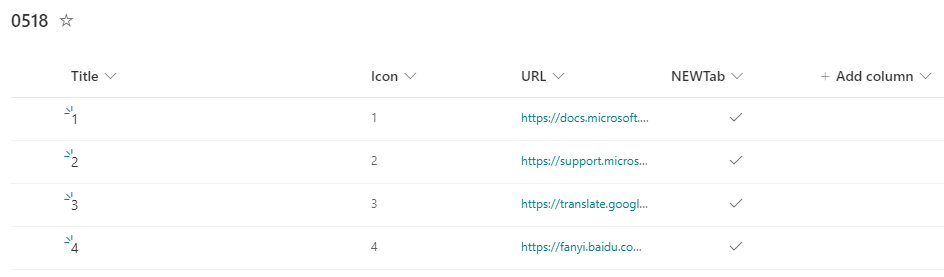
2,Enter the Json Editor interface as the follow steps.
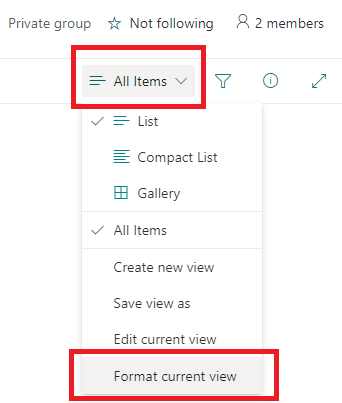
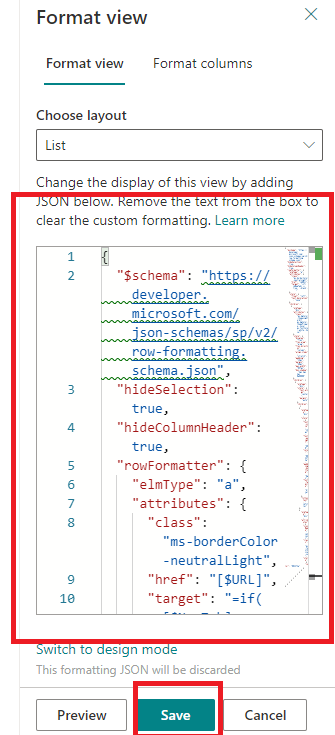
3,Then copy the Json Code to the area as below. And click save.
{
  "$schema": "https://developer.microsoft.com/json-schemas/sp/v2/row-formatting.schema.json",
  "hideSelection": true,
  "hideColumnHeader": true,
  "rowFormatter": {
    "elmType": "a",
    "attributes": {
      "class": "ms-borderColor-neutralLight",
      "href": "[$URL]",
      "target": "=if([$NewTab] == true, '_blank', '')"
    },
    "style": {
      "float": "left",
      "text-decoration": "none"
    },
    "children": [
      {
        "elmType": "div",
        "attributes": {
          "class": "ms-bgColor-themeLighterAlt ms-bgColor-themePrimary--hover ms-fontColor-white--hover"
        },
        "style": {
          "display": "flex",
          "flex-wrap": "wrap",
          "flex-direction": "column",
          "align-items": "stretch",
          "padding": "13px",
          "margin": "20px",
          "max-width": "957px",
          "box-shadow": "2px 2px 4px #a80000"
        },
        "children": [
          {
            "elmType": "div",
            "style": {
              "text-align": "center",
              "margin": "auto"
            },
            "children": [
              {
                "elmType": "div",
                "style": {
                  "font-size": "13px",
                  "font-weight": "600",
                  "color": "#04474a",
                  "padding-bottom": "8px",
                  "font-family": "Arial"
                },
                "txtContent": "[$Title]"
              },
              {
                "elmType": "div",
                "attributes": {
                  "iconName": "[$Icon]",
                  "class": "ms-fontSize-su",
                  "style": {
                    "color": "#04474a"
                  }
                }
              }
            ]
          }
        ]
      }
    ]
  }
}
4,After formatting style of view.
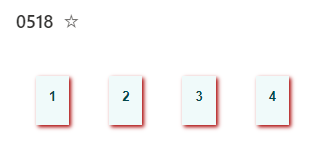
Thanks,
Yanli Jiang
===========================================
If the answer is helpful, please click "Accept Answer" and kindly upvote it. If you have extra questions about this answer, please click "Comment".
Note: Please follow the steps in our documentation to enable e-mail notifications if you want to receive the related email notification for this thread.
I am looking forward to your feedback if there is any update.
Please remember to update this thread if you have any progress.
Thank you for your understanding.
Hi anonymous user ,
I’m checking how the things are going on about this issue. Whether the answer helps you?
If there is any problem with this issue, feel free to let me know.

Hi anonymous user ,
Is there any update on this thread? Comment here if you still need any help.