Microsoft 365 and Office | SharePoint | For business | Windows
A group of Microsoft Products and technologies used for sharing and managing content, knowledge, and applications.

This browser is no longer supported.
Upgrade to Microsoft Edge to take advantage of the latest features, security updates, and technical support.
' cx='32' cy='32' r='32' /%3E%3Ctext x='50%25' y='55%25' dominant-baseline='middle' text-anchor='middle' fill='%23FFF' %3EM%3C/text%3E%3C/svg%3E)
Is there a way to delete an unmapped crawled property in Microsoft 365? I've already deleted any reference of the site column from several document libraries and removed it from the content type. However, the crawled property is still present after I performed a site crawl. Also, I previously read that unchecking "Include in full-text index" within the crawled property might help in the removal but this option is greyed out.
' cx='32' cy='32' r='32' /%3E%3Ctext x='50%25' y='55%25' dominant-baseline='middle' text-anchor='middle' fill='%23FFF' %3EYJ%3C/text%3E%3C/svg%3E)
Thanks for your question.
We are currently looking into this issue and will give you an update as soon as possible.
Thank you for your understanding and support.
Hi @MDR226 ,
May I know why you need to delete the unmapped crawled property? Is there any requirement need to delete it?
In SharePoint Online, the crawled property is managed by backend mechanism, we’re not able to remove it manually by default.
Thanks,
Yanli Jiang
===========================================
If the answer is helpful, please click "Accept Answer" and kindly upvote it. If you have extra questions about this answer, please click "Comment".
Note: Please follow the steps in our documentation to enable e-mail notifications if you want to receive the related email notification for this thread.
I simply wanted to clean up the mess I created when I made site columns with similar names. I created a content type in order to reuse the same site column across multiple document libraries. But because I made both site columns and list columns with similar names I noticed that the internal names of the column in different document libraries are slightly different. This presented an issue when I created a flow with Power Automate in which I wanted to move files across different SharePoint document libraries. A move could not happen because the internal names were different. Instead I had to perform a copy but unfortunately it does not contain version history. I hope this explanation helps as to why I would prefer to clean up the crawled properties.

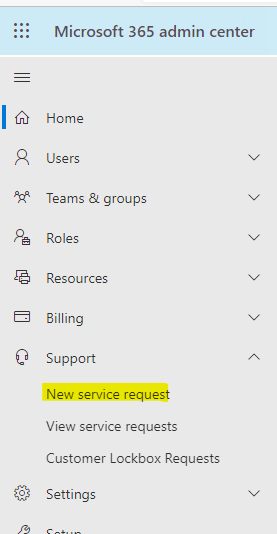
@MDR226 Per my test and research, there is no OOB way to remove crawled properties from user side, you can try to create a service request to the backend team to check if there is a way to remove them.
To open a service request, you can go to Microsoft 365 Admin Center->Support->new service request.
--------------------
If the answer is helpful, please click "Accept Answer" and kindly upvote it. If you have extra questions about this answer, please click "Comment".
Note: Please follow the steps in our documentation to enable e-mail notifications if you want to receive the related email notification for this thread.