Microsoft 365 and Office | SharePoint | Development
The process of building custom applications and tools that interact with Microsoft SharePoint, including SharePoint Online in Microsoft 365.

This browser is no longer supported.
Upgrade to Microsoft Edge to take advantage of the latest features, security updates, and technical support.
' cx='32' cy='32' r='32' /%3E%3Ctext x='50%25' y='55%25' dominant-baseline='middle' text-anchor='middle' fill='%23FFF' %3EJA%3C/text%3E%3C/svg%3E)
How am I able to select SharePoint Managed Property on the new Microsoft Search API?
Something as simple as:
{
    "requests": [
        {
            "entityTypes": [
                "driveItem"
            ],
            "query": {
                "queryString": "ContentTypeId:0x0120D520* AND *"
            },
            "from": 0,
            "size": 10,
            "fields": [
                "Title",
                "Path",
                "RefinableString01",
                "Description"
            ]
        }
    ]
}
Does not seem to be supported like in SharePoint Search API $select query.
' cx='32' cy='32' r='32' /%3E%3Ctext x='50%25' y='55%25' dominant-baseline='middle' text-anchor='middle' fill='%23FFF' %3ETZ%3C/text%3E%3C/svg%3E)
Hi @Jonathan Aditya ,
I am currently doing some research on this issue, will let you know as soon as possible.
' cx='32' cy='32' r='32' /%3E%3Ctext x='50%25' y='55%25' dominant-baseline='middle' text-anchor='middle' fill='%23FFF' %3EZY%3C/text%3E%3C/svg%3E)
Hi @Jonathan Aditya , according to my understanding of your needs, you are using the Microsoft Search API to query Microsoft 365 data in your apps.
Here is the docuemtation for your reference: https://learn.microsoft.com/en-us/graph/api/resources/search-api-overview?view=graph-rest-1.0

In the case of getting selected properties, you can include in the fields property specific entity properties, including custom managed properties from SharePoint and OneDrive.
And the query options are expressed in the POST body.

Here is a sample of request body, hope it will help you.
{
  "requests": [
    {
      "entityTypes": [
        "listItem"
      ],
      "query": {
        "queryString": "contoso product"
      },
      "from": 0,
      "size": 25,
      "fields": [
        "title",
        "description"
      ]
    }
  ]
}

If the answer is helpful, please click "Accept Answer" and kindly upvote it. If you have extra questions about this answer, please click "Comment".
Note: Please follow the steps in our documentation to enable e-mail notifications if you want to receive the related email notification for this thread.
Hi @Jonathan Aditya , I need to investigate this issue further with my colleagues and will get back to you as soon as there is any progress.
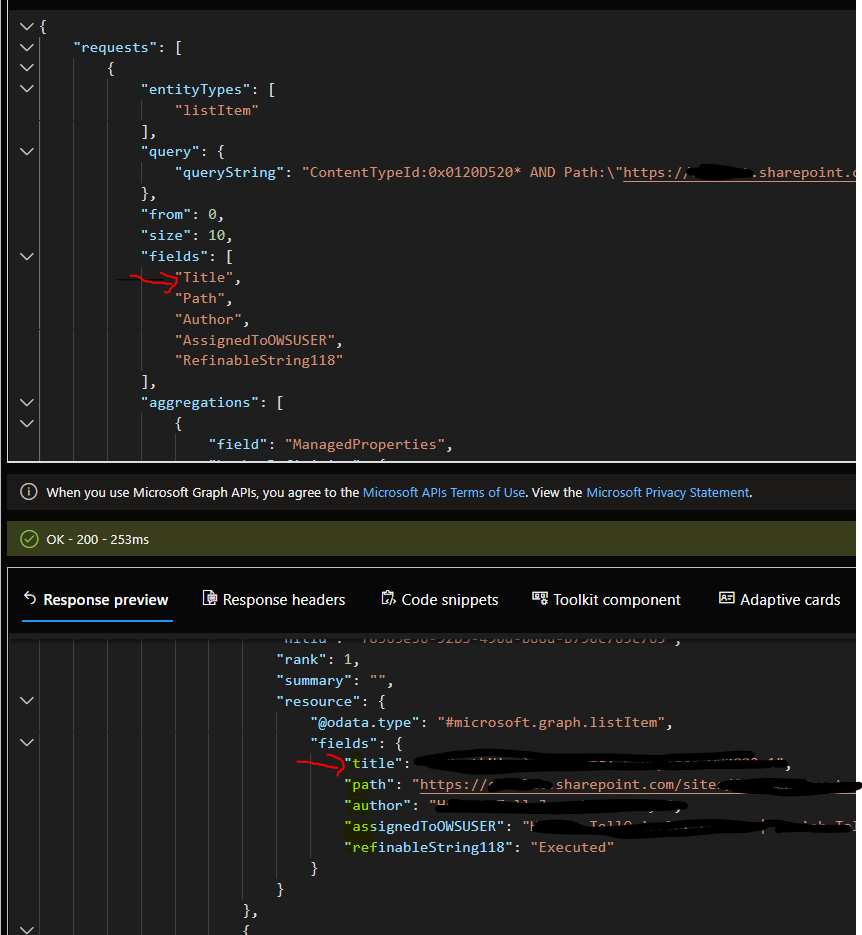
@Zehui Yao_MSFT Now I get that I need to use
listItem
instead of
driveItem
.
I am now curious on why the search results within fields are lowercased by default and does not follow the correct managed property naming convention..
Hi @Jonathan Aditya , I recommend opening a support ticket and a backend engineer will help with this.
' cx='32' cy='32' r='32' /%3E%3Ctext x='50%25' y='55%25' dominant-baseline='middle' text-anchor='middle' fill='%23FFF' %3EPT%3C/text%3E%3C/svg%3E)
@Tong Zhang_MSFT
@Zehui Yao_MSFT
In fields we provide the column names which we want to receive in response.
But how can we get all columns in response? "*" is not working
{
    "requests": [
        {
            "entityTypes": [
                "listItem"
            ],
            "query": {
                "queryString": "issue"
            },
            "fields": [
                "*"
            ]
        }
    ]
}