Microsoft Security | Microsoft Authenticator
A Microsoft app for iOS and Android devices that enables authentication with two-factor verification, phone sign-in, and code generation

This browser is no longer supported.
Upgrade to Microsoft Edge to take advantage of the latest features, security updates, and technical support.
' cx='32' cy='32' r='32' /%3E%3Ctext x='50%25' y='55%25' dominant-baseline='middle' text-anchor='middle' fill='%23FFF' %3EFA%3C/text%3E%3C/svg%3E)
[SOLVED]
Hi,
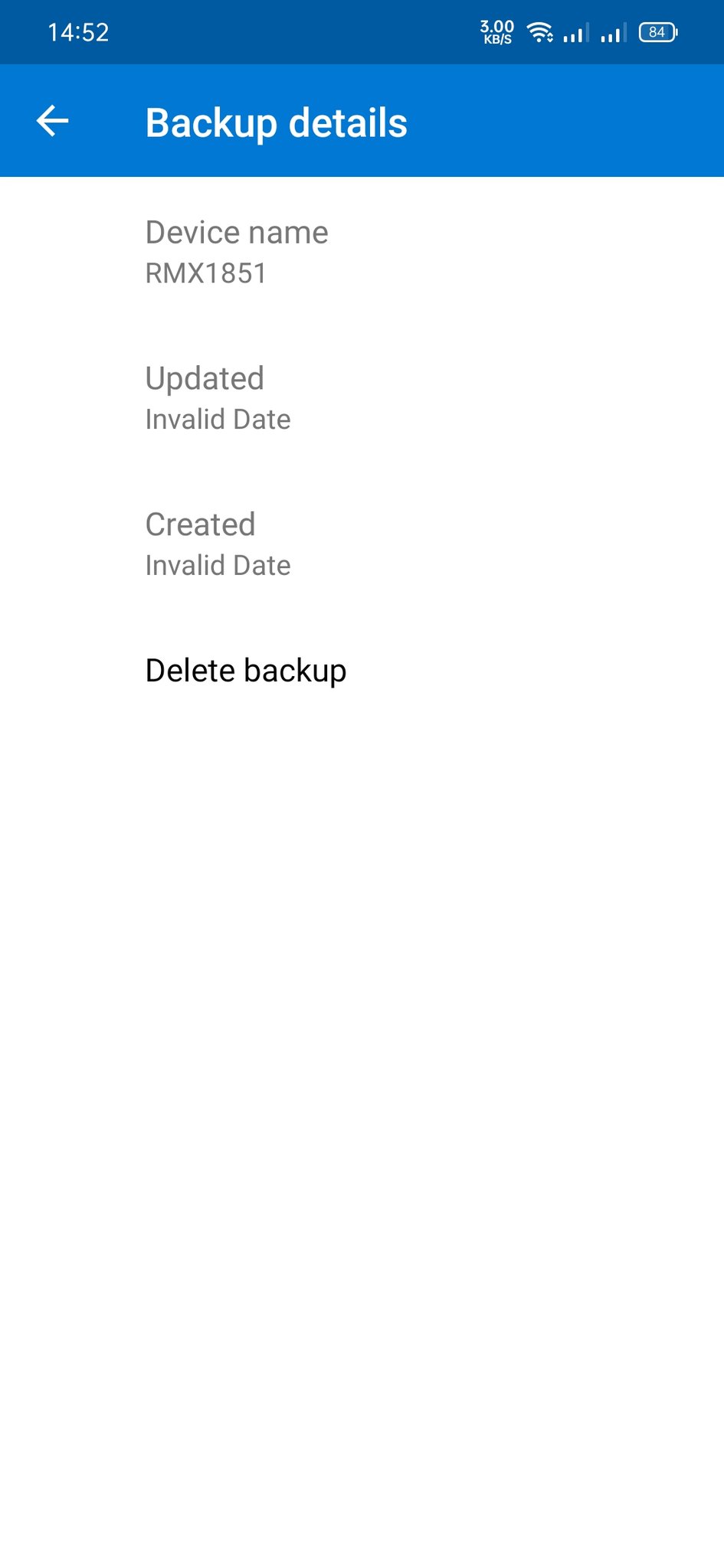
I want to ask something about MS Authenticator. This noon GMT+7, 'Add Account to Backup' was show in the 3-dot menu, I added the MS account, then looking into the Details in Backup section, and the Created and Updated was Invalid Date.
I've lost the authentication codes twice, and I lost access to some accounts with no recovery codes i.e Indodax (Indonesian cryptocurrency marketplace) and Termius. Termius was recovered successfully by turning 2FA off on their side and Indodax needs further verification on my side.
How to fix this? I've try to synchronized the clock, using data, deleting and backup the codes again, and turning off the VPN. I've been reinstall it, and adding MS Account (no using Restore Backup), the backup still "Invalid Date"
Thanks for recommending others authenticator, but I won't move to other apps.
Thank you.
Sorry for my broken English.
Device: Realme 3 Pro, Android 11
Link to Twitter asking this problem to MS Helps
' cx='32' cy='32' r='32' /%3E%3Ctext x='50%25' y='55%25' dominant-baseline='middle' text-anchor='middle' fill='%23FFF' %3EJG%3C/text%3E%3C/svg%3E)
I have the same "Invalid Date" problem on my Pixel 4a 5G. I live in California, GMT -8.
is your device running on Android 12, mate?
Yes, Android 12. This only just started happening. It's been working great for months. :-(
' cx='32' cy='32' r='32' /%3E%3Ctext x='50%25' y='55%25' dominant-baseline='middle' text-anchor='middle' fill='%23FFF' %3EA8%3C/text%3E%3C/svg%3E)
I am having the same issue, on two different devices and two different accounts. Is there any information about this anywhere? I can't seem to find anything else except for this question.
' cx='32' cy='32' r='32' /%3E%3Ctext x='50%25' y='55%25' dominant-baseline='middle' text-anchor='middle' fill='%23FFF' %3EPT%3C/text%3E%3C/svg%3E)
Same issue with Pixel 5 and android 12
' cx='32' cy='32' r='32' /%3E%3Ctext x='50%25' y='55%25' dominant-baseline='middle' text-anchor='middle' fill='%23FFF' %3EPC%3C/text%3E%3C/svg%3E)
Same "invalid date" fields on my OnePlus 7 Pro running Android 11. If it's not backing up properly, are we out of luck to restore if catastrophe hits?
' cx='32' cy='32' r='32' /%3E%3Ctext x='50%25' y='55%25' dominant-baseline='middle' text-anchor='middle' fill='%23FFF' %3EB%3C/text%3E%3C/svg%3E)
For me on Samsung S10 now also solved with the June 22nd update.
Now nicely reporting correct timestamps again for "updated" and "created". No longer any "invalid date" being stated.
Thank you, even though it did take way longer than I'd hoped for. One would have thought, that MS, would be using their own authenicator and that this should have popped-up during basic testing of any new release? Is backup/recovery working for example?
' cx='32' cy='32' r='32' /%3E%3Ctext x='50%25' y='55%25' dominant-baseline='middle' text-anchor='middle' fill='%23FFF' %3EPD%3C/text%3E%3C/svg%3E)
Same problem for me with Infinix zero 5. It gives Invalid Date. Done with multiple reinstalls and logins. My old phone broke and am not able to configure Authenticator backup on new phone.
I live in Pune, India. GMT +5:30
' cx='32' cy='32' r='32' /%3E%3Ctext x='50%25' y='55%25' dominant-baseline='middle' text-anchor='middle' fill='%23FFF' %3EE%3C/text%3E%3C/svg%3E)
I have the same problem on Android 12, using Samsung Galaxy s22 Ultra, with the latest version of the authenticator app.
I just happened to be poking around in the app and noticed that the backup wasn't valid, with an ambiguous error message (image included).
I was able to delete the [invalid] backup, the cloud backup toggle switch moved to the off position, and I re-enabled it, and it comes back with the same error.
There was no proactive push notification from the app indicating that the integrity of the backup is compromised.
This is rather concerning. Can someone at Microsoft please look into this ASAP?
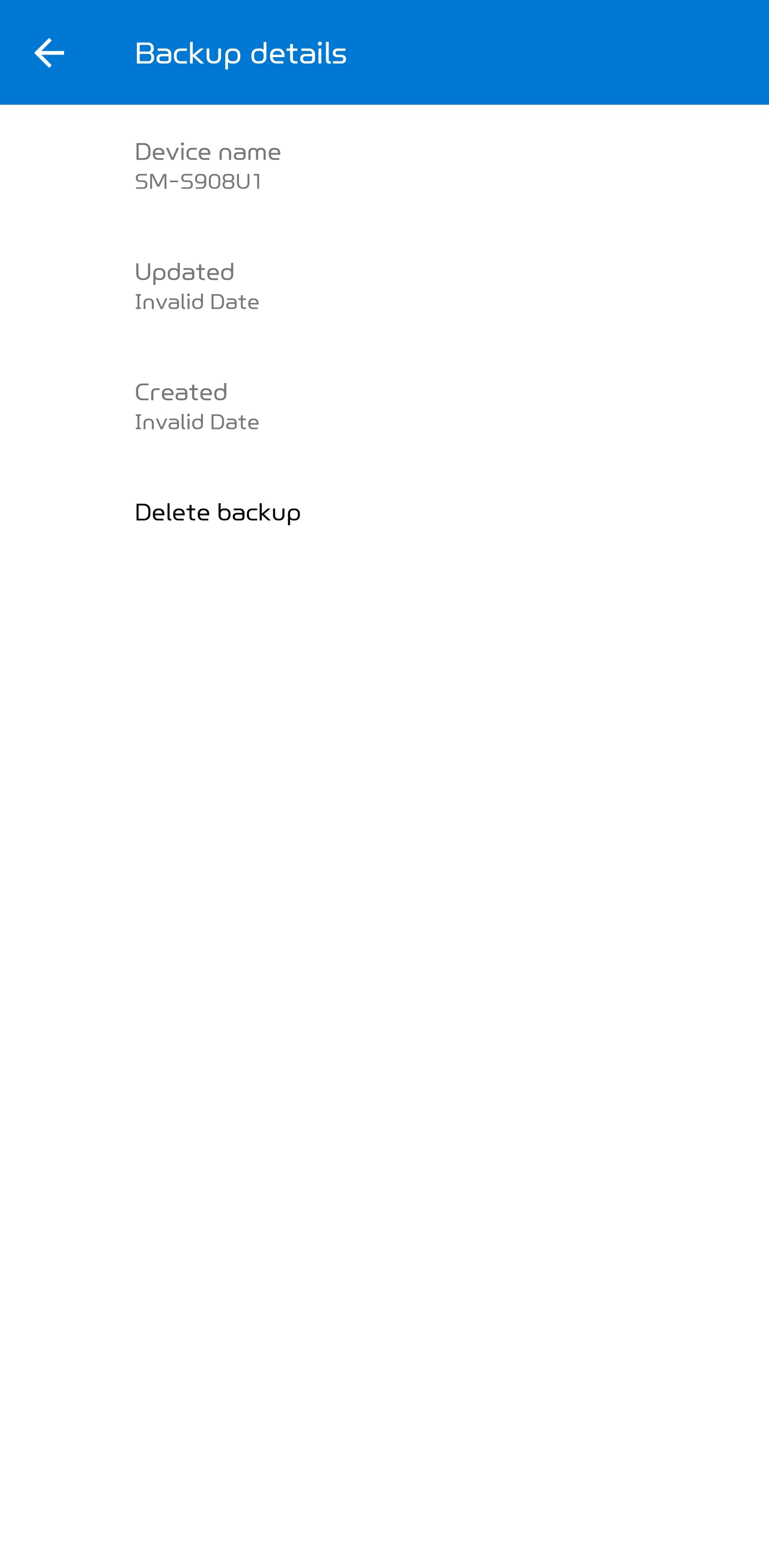
I have the same issue on android 12. There is no error generated when re-enabling the cloud backup using a MS mail address, using a non-business but a private mail account. Also no error when deleting the backup, assuming there even is a backup?
However when a new backup is made, the "backup details" state :
Updated
Invalid Date
Created
Invalid Date
Based on multiple people having recent restore issues of the MS Auth app backup, to me it seems related to issues with the backup?
Only by looking at the "Backup details" I even noticed that something seems to be the matter with the backup, without anymore stating that is the case? Having the possibility of a backup to restore from, is the big selling-point for the MS Auth app, compared to the same kind of app offering from another cloud competitor.
If there would be a restriction/limitation due to the fact that MS Intune is orchestrating the phone in question as it is also used for company purposes (a BYOD phone), it would be very welcome if there would be any notification due to a restriction from company end by either Intune or the MS Auth app.
If limited due to corporate restrictions, without even knowing if that is the case, how would we even be able to make a backup, especially if MS Auth is also/mainly used for non-company related 2FA authentication, so one would not want to have that restricted to a company mail address, which might be less future proof than using a private MS mail address?
Yeah, it's an ambiguous error, if we can even call it that, and M$ clearly isn't following this thread, and the developer contact info in the Google Play Store at least, doesn't have any "developer contact information".
I tried opening a support case on this issue/bug/authenticator app backup integrity issue and that has been the most painful experience. Absolutely lackluster support for this app, and I really like the app, it's extremely useful, but without a backup to be able to restore from it's really put serious concerns about my confidence in the application.
If anyone has any luck getting in touch with them, please let the group here know. I imagine a multitude of users don't even realize they aren't having their data backed up.