Azure SQL Database
An Azure relational database service.
This browser is no longer supported.
Upgrade to Microsoft Edge to take advantage of the latest features, security updates, and technical support.
' cx='32' cy='32' r='32' /%3E%3Ctext x='50%25' y='55%25' dominant-baseline='middle' text-anchor='middle' fill='%23FFF' %3ESG%3C/text%3E%3C/svg%3E)
Hi Team,
I am trying to Export the schema and data from Azure SQL Database to blob storage. I used the SqlPackage Export function to export the .bacpac file which works for all the schemas present in the database, but I need to export only tables which belongs to one schema only.
SQL DB1- dbo schema.
Table Names:
dbo.x1
dbo.x2,
......................................................................
SQL DB1 - stage1 schema
Table Names:
stage1.y1
stage2.y2
As per above example I want to export all tables from dbo schema only, not stage1 schema. I know SqlPackage has option /p: TableData=[list of table names], but I do not want to explicitly mention name of the tables, however I want to export all tables under dbo schema.
Please share your valuable suggestion on this. I would Highly appreciate your help and support.
Thanks

The simplest option is to use SQL Server Management Studio since it provide a graphical interface which allow you to select which exact resources you want to add to your export
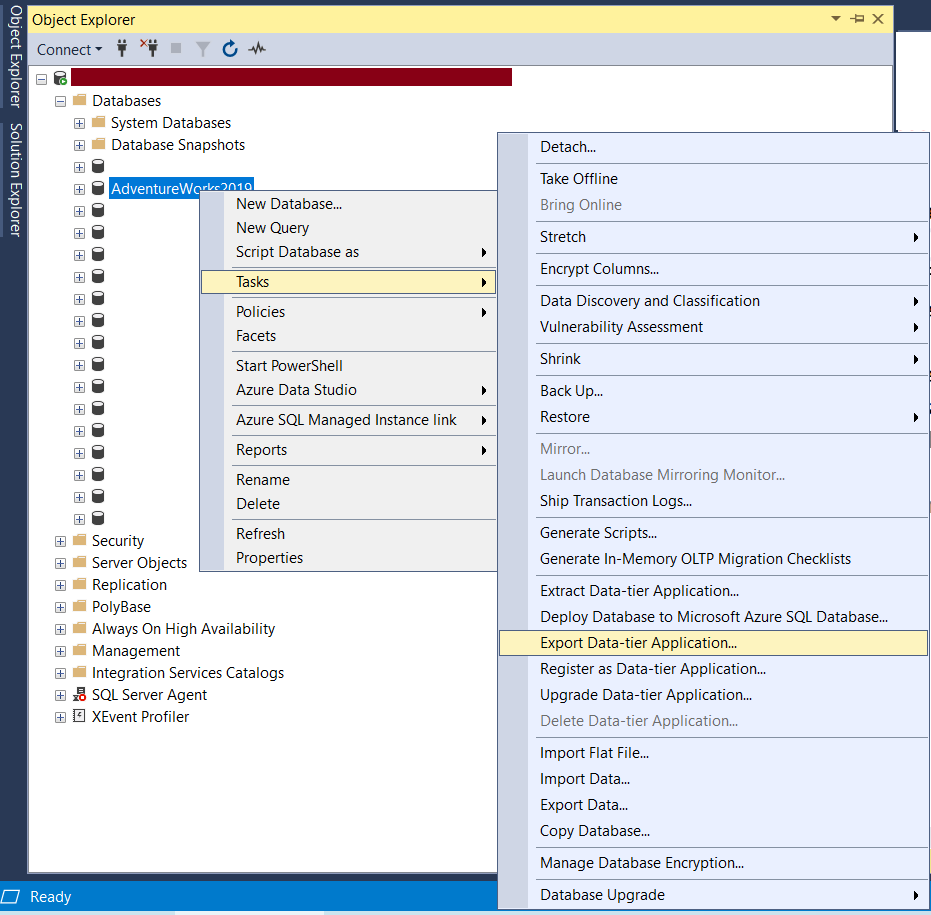
Behind the scenes this execute the utility SQLPAckage but it provide a simple GUI
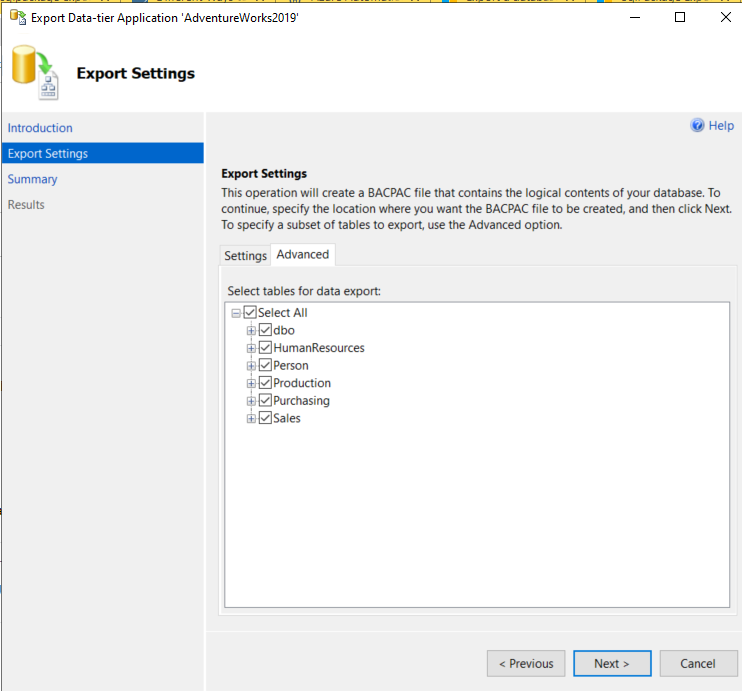
After you fill the setting, go to the advance tab
Here you can do exactly what you asked for: select which schema you want to add to the bacpac file
@Ronen Ariely we are doing this export using azure devops. Our team does not prefer SSMS to do this activity. Do you see any other way to do this except SSMS export feature?
Hi,
we are doing this export using azure devops
DevOPs is not a specific application but a technologies. I have no idea what app you are using and if that app has the option built-in
If this an application that you develop then your best option is probably to sue two steps:
(1) Use query to check the name of the tables and step
select t.name as table_name from sys.tables t where schema_name(t.schema_id) = 'Schema_Name_you_Want_to_Get'
(2) use the "/p: TableData" parameter
/p: TableData=[list of table names]
Note that this not the right format. You do not use single parameter with "list of table names". This is common mistake. You should use one parameter for each table you want to add. For example: /p:TableData=HumanResources.Department /p:TableData=HumanResources.Employee /p:TableData=HumanResources.EmployeeDepartmentHistory
@Ronen Ariely thank you so much for response. Above are the exact same steps I have performed already as I dont see any other option. The only problem with this approach is we have to keep a tab on the new/deleted tables to add/delete the entry from the /p: argument list