Microsoft 365 and Office | Excel | For business | Windows
A family of Microsoft spreadsheet software with tools for analyzing, charting, and communicating data

This browser is no longer supported.
Upgrade to Microsoft Edge to take advantage of the latest features, security updates, and technical support.
' cx='32' cy='32' r='32' /%3E%3Ctext x='50%25' y='55%25' dominant-baseline='middle' text-anchor='middle' fill='%23FFF' %3EF%3C/text%3E%3C/svg%3E)
Hi,
I want to know the support of Unicode bidirectional algorithm in Excel.
Embedding and override characters (PDF, LRE, RLE, LRO, RLO) looks like working,
but isolate characters (LRI, RLI, PDI) looks not.
When I enter LRI(U+2066), RLI(U+2067), PDI(U+2069),
excel shows character icon with a broken line.
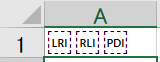
Do I need some kind of settings to get isolate characters to work?
Or just excel dosent support isolate characters?
I found a similar question, but no answers.
https://learn.microsoft.com/en-us/answers/questions/521271/using-unicode-directional-formatting-characters-in.html
My excel version is
Microsoft® Excel® for Microsoft 365 MSO (16.0.14326.20850) 64 bit version 2108

Did you try pasting some valid text that includes these characters (and which looks good in Word, for example)?

Hi @fbKH ,
Welcome to Q&A forum~
> I want to know the support of Unicode bidirectional algorithm in Excel.
So far, I haven't found the documentation related to Unicode BiDi algorithms of Excel or Office.
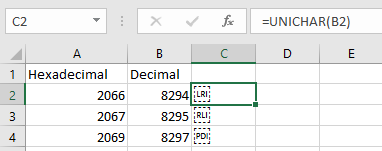
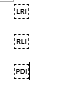
Based on my tests, isolate characters enter in Word and Excel do have the broken lines, and I do not find any settings to remove it.
Following screenshot is using "UniChar" function to enter the isolate characters in Excel.
Following image is pressing Alt+X to convert the Unicode number to get isolate characters in Word.
If the answer is helpful, please click "Accept Answer" and kindly upvote it. If you have extra questions about this answer, please click "Comment".
Note: Please follow the steps in our documentation to enable e-mail notifications if you want to receive the related email notification for this thread.
Hi @fbKH
I am checking this thread, if you have any updates, welcome to share with us.