Developer technologies | .NET | Blazor
A free and open-source web framework that enables developers to create web apps using C# and HTML, developed by Microsoft.
This browser is no longer supported.
Upgrade to Microsoft Edge to take advantage of the latest features, security updates, and technical support.

Hello guys,
I have a component as follows;
 @using IMS.CoreBusiness

    @inject NavigationManager NavigationManager

    @if (Customer != null)
    {
        <tr>
            <td>@Customer.Name</td>
            <td>@Customer.TaxNumber</td>
            <td>@Customer.TaxAdministration</td>
            <td>@Customer.PhoneNumber</td>
            <td>@Customer.Email</td>
            <td>@Customer.Address</td>
            <td>@Customer.DeliveryAddress</td>
            <td>@Customer.MainResponsibleName</td>
            <td>@Customer.AssistantResponsibleName</td>
            <td>
                <button type="button" class="btn btn-light" @onclick="() => EditCustomer(Customer.CustomerId)">Edit</button>
            </td>

        </tr>
    }


    @code {
        [Parameter]
        public Customer? Customer { get; set; }

        private void EditCustomer(int cusId)
        {
            NavigationManager.NavigateTo($"/editcustomer/{cusId}");
        }
    }
And here is my print preview;
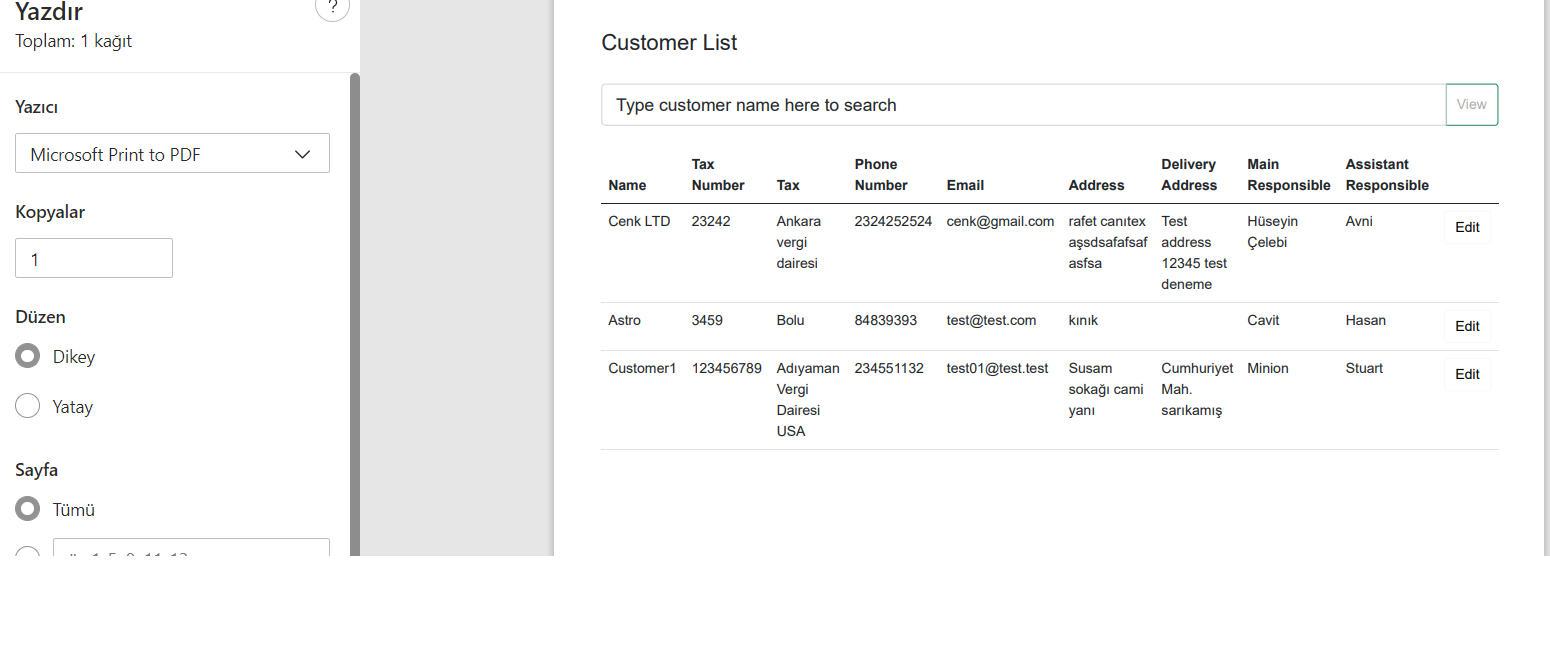
I wonder if there is a way not to print the edit button? If not, I have to implement a separate report for this.
' cx='32' cy='32' r='32' /%3E%3Ctext x='50%25' y='55%25' dominant-baseline='middle' text-anchor='middle' fill='%23FFF' %3ERN%3C/text%3E%3C/svg%3E)
Hi @Cenk ,
The html render code requires a certain response time. JS interop calls will not wait for the html render. You can add a delay to achieve your requirement:
private async void PrintReport()
{
    ShowEdit = false;
    await Task.Delay(1000);
    JSRuntime.InvokeVoidAsync("print");
}
If you also need redisplay the edit button after printing, you need change your code:
    private async void PrintReport()
    {
        ShowEdit = false;
        await Task.Delay(1000);
        JSRuntime.InvokeVoidAsync("printInvoke");
        ShowEdit  = true;
        InvokeAsync(() => StateHasChanged());
    }
If the answer is the right solution, please click "Accept Answer" and kindly upvote it. If you have extra questions about this answer, please click "Comment".
Note: Please follow the steps in our documentation to enable e-mail notifications if you want to receive the related email notification for this thread.
Best Regards,
Rena
' cx='32' cy='32' r='32' /%3E%3Ctext x='50%25' y='55%25' dominant-baseline='middle' text-anchor='middle' fill='%23FFF' %3EBS%3C/text%3E%3C/svg%3E)
if your print preview is not a re-render, but just the browser preview, then just use CSS to hide the edit
<style>
       @media print {
               .noprint {
                  visibility: hidden;
               }
       }
</style>


<button type="button" class="btn btn-light noprint" @onclick="() => EditCustomer(Customer.CustomerId)">Edit</button>