Developer technologies | C#
An object-oriented and type-safe programming language that has its roots in the C family of languages and includes support for component-oriented programming.
This browser is no longer supported.
Upgrade to Microsoft Edge to take advantage of the latest features, security updates, and technical support.
' cx='32' cy='32' r='32' /%3E%3Ctext x='50%25' y='55%25' dominant-baseline='middle' text-anchor='middle' fill='%23FFF' %3EAT%3C/text%3E%3C/svg%3E)
In a VS 2019 WindowsFormsApp, using C#, I am looking for ways to prevent automation of my window form.
I know that an application can be targeted by process name, window title and window class (I hope I didn't missed another way).
The process name and the window title I can change for each user, but I have no ideea how I can change the window class name which is the same every time I start the app.
Is there a way to change this window class name to something "random" everytime the app starts?

What problem are you trying to solve by disabling UI Automation?
Trying to prevent the creation of a generic macro (one that would work for all users) that would:
- identify the app,
- focus the app
- click buttons within the app
This is a repetition of what UI Automation is capable of doing. It's like saying that the problem you want to solve by disabling UI Automation is disabling UI Automation.
I'm not asking what you want to do mechanically. I'm asking what the problem is.
Why would you ask me why I want to prevent my users to automaticaly click a button in my app? It's not relevant for you. I am not here to debate the philosphy behind a need, but to get help to accomplish a set task. In this case: disabling UI Automation.
Well, if we knew the actual problem you are trying to solve there might be other solutions besides disabling UI Automation.
And I certainly don't intend to debate philosophy with you. :)
You may find Will Pearson's responses from preventing-ui-automation-access-to-an-application to be informative.
The UI Automation I'm talking about has nothing to do with the Windows Automation API: UI Automation.
I thought that was clear from the original post, and my comments.
The problem I am trying to solve is to prevent the creation of generic tool that could target the window of my app (process name, title, class). Why I have this task, is irelevant.
Will Pearson's answers from the year 2006 have nothing to do with my current task.
Thanks anyway.

No you can not change the class name. If you have users who are that sophisticated then consider looking into copy protection and obfuscation using a tool like Obfuscar (free).
Just for me to be clear because this is not about the code (or the class name of the app in the code but the class name of the form window generated):
There is no way to change the form window class name from something like this: "WindowsForms10.Window.8.app.0.121b42a_r3_ad1" (which i get using spy++ on the app) to something random?

You can use your own class name with RegisterClassEx, then CreateWindow, like for any C++/Win32 app
But it won't prevent Automation...
@Castorix31 , since your reply, I have been trying to find examples online and tryed to implement this. Here createwindowex-and-registerclass-c-sharp is the best I could find, but still I cannot get it to work
Is it true that there is no way to integrate the RegisterClassEx with the standard WindowsFormsApp template generated by VS 2019? You have to code the window and its from scratch without the designer?
I tryed the following:
    [StructLayout(LayoutKind.Sequential, CharSet = CharSet.Auto)]
    struct WNDCLASSEX
    {
        [MarshalAs(UnmanagedType.U4)]
        public int cbSize;
        [MarshalAs(UnmanagedType.U4)]
        public int style;
        public IntPtr lpfnWndProc;
        public int cbClsExtra;
        public int cbWndExtra;
        public IntPtr hInstance;
        public IntPtr hIcon;
        public IntPtr hCursor;
        public IntPtr hbrBackground;
        [MarshalAs(UnmanagedType.LPStr)]
        public string lpszMenuName;
        [MarshalAs(UnmanagedType.LPStr)]
        public string lpszClassName;
        public IntPtr hIconSm;
    }

    [DllImport("user32.dll", SetLastError = true, EntryPoint = "CreateWindowEx")]
    public static extern IntPtr CreateWindowEx(
       int dwExStyle,
       //UInt16 regResult,
       [MarshalAs(UnmanagedType.LPStr)]
   string lpClassName,
       [MarshalAs(UnmanagedType.LPStr)]
   string lpWindowName,
       UInt32 dwStyle,
       int x,
       int y,
       int nWidth,
       int nHeight,
       IntPtr hWndParent,
       IntPtr hMenu,
       IntPtr hInstance,
       IntPtr lpParam);
After that I don't know how to proceed...
Can the above code somehow modifiy the window generated by the default template and continue with the designer?
For example, I "changed" the main window class to "MyClass", and I transferred the .NET Button (WindowsForms10.BUTTON.app.0.141b42a_r8_ad1 on my version) from the Designer to the new window class with SetParent
But it is not very useful...
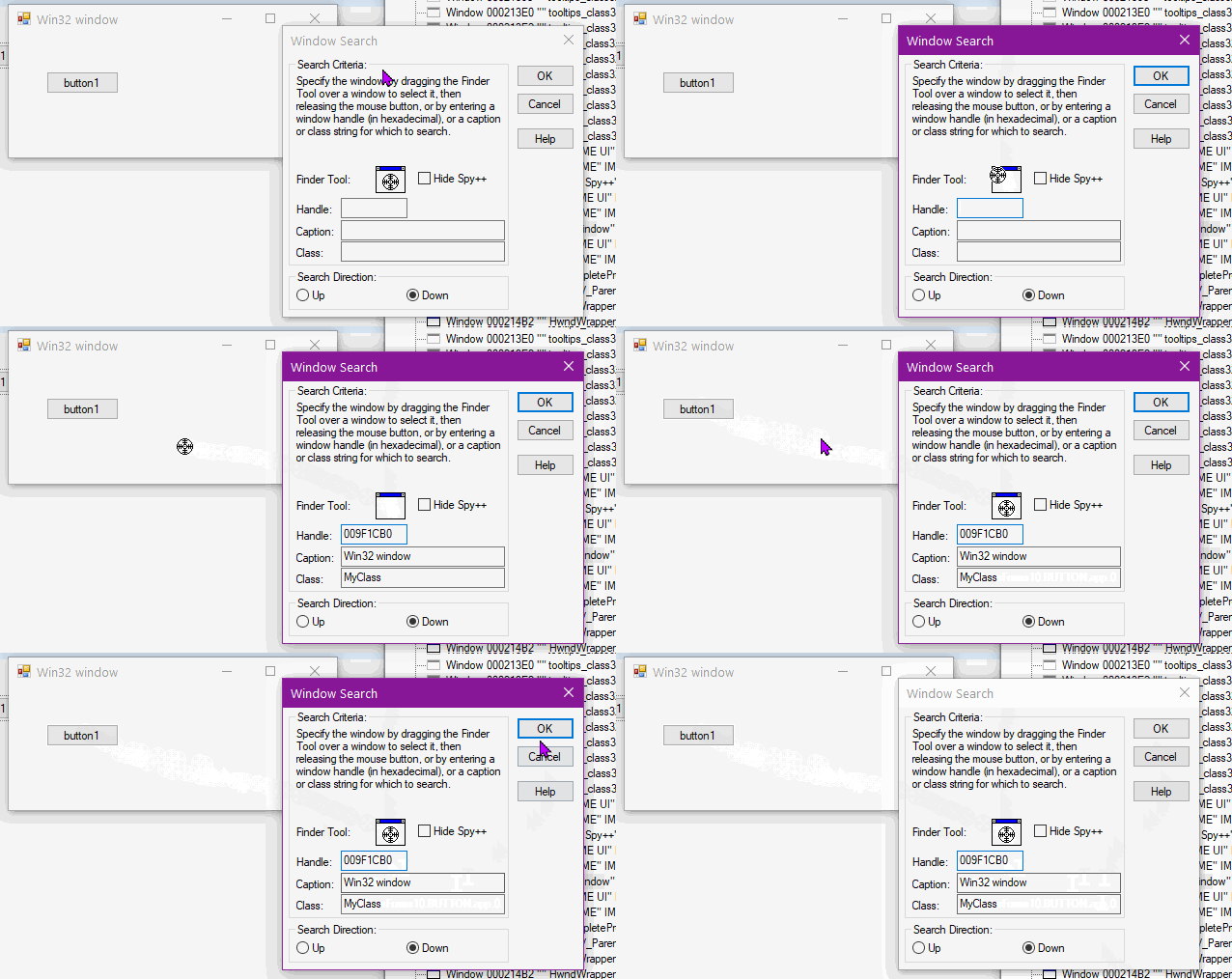
@Castorix31 , Now I think I understand why you said that changing the window class name won't prevent automation. They could create a tool that triggers directly the controls on the form ignoring the window title or class :( I haven't even thought about the class of the controls. All my efforts were just to change the window class name.
However, If I wanted to change just the window class to a custom one, but still be able to use the designer and create controls with it, would it be possible?
Is it possible that in the tempate of a standard WindowsForms App to modify just the class of the window, and then continue with the designer creating controls with whatever class vs generates for them? (something like "injecting" the custom class in the standard template code wihout careing what class the designer generated controls have....)
However, If I wanted to change just the window class to a custom one, but still be able to use the designer and create controls with it, would it be possible?
It can be done like in the test I did with 1 Button, by looping on all child controls created in the Designer and using SetParent to re-create them in the new window
I tested with random standard/simple controls (Buttons, TextBoxes, ListBoxes, ...), it works (they keep the right location), but it will become complicated with .NET controls like ToolStrips...
@Castorix31 could you please share your .sln?