Developer technologies | ASP.NET | ASP.NET Core
A set of technologies in the .NET Framework for building web applications and XML web services.
This browser is no longer supported.
Upgrade to Microsoft Edge to take advantage of the latest features, security updates, and technical support.

Hello all,
I am new to the ASP.NET Core and MVC development.
My goal is to create a simple Movie Management Web Application, just like the one in this tutorial:
https://learn.microsoft.com/en-us/aspnet/core/tutorials/first-mvc-app/start-mvc?view=aspnetcore-6.0&t...
I already followed this tutorial 2 times, to learn the concept.
But there is something missing.
I want to separate the Genre from Movie in my database.
I must have two tables: Movie and Genre. They must be linked by the Foreign Key GenreID in the Movie table.
As the above tutorial doesn't show me how to do it. I would like to get your help here.
How do I generate the database properly from my models?
PS: I already created two Models classes: Movie and Genre.
After scaffolding, only one table was generated in the database: Movie.
The Genre table was completely ignored.

You did not share any code so we have no idea what mistakes exist in your code base. You should have a one-to-many relationship between the Movie and Genre. The Movie table will have the GenreId rather than the Genre name. The Genre table becomes a lookup table.
I don't have much code.
In fact, I have 2 classes in Models folder: Movie.cs and Genre.cs
I
Movie (MovieId, Title, Date, Price, Rating, GenreId)
Genre(GenreId, Title)
From there, I would like to auto-generate the database. So I am trying to scaffold, like shown here: https://learn.microsoft.com/en-us/aspnet/core/tutorials/first-mvc-app/adding-model?view=aspnetcore-6.0&tabs=visual-studio
As Model and Context class, I chose Movie.
The resulting DB only contains the Movie table.
Maybe I need to scaffold a second time, and chose this time Genre and Model and Context?
Thank you
' cx='32' cy='32' r='32' /%3E%3Ctext x='50%25' y='55%25' dominant-baseline='middle' text-anchor='middle' fill='%23FFF' %3EA%3C/text%3E%3C/svg%3E)
I want to separate the Genre from Movie in my database.
I must have two tables: Movie and Genre. They must be linked by the Foreign Key GenreID in the Movie table.
As the above tutorial doesn't show me how to do it. I would like to get your help here.
How do I generate the database properly from my models?
PS: I already created two Models classes: Movie and Genre.
After scaffolding, only one table was generated in the database: Movie.
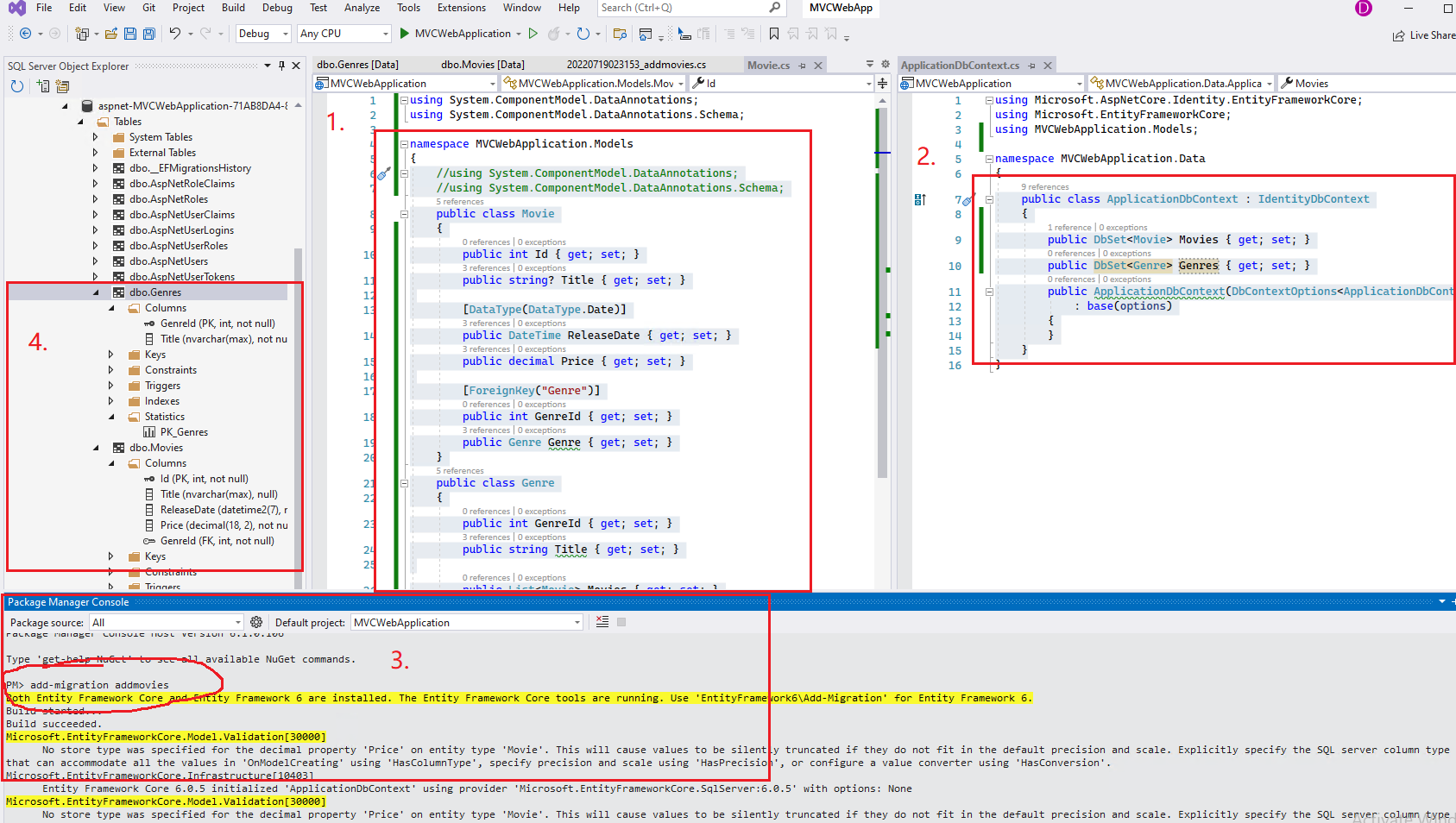
From the MS document, it seem that the Movie and Genre has the one to many relationships, in this scenario, when create the model, you can use the following code:
//using System.ComponentModel.DataAnnotations;
//using System.ComponentModel.DataAnnotations.Schema;
public class Movie
{
    public int Id { get; set; }
    public string? Title { get; set; }

    [DataType(DataType.Date)]
    public DateTime ReleaseDate { get; set; }
    public decimal Price { get; set; }

    [ForeignKey("Genre")]
    public int GenreId { get; set; }
    public Genre Genre { get; set; }
}
public class Genre
{
    public int GenreId { get; set; }
    public string Title { get; set; }

    public List<Movie> Movies { get; set; }
}
Then, in the MvcMovieContext, add the following code:
public class MvcMovieContext : DbContext
{
    public DbSet<Movie> Movies { get; set; }
    public DbSet<Genre> Genres { get; set; }
    public MvcMovieContext(DbContextOptions<MvcMovieContext > options)
        : base(options)
    {
    }
}
After that, use the following commands to enable migration in the Package Manager Console:
Add-Migration AddMovies
Update-Database
Then, you can see it already create the Movie and Genre tables in the database.
Check the following screenshot.
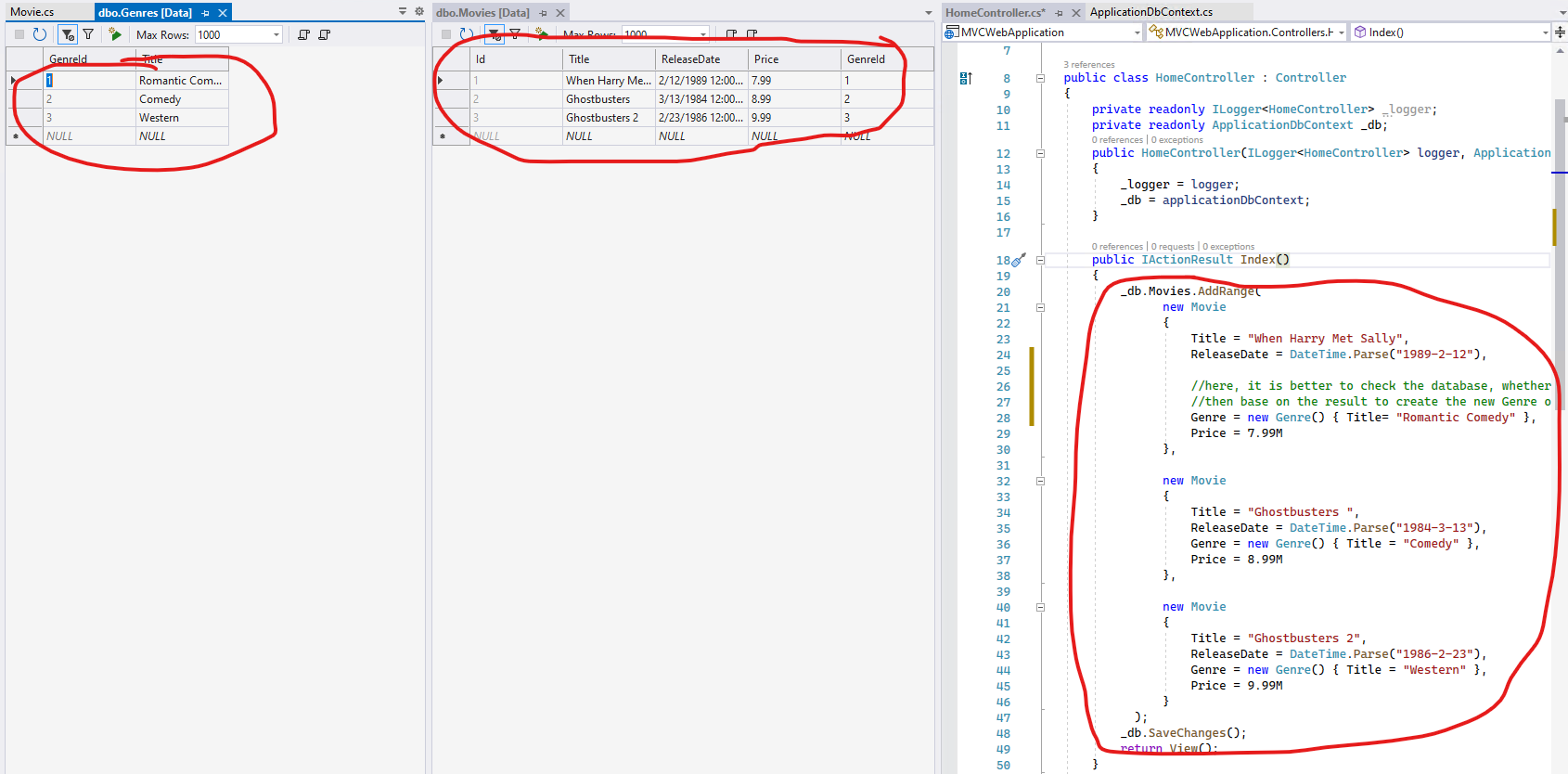
[Note] When insert the related entities to the database, please pay attention to the new item. It is better to check whether the related entities exist in the database, then based on the result to use the exist item or create the new item.
Code like this:
Here are some related articles about EF core relationship, you can refer to them:
One-to-Many Relationship Conventions in Entity Framework Core
If the answer is the right solution, please click "Accept Answer" and kindly upvote it. If you have extra questions about this answer, please click "Comment".
Note: Please follow the steps in our documentation to enable e-mail notifications if you want to receive the related email notification for this thread.
Best regards,
Dillion
Wow! Thank you very much for your time!
That's so kind of you, to answer with code and even the screenshots.
Really appreciated.
Now I think I am well equipped to finish my application.
Thanks again.

My goal is to create a simple Movie Management Web Application, just like the one in this tutorial:
I suggest that you follow the tutorial:
Part 4, add a model to an ASP.NET Core MVC app
https://learn.microsoft.com/en-us/aspnet/core/tutorials/first-mvc-app/adding-model?view=aspnetcore-6.0&tabs=visual-studio
Yes, that's where I came from.
I want the same application, but to separate Movie and Genre into different tables.
Thank you
How do you want to make it separate?