Azure SQL Database
An Azure relational database service.
This browser is no longer supported.
Upgrade to Microsoft Edge to take advantage of the latest features, security updates, and technical support.
' cx='32' cy='32' r='32' /%3E%3Ctext x='50%25' y='55%25' dominant-baseline='middle' text-anchor='middle' fill='%23FFF' %3EM%3C/text%3E%3C/svg%3E)
Hi team ,
I am unable to create an external table even when I created correct data source and file format , the table is creating but when reading the data facing the error as below -
Msg 107090, Level 16, State 1, Line 23
HdfsBridge::recordReaderFillBuffer - Unexpected error encountered filling record reader buffer: HadoopSqlException: String or binary data would be truncated.
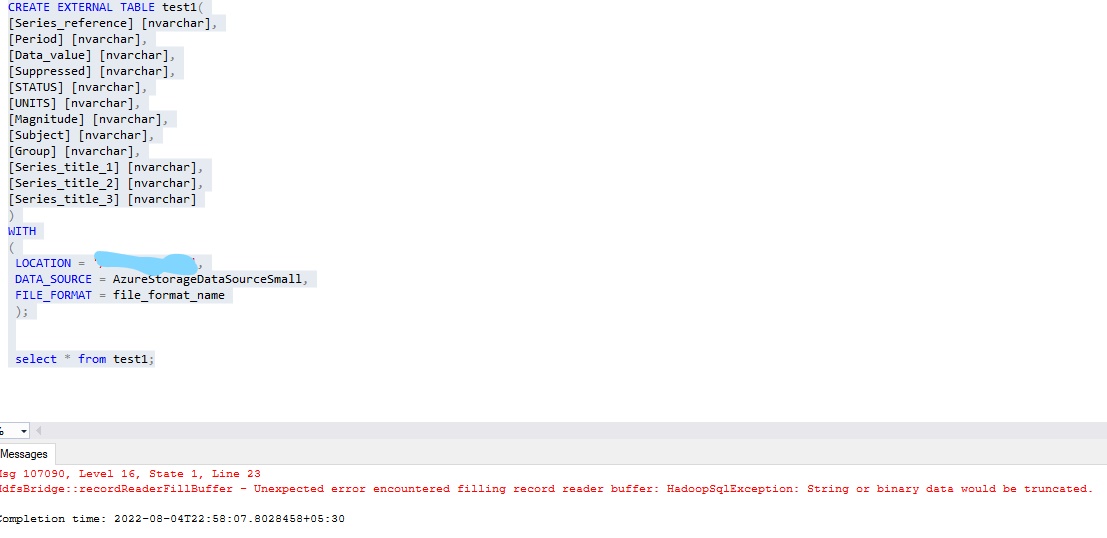
Can some one please help me with the error ,
Thanks in advance

Maybe you should specify the sizes, such as nvarchar(max) or nvarchar(100)?

You need to create a file format. For example:
CREATE EXTERNAL FILE FORMAT fmtFile
WITH (
    FORMAT_TYPE = DELIMITEDTEXT,
    FORMAT_OPTIONS (
      FIELD_TERMINATOR = ',',
      STRING_DELIMITER = '"',
      FIRST_ROW = 2,
      USE_TYPE_DEFAULT = TRUE,
      ENCODING = 'UTF8' )
);
Then on the definition of the External table you do the following:
FILE_FORMAT = fmtFile
Thanks Alberto , it worked after created the file format as you mentioned , Thanks
I am glad it worked. Thank you for letting me know the results and thank you for visiting Microsoft QA forums!
' cx='32' cy='32' r='32' /%3E%3Ctext x='50%25' y='55%25' dominant-baseline='middle' text-anchor='middle' fill='%23FFF' %3EI1%3C/text%3E%3C/svg%3E)
Hi @MadhuVamsi
Maybe you need to change the field type as nvarchar(MAX)
Please refer to this thread to see if field type is correct fit :
https://learn.microsoft.com/en-us/azure/synapse-analytics/sql-data-warehouse/design-elt-data-loading#define-the-tables
Best Regards,
Isabella