Hey everyone!
I'm trying to look over a way for my sysadmins to take some work off their hands with static security groups that have set in stone delegated permissions over an OU.
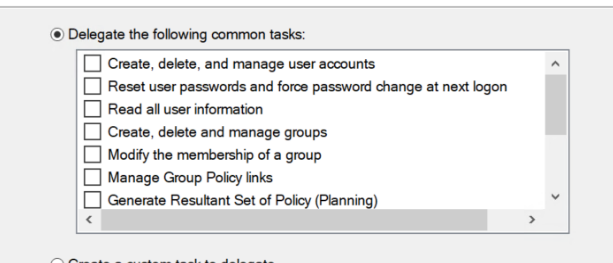
I understand some people in other forums have had a $permissions = "FullControl" or "modify" but I can't support for anything more specific that the delegation wizard can assign... ("Modify membership of a group")
However, lines 25+ confuse me.. there doesn't seem to be any specific attribute for the permissions/tasks I can assign to them.
The code I have so far is edited from others I've read up on who have done similar things, but not with delegation wizards, and I can't seem to find documentation on this :\
any help is appreciated, thank you so much!
        #Create a hashtable to store the GUID value of each schema class and attribute
        Import-Module ActiveDirectory
        $ADRootDSE = Get-ADRootDSE
        $domain = Get-ADDomain

        $ou_DN = "OU=dont worry about thisss,OU=tata,OU=lala,OU=lala Users and Computers"
        $AD_Group = "Test Group"

        $searchbase_DN = $ou_DN+","+$domain.DistinguishedName

        $users = Get-ADUser -Filter * -SearchBase $searchbase_DN

        $ou = Get-ADOrganizationalUnit -Identity ($searchbase_DN)
        $p = New-Object System.Security.Principal.SecurityIdentifier (Get-ADGroup $AD_Group).SID

        $contents = Get-ADObject -SearchBase ($ADrootdse.SchemaNamingContext) -LDAPFilter "(schemaidguid=*)" -Properties lDAPDisplayName,schemaIDGUID

        ## populate guidmap with an array of all things from the $contents
        $GUIDMap = @($contents)

        $GUIDMap = Get-ADObject -SearchBase ($ADrootdse.SchemaNamingContext) -LDAPFilter "(schemaidguid=*)" -Properties lDAPDisplayName,schemaIDGUID |
        ForEach-Object {"$guidmap[$_.lDAPDisplayName]=[System.GUID]$_.schemaIDGUID"}


        ## delegate on ou via wizard
        #object1 = modify create delete and manage user accounts
            $acl.AddAccessRule((New-Object System.DirectoryServices.ActiveDirectoryAccessRule $p,"CreateChild,DeleteChild","Allow",$guidmap["user"],"All"))

        #object2 = reset user password and force pass chang eon next login
            $user_acl.AddAccessRule((New-Object System.DirectoryServices.ActiveDirectoryAccessRule $p,""))

        #object3 = Read all user information
            $user_acl.AddAccessRule((New-Object System.DirectoryServices.ActiveDirectoryAccessRule $p,"GenericAll","Allow","Descendents",$GUIDMap["user"]))

        #object4 = Create delete and manage groups ##
            $acl.AddAccessRule((New-Object System.DirectoryServices.ActiveDirectoryAccessRule $p,"CreateChild,DeleteChild","Allow",$guidmap["group"],"All"))

        #object5 = Modify the membership of a group
            $user_acl.AddAccessRule((New-Object System.DirectoryServices.ActiveDirectoryAccessRule $p,"""Descendents"["group"]))

        #object6 = Manage Group Policy links ## what group actually is assigned this
            $user_acl.AddAccessRule((New-Object System.DirectoryServices.ActiveDirectoryAccessRule $p,"create, delete"))

        #object7
            $user_acl.AddAccessRule((New-Object System.DirectoryServices.ActiveDirectoryAccessRule $p,"modify"))
' cx='32' cy='32' r='32' /%3E%3Ctext x='50%25' y='55%25' dominant-baseline='middle' text-anchor='middle' fill='%23FFF' %3EPB%3C/text%3E%3C/svg%3E)