Microsoft 365 and Office | Word | For business | Windows
A family of Microsoft word processing software products for creating web, email, and print documents.

This browser is no longer supported.
Upgrade to Microsoft Edge to take advantage of the latest features, security updates, and technical support.
' cx='32' cy='32' r='32' /%3E%3Ctext x='50%25' y='55%25' dominant-baseline='middle' text-anchor='middle' fill='%23FFF' %3ES%3C/text%3E%3C/svg%3E)
Im seeing problem with users updating their Office 365 Apps to version 2202 on semi annual channel. On about 10%, their defaults apps get messed up to where windows wont open .doc files and yet still shows its the default. The icon is no longer word icon, but still the doc opens up from explorer in Word, but Word then says its not the default. So its like it is and isnt. So far the only fix is to delete the users profile. Then it works again. It seems to only affect the user logged in at the time of the update. Any one else had this issue?

Hi @sysad42
Could please take some screenshots of the Office apps that says its not the default.
To help us better analyze on this issue, I have some questions as following.
Does this issue occur with all users in your organization?
Does the update source path is CDN?
Besides, do users' profile files are mapped to shared folder?
Here are some examples of the messages. Default apps shows Word as default., but when you launch a doc file and it opens in word, it says its not the default. It does not occur with all users, so for about 10% who recently updates Office Apps to latest semi annual update. User profiles are not mapped to a shared folder. Not sure what you mean about CDN
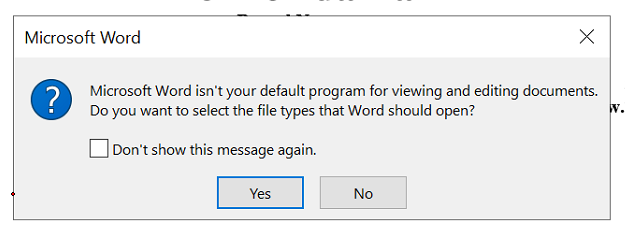

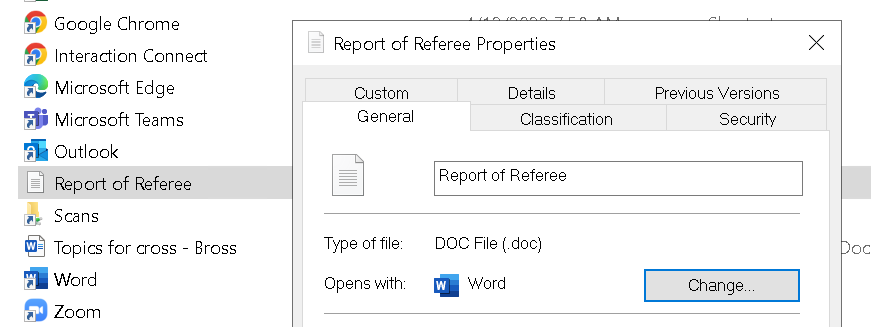
Hi @sysad42
Sorry for the delay.
CDN is a Microsoft content delivery network which stores Office installation files and other cached content.
If you do not change the Office update source ( Such as via SourcePath attribute in .xml file), then Office will check the updates from CDN by default.
Then please go to Registry Editor, check the .doc and other Office formats registry keys on those machines with this issue.

This is what we are showing under that key. Changing to Word Doc 8 does seem to fix it, but only tried on one machine so far.

Hi @sysad42
Thanks for your sharing.
I would suggest you check this .doc registry key on other machines.
Besides, here is a thread I find online, I want to confirm whether there are Adobe software installed on those machines with this issue?
combining Word documents
(Please Note: Since the web site is not hosted by Microsoft, the link may changed without notice. Microsoft does not guarantee the accuracy of this information.)
If yes, I would suggest you choose one machine and uninstall Adobe software to have a check.
If the answer is helpful, please click "Accept Answer" and kindly upvote it. If you have extra questions about this answer, please click "Comment".
Note: Please follow the steps in our documentation to enable e-mail notifications if you want to receive the related email notification for this thread.
Hi @sysad42
I am checking this issue, if there is any update, welcome to post back.
We havent seen any new instances other than the first 20 or so. Changing those registry keys seems to fix it, so we'll just move on.
Hi @sysad42
Thanks for your response.
Generally, the registry data value of .doc won't be changed via updating Office.
If you do not find 3rd-party software that may changes the data value "Word.Document.8", I suggest you check this issue after moving "DOC_auto_file".