Microsoft 365 and Office | SharePoint | For business | Windows
A group of Microsoft Products and technologies used for sharing and managing content, knowledge, and applications.

This browser is no longer supported.
Upgrade to Microsoft Edge to take advantage of the latest features, security updates, and technical support.
' cx='32' cy='32' r='32' /%3E%3Ctext x='50%25' y='55%25' dominant-baseline='middle' text-anchor='middle' fill='%23FFF' %3EJJ%3C/text%3E%3C/svg%3E)
Is it possible to have both alternate row formatting (eg. blue/white), as well as conditional formatting based on a column value? I can get either to do what I want, but struggling to have both at the same time. I have a column called "Old", and if the value is "Yes" the entire row changes to red. Any help on the code would be appreciated!

Yes, as seen below I have alternating colors and conditional formatting:
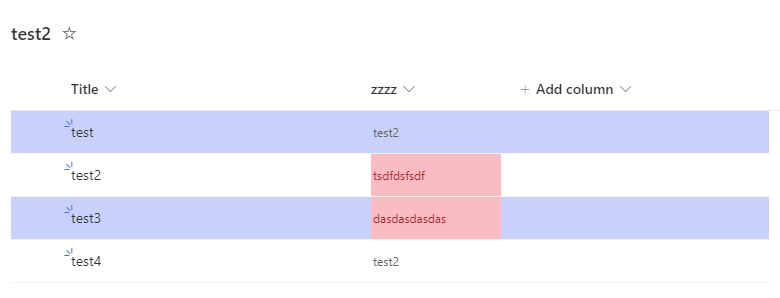
How to have both:
1) Create the conditional formatting for the list:
a) Format this column

b) Go to Manage Rules > Add Rule > Make the rule and formatting you want.

2) Format the current view (for alternate coloring of rows)
a) Go to All Items > Format Current View
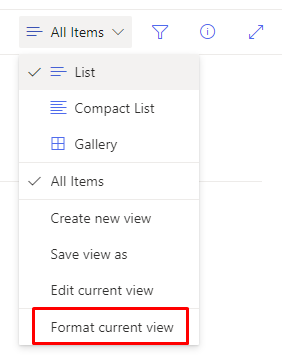
b) Add the JSON code:
{
  "$schema": "https://developer.microsoft.com/json-schemas/sp/view-formatting.schema.json",
  "additionalRowClass": "=if(@rowIndex%2==0,'ms-bgColor-themeLight','')"
}
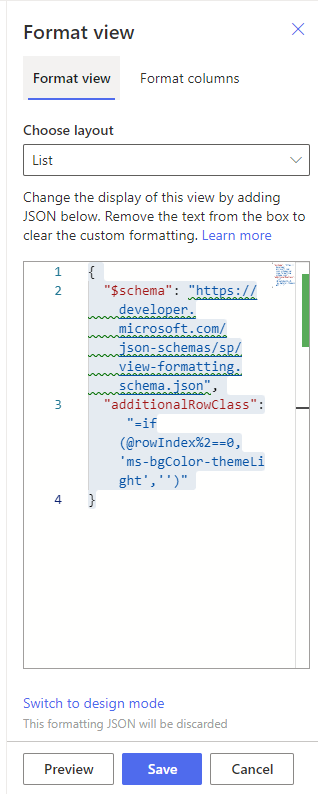
c) Click Save
-------------------------------
If this is helpful please accept answer.
' cx='32' cy='32' r='32' /%3E%3Ctext x='50%25' y='55%25' dominant-baseline='middle' text-anchor='middle' fill='%23FFF' %3EXX%3C/text%3E%3C/svg%3E)
Hi @James Jarman ,
I tried DillonJS's answer and it worked perfectly, feel free to contact me if you have any problems while trying it.

If the answer is helpful, please click "Accept Answer" and kindly upvote it. If you have extra questions about this answer, please click "Comment".
Note: Please follow the steps in our documentation to enable e-mail notifications if you want to receive the related email notification for this thread.
' cx='32' cy='32' r='32' /%3E%3Ctext x='50%25' y='55%25' dominant-baseline='middle' text-anchor='middle' fill='%23FFF' %3EJJ%3C/text%3E%3C/svg%3E)
Thank you DillonJS, it worked!
Is it possible to expand this to the entire line to change color, or is it just the the column field that I'd be limited to? Appreciate all the help!
Unfortunately you cannot expand it to the line as you would need to override the alternating colors to do so.
If my answer was helpful above, please remember to accept answer. Thank you!
Hi @James Jarman ,
Is there any update on this thread? Comment here if you still need any help.
Best regards,
Haoyan Xue

Hi @James Jarman ,
Would you please provide us with an update on the status of your issue?
Hi @James Jarman ,
I’m checking how the things are going on about this issue. If there is any problem with this issue, feel free to let me know.