Microsoft 365 and Office | SharePoint Server | For business
A family of Microsoft on-premises document management and storage systems.

This browser is no longer supported.
Upgrade to Microsoft Edge to take advantage of the latest features, security updates, and technical support.
' cx='32' cy='32' r='32' /%3E%3Ctext x='50%25' y='55%25' dominant-baseline='middle' text-anchor='middle' fill='%23FFF' %3ETC%3C/text%3E%3C/svg%3E)
I want to add the new guest in a teams group with a csv file of spo list and automate.
How can I add an empty attachment to a spo list column?
I want the user to be able to download and import an empty csv. And, I want to be able to edit on the browser.
Eventually, I want to create an approval workflow.
By Azure AD App and automate....

Hi @tarou chabi ,
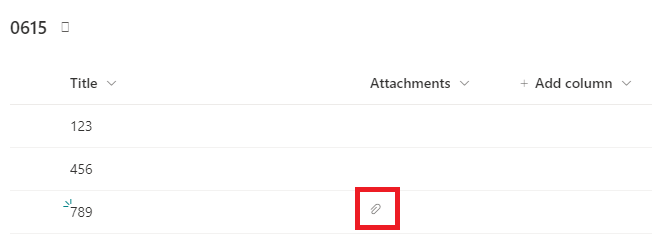
Regarding "add an empty attachment to a SPO list column", when creating a new item, add attachments. Next, make the attachments column visible. By default, the Attachments column is hidden. To unhide it, you can click on one of the column names and select column settings > Show/hide columns, and then tick the Attachments column.
However, this column only indicates with an attachment icon whether the items has attachments or not. It does not show the detailed attachment. If someone wants to open the attachment, he/she still needs to open the list item. By default, attachments are opened directly in the browser.
Regarding "I want to create an approval workflow.", can you describe your requirements in detail?
------------------------
If this is helpful please accept answer.
Opus wwwwwwwww !!!!!!!! You're right ^^ Thank you very much^^