Azure Data Factory
An Azure service for ingesting, preparing, and transforming data at scale.
This browser is no longer supported.
Upgrade to Microsoft Edge to take advantage of the latest features, security updates, and technical support.
' cx='32' cy='32' r='32' /%3E%3Ctext x='50%25' y='55%25' dominant-baseline='middle' text-anchor='middle' fill='%23FFF' %3EDF%3C/text%3E%3C/svg%3E)
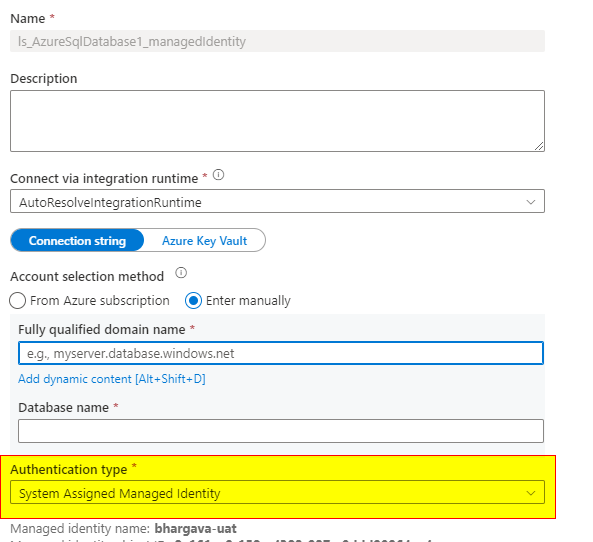
In the development Azure Data Factory (ADF) the linked sql connection's Authentication Type is set as System Assigned Managed Identity. As shown in the image bellow.

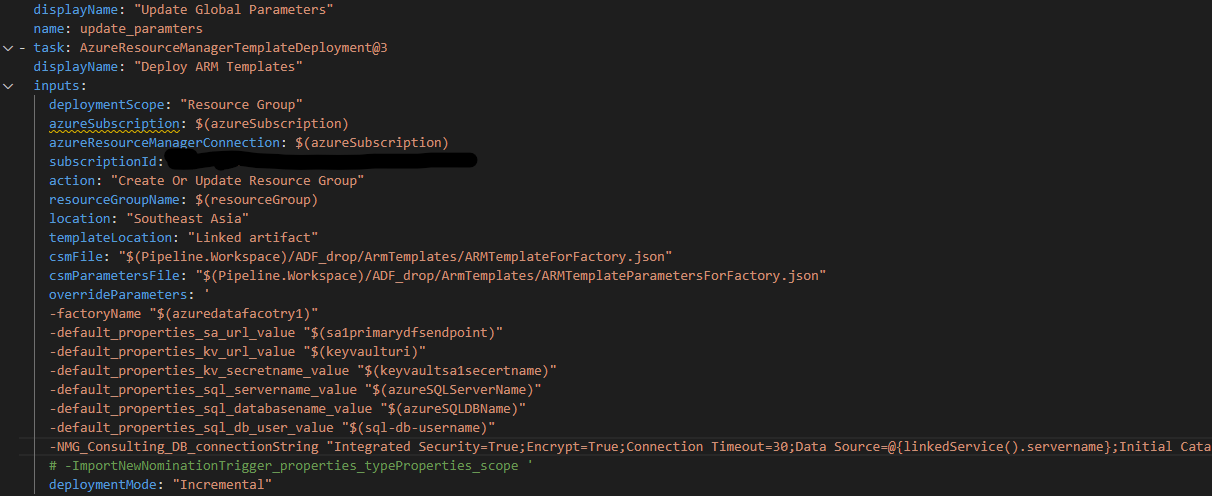
The ADF is connected to Azure Repo and when deployed via ARM template in CI/CD the same is created in the test ADF. Bellow is the Azure Pipeline power shell configuration for deployment.
But when click on the Linked Service in the Test ADF it sets Authenticaion Type as SQL Authentication. (It should be System Assigned Managed Identity)
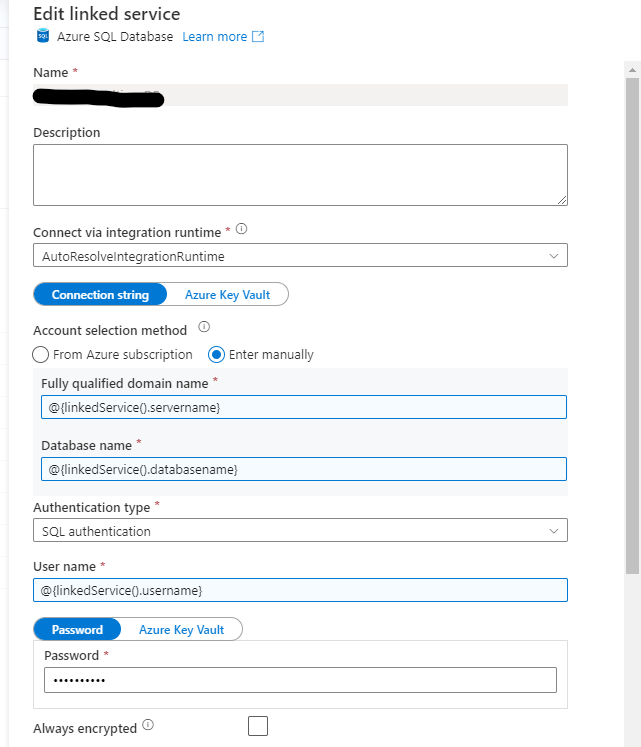
As a result of this, the linked service connection in Test environment is unable to use System Assigned Managed Identity. I to understand what is causing this issue?
' cx='32' cy='32' r='32' /%3E%3Ctext x='50%25' y='55%25' dominant-baseline='middle' text-anchor='middle' fill='%23FFF' %3EBM%3C/text%3E%3C/svg%3E)
Hello DesmondFernando-2064,
Thanks for the question and using MS Q&A platform.
I tried to reproduce the issue from my end, but my release pipeline is able to create the SQL-linked service connection with managed identity.
Did you use SQL auth before? It could be your adf_publish branch might not have a recent commit. Could you create a new pull request to the adf_publish and rerun the pipeline and see if it fixes the issue?
Please let me know if you have any further questions.
Thanks for the prompt reply. I am deploying to a completely different ADF resource which is not connected to a repository. This deployment is done via ARM deployment via Azure pipeline. I have attached the screen shot of the task which dies the deployment.
In that, I have overwritten the connection string as per the recommendations. So there is no way that add_publish to the newly deployed ADF resource. When ever I make changes to the global parameter or override the values to ADF in the ARM template it is correctly reflected.
However, linked service connection for SQL does not apply system Assigned Managed Identity instead it assignes SQL Authentication as shown in the image.
Hello @Desmond Fernando ,
The issue is most likely with your override template parameters only.
Sorry, I overlooked your screenshot earlier. From your screenshot, it seems like you are using the "SQL authentication" connection string in your override template parameter for your SQL linked server connection string.
I tested using SQL authentication connection string on the "SQL linked server connection string" value, then the authentication is changed to - "SQL auth"
If I level it blank, it reflects the "System managed identity."
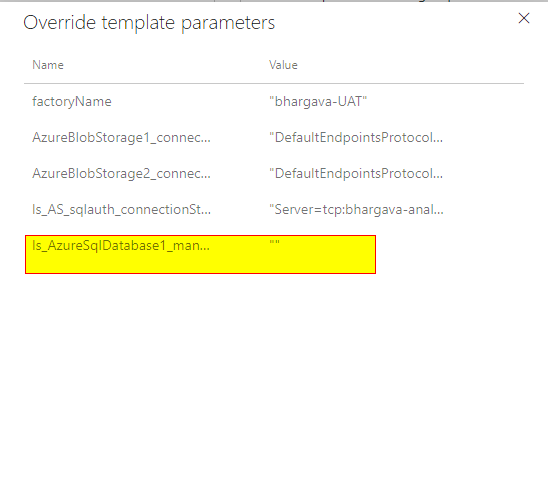
Here is a sample SQL connection string with SQL authentication that I have used on my override template parameter.
Server=tcp:myserver.database.windows.net,1433;Initial Catalog=demoDB;Persist Security Info=False;User ID=Demouser;Password={your_password};MultipleActiveResultSets=False;Encrypt=True;TrustServerCertificate=False;Connection Timeout=30;
I hope this helps.
Hello @Desmond Fernando ,
I have updated my overrider template parameters in my SQL connection string to: "Data Source=@{linkedService().servername};Initial Catalog=@{linkedService().database}" to reflect the below values shown in my screenshot.
Please try and let me know.
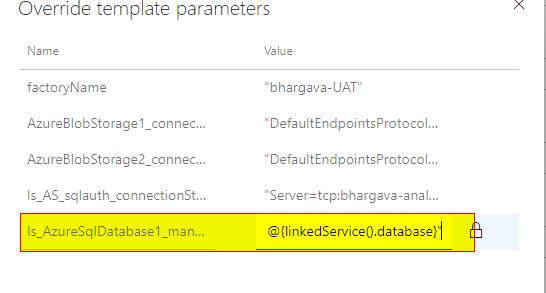
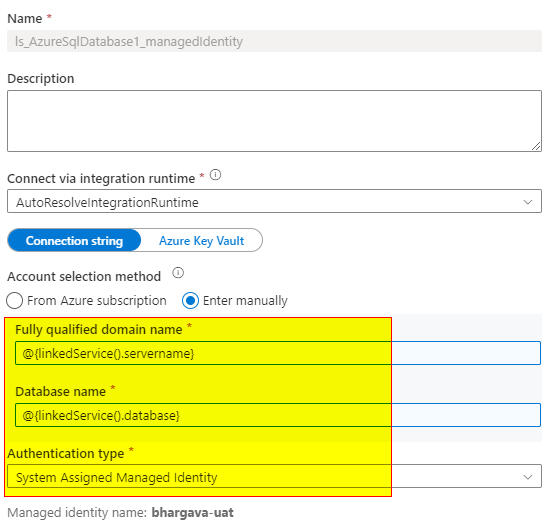
Thank you very much for the answer.
I have done as per your instructions, firstly I set the overwriting connection string with empty value in ARM deployment. This has set the Authentication type to System Assigned Managed Identity and then I did the overwriting for connection string in the ARM deployment as you suggested and now the settings were set as expected.
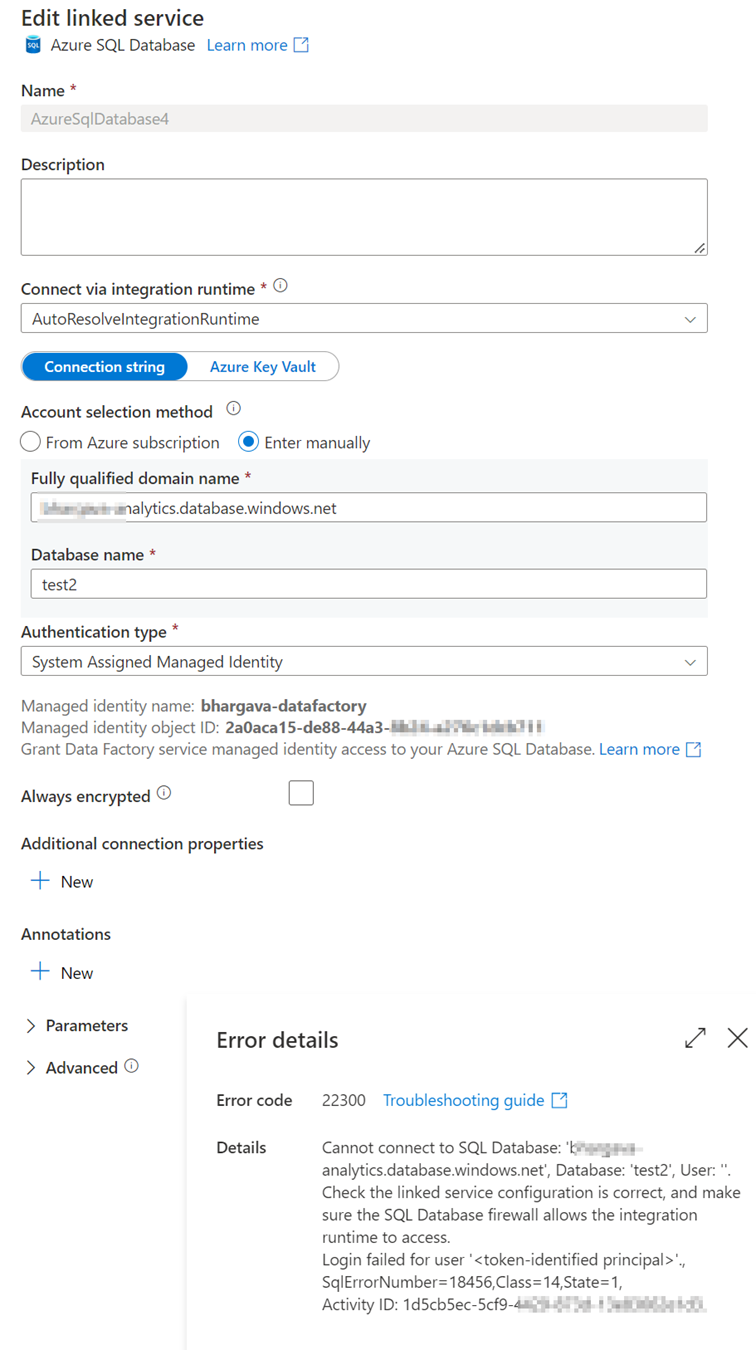
Now that I things were set up as expected, When I tried to test the connection from the Linked service, I am experiencing below error.
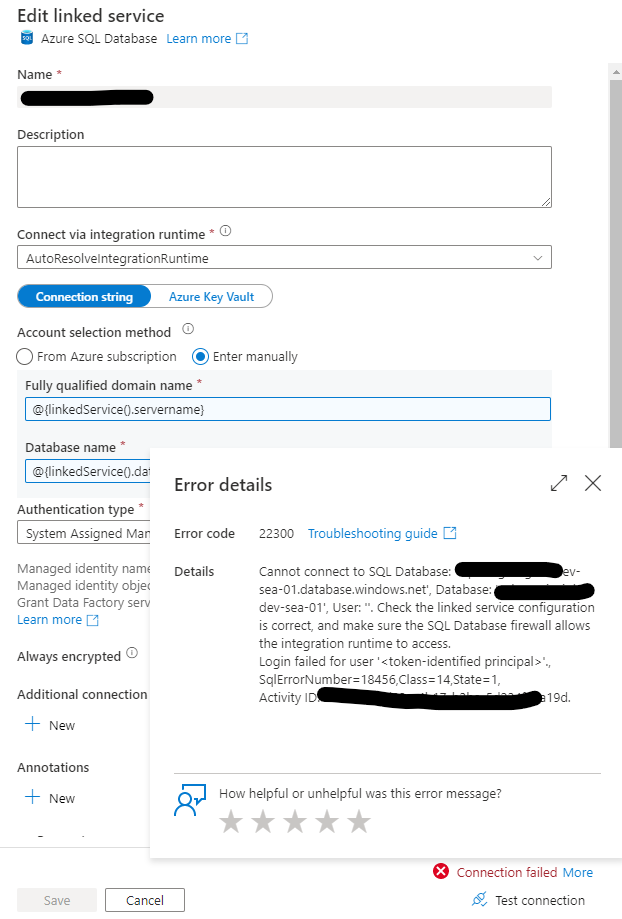
I have already created the ADF as a User in the Azure SQL database and assigned the role DB_Owner with bellow scripts on the correct Database.

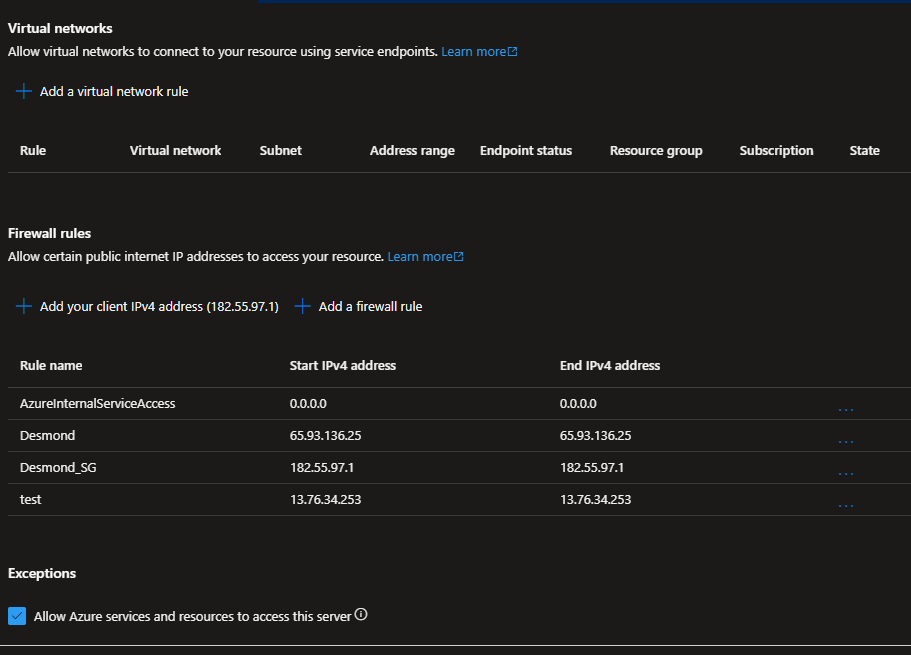
I have also assigned managed Identity for Azure SQL database and to the ADF resource. In addition I have added AzureInternalServiceAccess with IP range 0.0.0.0 to allow Azure Services to access Azure SQL and enabled Allow Azure service and resources to access this server option as per the image bellow.
Hello @Desmond Fernando ,
Thanks for the reply.
Could you please check if the SQL user exists on the master database? It looks like you are missing the user on the master DB.
1) user needs to be created on the master DB
2) also the user needs to be created on user DB and provide permissions on user DB.
ex:
on master
Create user [testuser] from external provider ;
on user DB
Create user [testuser] from external provider ;
on user DB
ALTER ROLE db_datareader ADD MEMBER [testuser];
I hope this helps.
Since your other issue got resolved, could you please consider accepting the answer by hitting on Accept answer button as it helps the community? Please us know if you have any further queries.
Thanks for the reply. I have the ADF resource name as the user in both Master DB and in the DB I wanted to access, as well as the role that is mentioned here. Even when it test the connection in the linked service I am experiencing the error mentioned bellow.

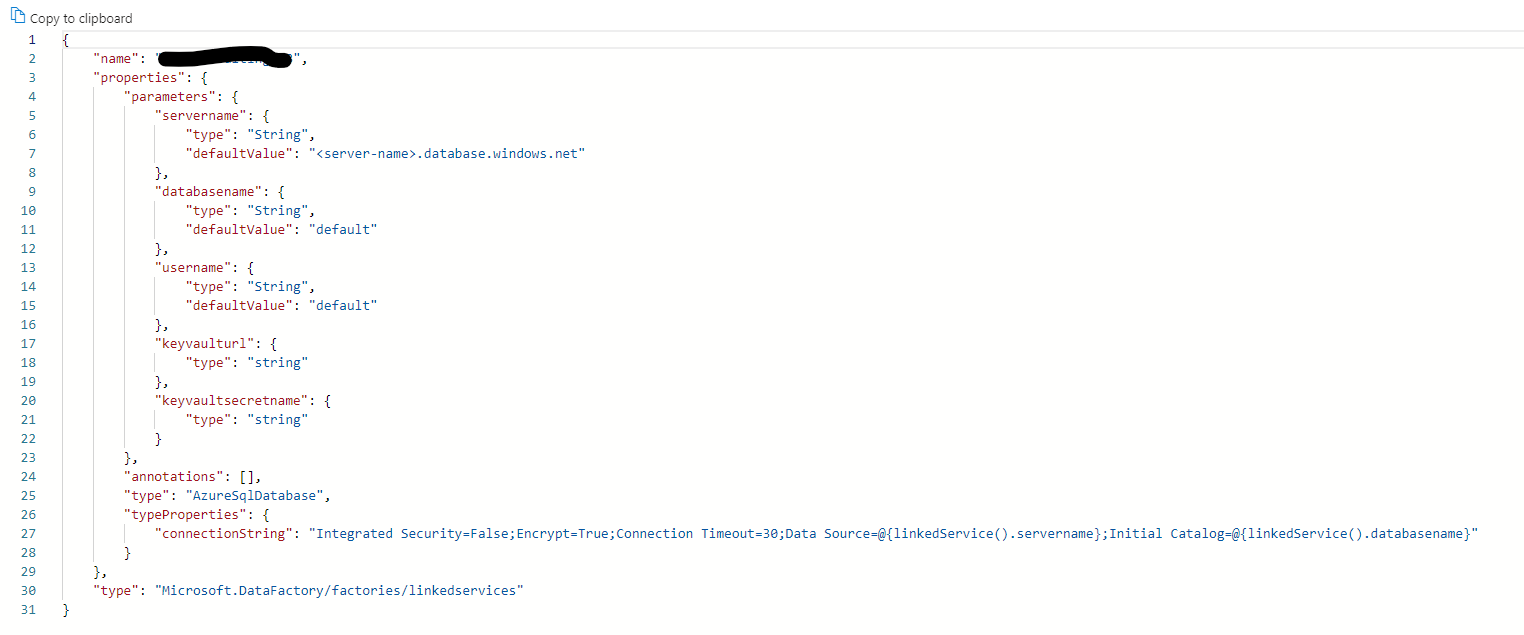
Bellow in the JSON for the Linked service and all the parameters will be filled via Global Parameter
Hello @Desmond Fernando ,
It seems like your Datafactory managed service identity doesn't have access to the SQL server.
Can you please compare the managed Identity objects from the linked server connection and as well as from the Azure data factory-managed identities?
I can repro this issue from my end. Once I provide access to the account on my user DB, the connection went successful. If this doesn't help, I would suggest to open a support ticket. If you don't have a support plan, please let me know. I can enable one-time free support for you to work closely on this matter.
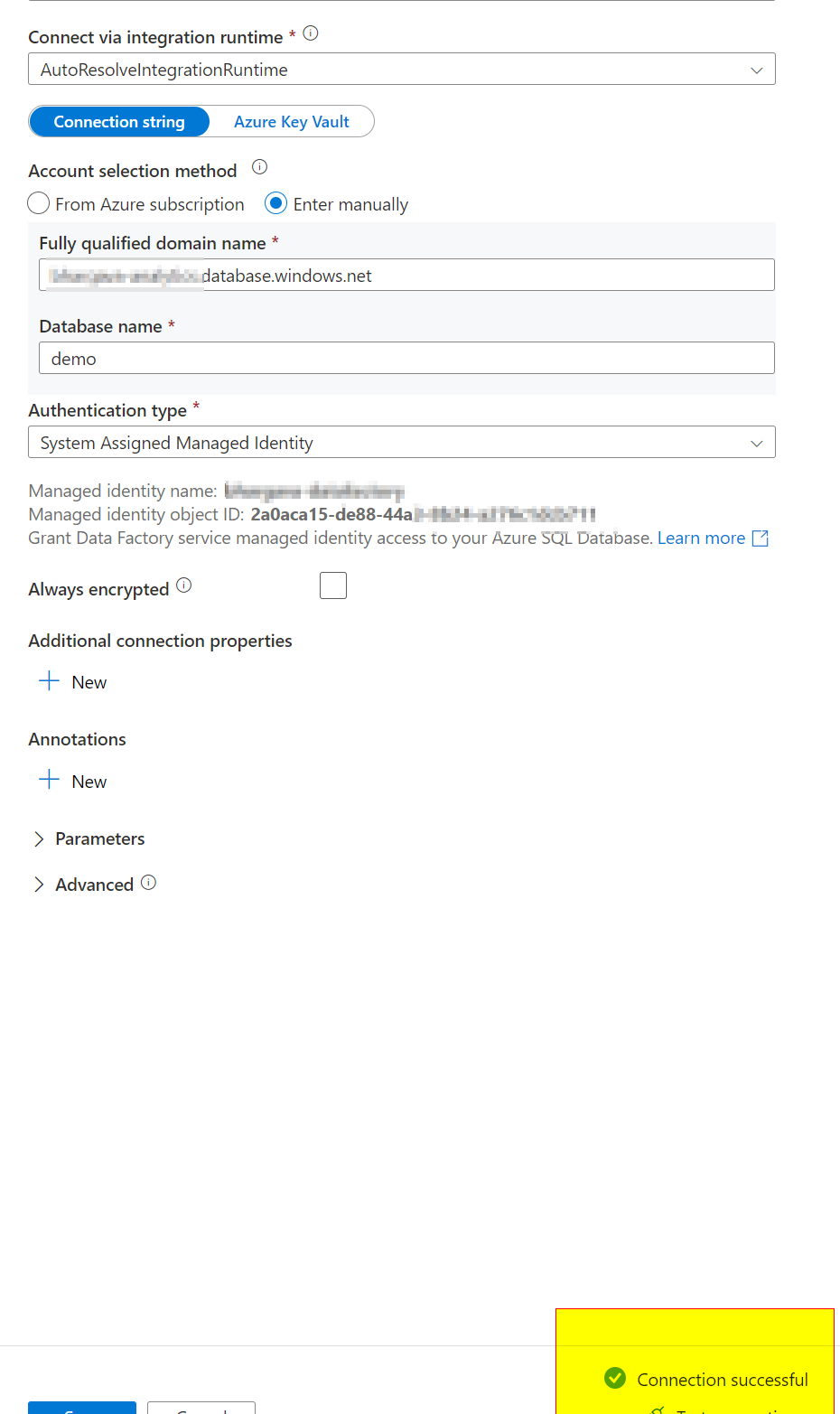
Thanks for the reply but still it is not resolve.
My test connection also work from ADF portal to the Azure SQL Server. However, when the trigger is occurred it fails to connect throwing below error.
Operation on target Copy data1 failed: ErrorCode=SqlFailedToConnect,'Type=Microsoft.DataTransfer.Common.Shared.HybridDeliveryException,Message=Cannot connect to SQL Database: 'db_name', Database: 'dn_name', User: ''. Check the linked service configuration is correct, and make sure the SQL Database firewall allows the integration runtime to access.,Source=Microsoft.DataTransfer.ClientLibrary,''Type=System.Data.SqlClient.SqlException,Message=A network-related or instance-specific error occurred while establishing a connection to SQL Server. The server was not found or was not accessible. Verify that the instance name is correct and that SQL Server is configured to allow remote connections.
Service Ticket pls
' cx='32' cy='32' r='32' /%3E%3Ctext x='50%25' y='55%25' dominant-baseline='middle' text-anchor='middle' fill='%23FFF' %3EMW%3C/text%3E%3C/svg%3E)
If anybody else is having this problem in 2023 in Synapse, check if your connectionString value is a | instead of anything else.
This worked for me:
"typeProperties": {
                    "connectionString": "|",
                    "baseUrl": "=",
                    "serviceEndpoint": "="
                },