Microsoft 365 and Office | Development | Other
Building custom solutions that extend, automate, and integrate Microsoft 365 apps.

This browser is no longer supported.
Upgrade to Microsoft Edge to take advantage of the latest features, security updates, and technical support.
' cx='32' cy='32' r='32' /%3E%3Ctext x='50%25' y='55%25' dominant-baseline='middle' text-anchor='middle' fill='%23FFF' %3EA%3C/text%3E%3C/svg%3E)
Hi there, I am trying to insert a column using Office Scripts but it fails with errors.

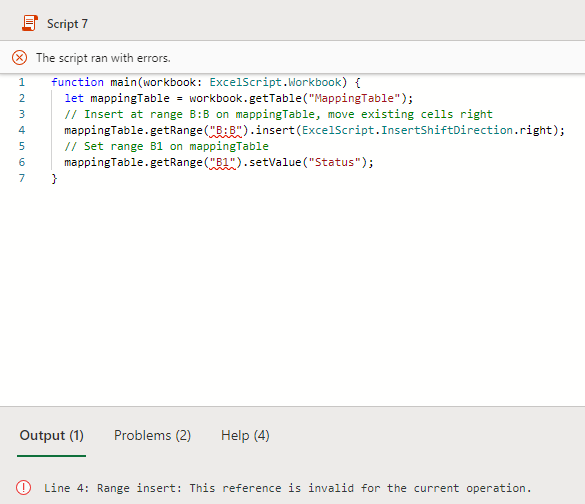
What could be the issue?
' cx='32' cy='32' r='32' /%3E%3Ctext x='50%25' y='55%25' dominant-baseline='middle' text-anchor='middle' fill='%23FFF' %3EBG%3C/text%3E%3C/svg%3E)
You can try using addColumn() to add a new column to the table instead of getRange(). Add column expects a number and is zero indexed. So index 0 would map to column A, index 1 would map to column B, etc. Since you want to insert where column B would be that would be index 1. After the addColumn() method, you can set the header name for the new column using the setName() method. You can see an example of how to do that using the code below:
function main(workbook: ExcelScript.Workbook) {
  let sh = workbook.getActiveWorksheet()
  let tbl = sh.getTable("Table1")
  tbl.addColumn(1).setName("Status")
}
' cx='32' cy='32' r='32' /%3E%3Ctext x='50%25' y='55%25' dominant-baseline='middle' text-anchor='middle' fill='%23FFF' %3ERL%3C/text%3E%3C/svg%3E)
I was struggling with a similar script until I realised there is a 'Record Actions' option.