Microsoft 365 and Office | Excel | For business | Windows
A family of Microsoft spreadsheet software with tools for analyzing, charting, and communicating data

This browser is no longer supported.
Upgrade to Microsoft Edge to take advantage of the latest features, security updates, and technical support.
' cx='32' cy='32' r='32' /%3E%3Ctext x='50%25' y='55%25' dominant-baseline='middle' text-anchor='middle' fill='%23FFF' %3ELA%3C/text%3E%3C/svg%3E)
I have an excel document that has two sheets. From these two sheets I want to merge the two but I don't want any duplicates in the new merge sheet. How can I go about this either through vba or some function.

Can you give us a sample of the data? Not sure what your structure looks like.
Please ensure you remove anything personal/business related from the file samples.

Hi, @Lopez, Ahiezer
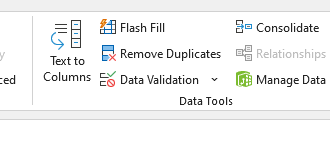
There is the function of removing duplicates in the Data tab in excel, you can copy and paste A worksheet into worksheet B and then remove duplicates.
If the response is helpful, please click "Accept Answer" and upvote it.
Note: Please follow the steps in our documentation to enable e-mail notifications if you want to receive the related email notification for this thread.