Microsoft Security | Microsoft Entra | Microsoft Entra ID
A cloud-based identity and access management service for securing user authentication and resource access

This browser is no longer supported.
Upgrade to Microsoft Edge to take advantage of the latest features, security updates, and technical support.
' cx='32' cy='32' r='32' /%3E%3Ctext x='50%25' y='55%25' dominant-baseline='middle' text-anchor='middle' fill='%23FFF' %3EMR%3C/text%3E%3C/svg%3E)
Hello All,
I have set an Additional Access Policy on an MFA group and linked users to it who have to log in with MFA.
I decorated it like this that they have to be inside the location of organizations to be able to log in without MFA, but outside they need the Multi Factor Authentication.
But the problem is, if they want to log in outside the organization, they don't get an MFA request? Something is wrong here but I don't know what.
While they have been added to MFA group and have successfully completed the entire MFA procedure?
What exactly is going wrong?

I am looking forward to hear from someone for helping me on this.

Hi,
Can you try to set the locations to All Locations instead of All Trusted Locations ? Excluded is fine as these are internal sites/locations I guess.
==
Please "Accept the answer" if the information helped you. This will help us and others in the community as well.
HI,
So you configured the Named Locations or Trusted IPs that is internal to the organization and excluded the MFA for internal users is that correct? What is the Grant settings can you check that section please and verify what is the configuration.
I will check the named locations if they are not overlapping the source locations somehow and does the devices have VPN software?
=
Please "Accept the answer" if the information helped you. This will help us and others in the community as well.
Hi Jimmy,
Thanks for responding.
For your first question, so far that I know we configured the Named Locations. The Trusted IPs, I don't know exactly.
Our previous IT colleague has retired so I didn't get around to finding out about this from my previous colleague.
It is configured excluded the MFA for internal users. So if the users want to login on for example, office.com outside the organization, they must need MFA to login.
This is the Grant Settings:

The Conditional Policy is applied to this MFA group:
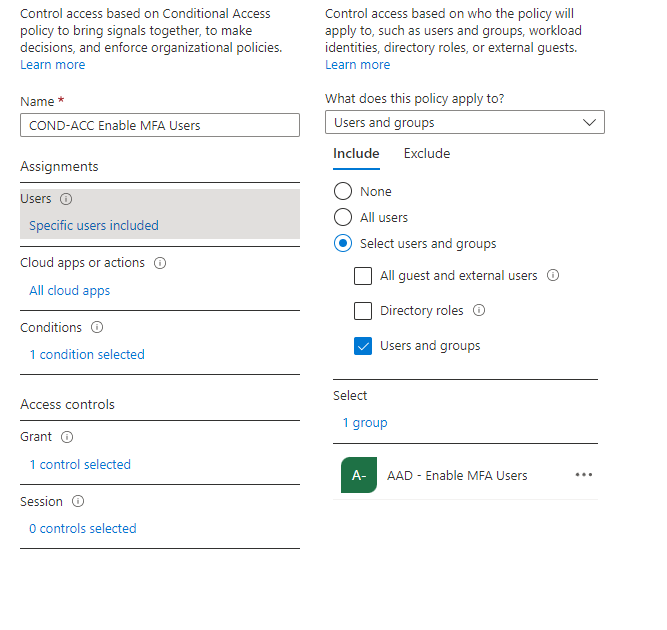
And when I look at Sign-in log, I see that a user was able to successfully log in to office.com without MFA. Here I see that Conditional Policy has not yet been applied?
(I just want to show you more information for understanding.

For you last question, the devices have no VPN software. Everybody must use MFA with their Smartphones.
I want to provide you more information about this, when I click on the Conditional Access Poicy Details: maybi we can understand what the issue is?

Hi,
I am sorry but what do you mean exactly?
I did this right now: 9 Included (these are the sites that must be internal.

And the excluded I changed to "All Trusted Locations". But I dont see any option for "All Locations"? **Or you mean Any Locations? **

Yes it should be other way around Include - Any Locations and Exclude - Internal Locations or Trusted IPs
==
Please "Accept the answer" if the information helped you. This will help us and others in the community as well.