Hello. I know quite a few questions have been posted about many large files existing in the "System Volume Information" folder in Windows 7, but none have addressed my specific questions. Most of the posts recommend taken steps such as:
- Cleaning up the "SystemRestore" folder by deleting the various System Restore Points
- Turning the disk percentage used by System Restore to a low number
- Shutting off, rebooting and restarting System Restore
- Using Disk Cleaner afterwards
I have gone through all those steps and still have a lengthy list of files of several Gigabytes each, not in the SystemRestore folder, but only in the System Volume Information folder, as you can see in the screenshot below, taken from a utility called "Folder
Size."
The "System Volume Information" folder and subfolders are highlighted in red, on the left. The largest files in that folder are shown on the right, highlighted in blue:
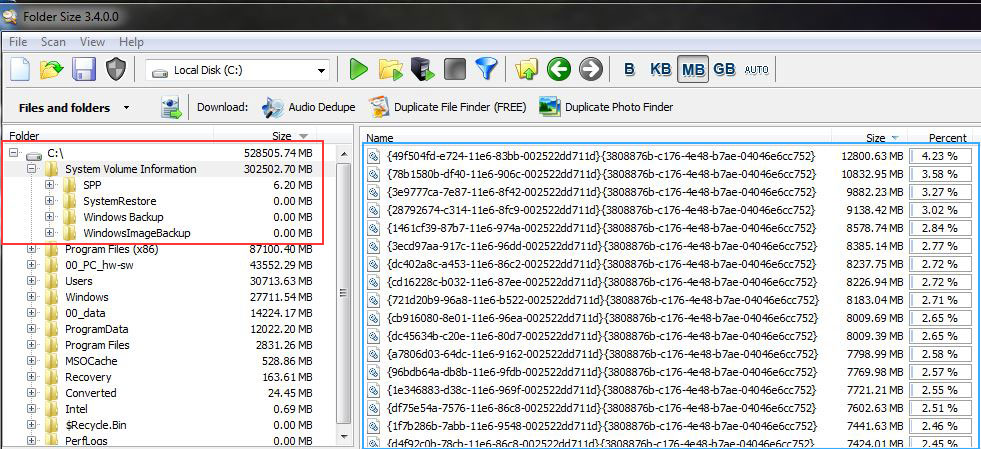
These files are taking up over 300 GB of my 500 GB internal drive. This drive is used for all system and user files.
I need to:
- Understand what these files are
- If they can be removed safely, without causing system problems
- How to remove them
Any assistance and suggestions for fixing this issue will be greatly appreciated, and thanks in advance.
' cx='32' cy='32' r='32' /%3E%3Ctext x='50%25' y='55%25' dominant-baseline='middle' text-anchor='middle' fill='%23FFF' %3EA%3C/text%3E%3C/svg%3E)
