Note
Access to this page requires authorization. You can try signing in or changing directories.
Access to this page requires authorization. You can try changing directories.
Azure Kubernetes Service (AKS) enabled by Azure Arc on Azure Local allows you to deploy and manage Kubernetes clusters. Clusters run as virtual machines (VM) on the Azure Local platform and are connected to Azure through Azure Arc. That connection gives you a consistent management experience using the Azure portal, Azure CLI, or Azure Resource Manager templates (ARM templates). The goal is to provide a unified deployment and lifecycle management experience.
This article describes the key architectural concepts for AKS on Azure Local for multi-rack deployments. It introduces core components, such as the control plane nodes and node pools.
Overview
When you deploy an AKS cluster on Azure Local, the platform deploys virtual machines that serve as Kubernetes control plane nodes and worker nodes. The Azure Local platform manages the full lifecycle of these clusters, including creation, scaling, upgrades, and deletion.
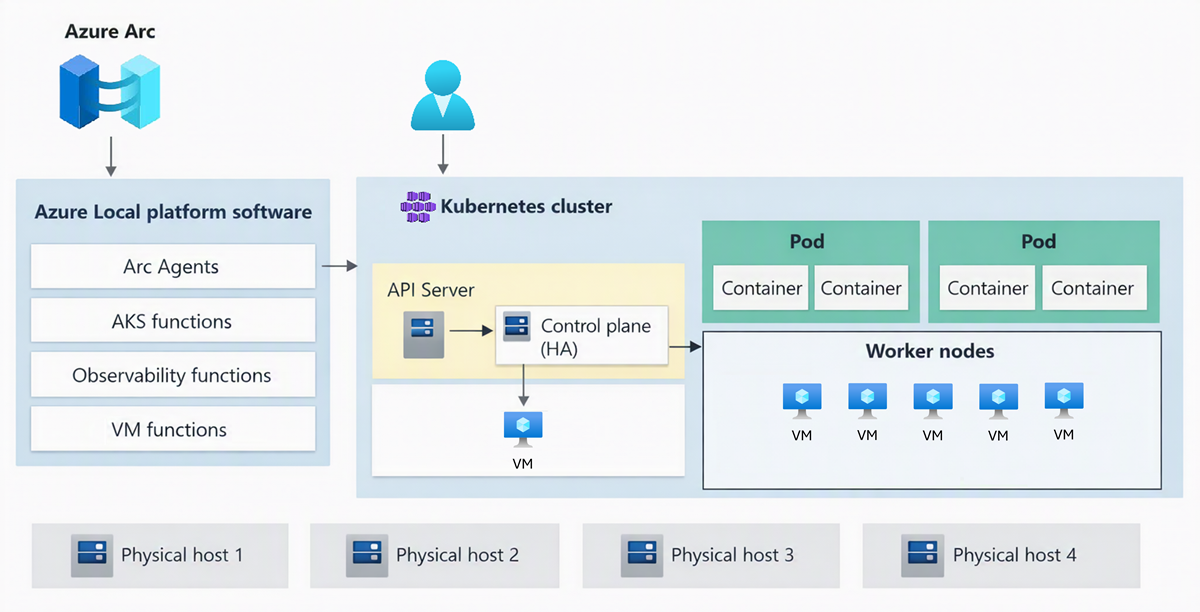
AKS Arc uses a predefined configuration to deploy Kubernetes clusters effectively and with scalability in mind. A deployment operation creates multiple Linux virtual machines and joins them together to create one or more Kubernetes clusters.
Key concepts
There are several key concepts for AKS on Azure Local multi-rack deployments.
Azure Local platform
Azure Local for multi-rack deployments provides the on-premises infrastructure for running AKS clusters. AKS clusters are deployed onto this infrastructure and managed through Azure. The platform is fully managed from Azure and has the following core AKS Arc components:
- AKS Arc cluster extensions: A cluster extension is the on-premises equivalent of an Azure Resource Manager resource provider. Just as the Microsoft.ContainerService resource provider manages AKS clusters in Azure, the AKS Arc cluster extension helps manage Kubernetes clusters via Azure.
- Custom location: A custom location represents your Azure Local environment in Azure. When you create an AKS cluster, you specify the custom location to target your deployment to the correct infrastructure. when Azure Local is deployed, the Custom Location is automatically created and surfaced to the users to target their AKS cluster deployments.
AKS clusters
AKS clusters are a high availability deployment of Kubernetes using Linux VMs for running Kubernetes control plane components and Linux node pools. There can be one or more AKS clusters on an Azure Local multi-rack deployment.
An AKS cluster on Azure Local (multi-rack) consists of:
Control plane: Kubernetes uses control plane nodes to ensure every component in the Kubernetes cluster is kept in the desired state. The control plane also manages and maintains the worker node pools that hold the containerized applications. AKS enabled by Arc deploys the KubeVIP load balancer to ensure that the API server IP addresses of the Kubernetes control plane are always available.
Control plane nodes run the following major components (not an exhaustive list):
- API server: Enables interaction with the Kubernetes API. This component provides the interaction for management tools, such as Azure CLI, the Azure portal, or kubectl.
- Etcd: A distributed key-value store that stores data required for lifecycle management of the cluster. It stores the control plane state.
Node pools: In Kubernetes, a node pool is a group of nodes within a cluster that share the same configuration. Node pools allow you to create and manage sets of nodes that have specific roles, capabilities, or hardware configurations. Node pools enable more granular control over the infrastructure of your AKS cluster. You can deploy Linux node pools in your AKS cluster. Each node pool has a configurable VM size and node count. You need to have at least one Linux node pool to host the Arc agents that maintain connectivity with Azure.
Kubernetes versions
AKS on Azure Local supports specific Kubernetes versions. You can learn more about the supported Kubernetes versions and upgrade process: Upgrade AKS on Azure Local for multi-rack deployments.
VM sizes
When you create a cluster, you select VM sizes for control plane and worker nodes from the available SKU catalog. The platform defines the available VM sizes, for more information, see VM sizes for AKS on Azure Local.
Cluster lifecycle
You manage the full lifecycle of AKS clusters through Azure:
| Operation | Description |
|---|---|
| Create | Deploy a new cluster by specifying the custom location, logical network, Kubernetes version, VM sizes, and node counts. |
| Scale | Add or remove control plane nodes (as long as number of nodes is odd) or worker nodes in a node pool. Or add new node pools to a cluster. |
| Upgrade | Update the cluster to a newer Kubernetes version. Upgrades are performed as rolling updates to minimize downtime. |
| Delete | Remove the cluster and release the associated infrastructure resources. |
All operations are available through the Azure portal, Azure CLI (az aksarc), ARM templates, and Bicep.
Azure Arc connectivity
Each AKS cluster is automatically connected to Azure as an Arc-enabled Kubernetes cluster. This connection provides:
- Azure portal management: View cluster status, node pools, and workloads in the Azure portal.
- Azure Monitor: Enable Container Insights to monitor cluster health, performance, and logs.
- Azure Policy: Apply and enforce policies across your clusters.
- GitOps: Use Flux v2 to manage cluster configurations from Git repositories.
- Cluster access: Connect to the Kubernetes API server using
az connectedk8s proxywithout requiring direct network access.