Note
Access to this page requires authorization. You can try signing in or changing directories.
Access to this page requires authorization. You can try changing directories.
Azure App Service
Azure Functions
Azure Cosmos DB
Azure Managed Redis
Azure Monitor
This article shows how to update Azure Managed Redis from changes in Azure Cosmos DB for NoSQL. Azure Cosmos DB is the system of record. Azure Managed Redis stores frequently requested data so an Azure App Service web application can reduce repeated database reads.
For reads, the application checks Azure Managed Redis first. If Redis doesn't contain the key for a value, the application queries Azure Cosmos DB for the value.
For writes, the application commits the change to Azure Cosmos DB. An Azure Functions function app reads the Azure Cosmos DB change feed and atomically updates affected Redis values or writes versioned tombstones after the database change commits. The Redis update doesn't block the application write request.
Important
Use this architecture when the application can tolerate a short delay between an Azure Cosmos DB write and the related Redis update. If clients must receive the new cached value immediately after an application-controlled write, use write-through caching instead.
Architecture
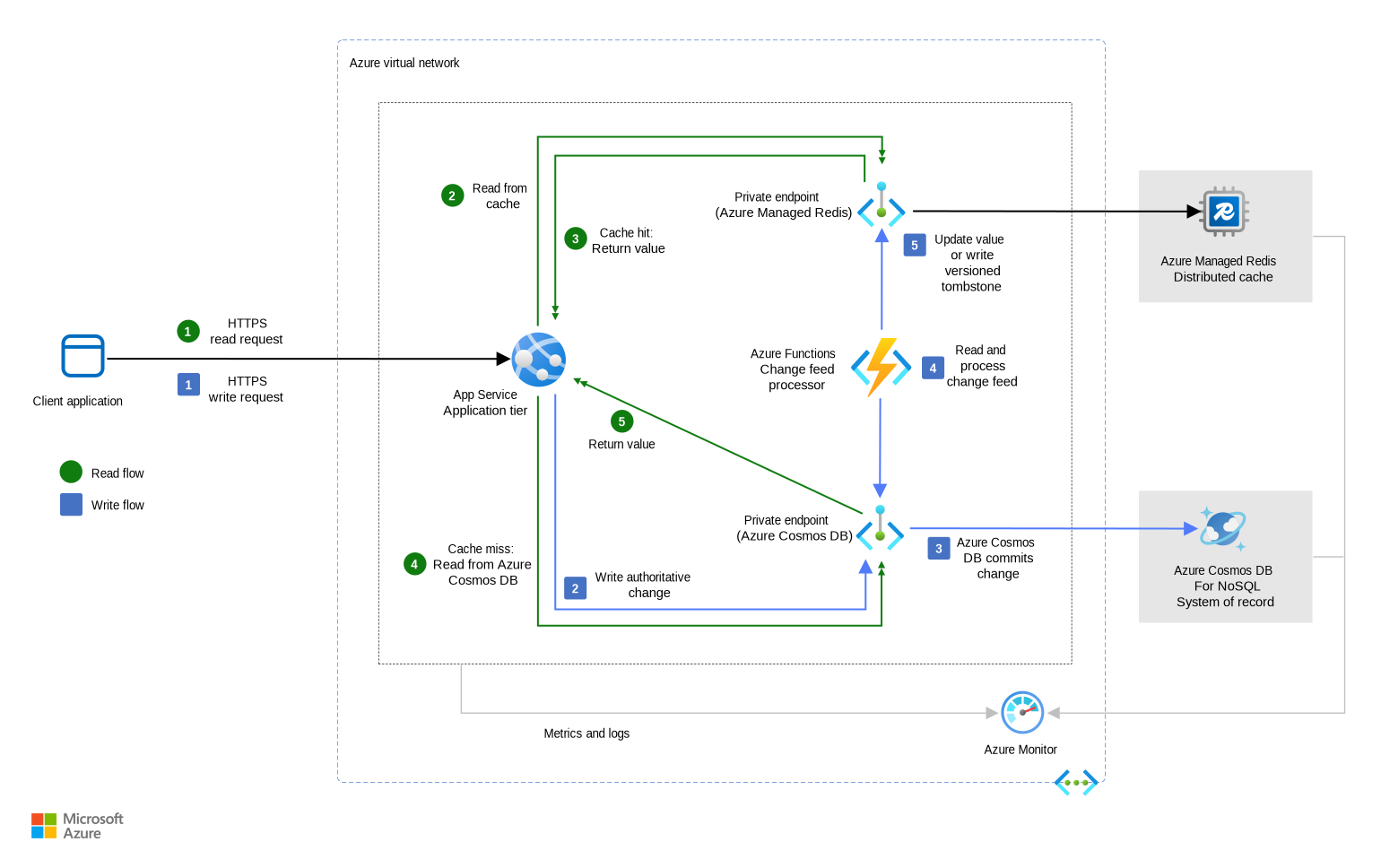
Download a Visio file of this architecture.
App Service handles application reads and writes. Azure Cosmos DB for NoSQL is the system of record. Azure Managed Redis stores cached values that the application can re-create from Azure Cosmos DB. Azure Functions processes committed Azure Cosmos DB changes and updates Redis outside the application write path.
Data flow
The following steps correspond to the numbers in the architecture diagram.
Read flow
A client sends an HTTPS read request to the application that runs on App Service.
The application creates the cache key for the requested value and checks Azure Managed Redis for the key.
If Redis contains the key, the application returns the associated cached value.
If Redis doesn't contain the key, the application reads from Azure Cosmos DB.
The database returns the value. The application can also store the value in Redis with a time to live (TTL).
If the application stores a value in Redis after a cache miss, use the same cache-key format that the change feed function app uses. Use a source version when a cache-miss fill can race with an event-driven cache update.
Write and cache-update flow
A client sends an HTTPS write request to the application that runs on App Service.
The application writes the authoritative data to Azure Cosmos DB.
Azure Cosmos DB commits the change.
The Azure Cosmos DB trigger for Azure Functions reads and processes the change feed.
The function app atomically updates the affected Redis value or writes a versioned tombstone.
The application doesn't wait for the Redis update before completing the write request. Redis can contain the previous value for a short period after the Azure Cosmos DB commit.
This architecture uses a change feed mode of latest version, because Redis needs only the most recent state of each item. This mode captures inserts and updates, but not deletes. To represent a deletion, the application writes a soft-delete marker to Azure Cosmos DB. The function app processes that marker and writes a versioned tombstone to Redis.
Azure Monitor collects metrics and logs from the workload. Monitor the application, Azure Functions, Azure Cosmos DB, Azure Managed Redis, and the change feed processing delay.
Components
The following components implement this architecture.
Azure Managed Redis is an in-memory distributed cache based on Redis Enterprise. In this solution, Redis isn't the system of record. Instead, it stores frequently requested values that the application can re-create from Azure Cosmos DB. Azure Managed Redis supports private endpoint connectivity and Microsoft Entra authentication.
App Service provides a fully managed hosting environment for building, deploying, and scaling web applications. In this solution, App Service hosts the web application or API and owns the application read path and the source write path. App Service creates cache keys, reads Redis, reads Azure Cosmos DB on cache misses, writes authoritative data to Azure Cosmos DB, and can populate Redis after a cache miss.
Azure Cosmos DB for NoSQL is the system of record. All application writes commit to Azure Cosmos DB before the related Redis update occurs. The Azure Cosmos DB change feed provides the committed item changes that Azure Functions processes.
Azure Functions is a serverless solution for building apps. In this solution, Azure Functions runs the change feed processor logic. The Azure Cosmos DB trigger uses the change feed processor to read changes and distribute work across function app instances. The trigger uses a lease container to store processing state. The lease container is an implementation detail and doesn't appear in the architecture diagram.
Azure Virtual Network provides the private network that contains the private endpoints and the integration subnets. App Service and Azure Functions use virtual network integration to reach Azure Managed Redis and Azure Cosmos DB through their private endpoints.
Azure Private Link provides private endpoint connectivity to Azure Managed Redis and Azure Cosmos DB. The private endpoints provide private IP addresses that App Service and Azure Functions can reach through virtual network integration.
Microsoft Entra ID provides workload identities. App Service and Azure Functions can use managed identities to access Azure resources without storing application credentials. Use separate identities when the application and function app need different permissions.
Azure Monitor collects metrics and logs from the application and data services. Use application telemetry with platform metrics to measure cache use, Redis latency, Azure Cosmos DB request-unit consumption, function app failures, and the cache-update delay.
Alternatives
Consider the following alternatives and their trade-offs.
Cache-aside without event-driven updates: Use the Cache-Aside pattern when one application owns the data and can manage cache invalidation after writes. This alternative has fewer components. It can leave old data in Redis if another writer changes Azure Cosmos DB without updating the cache.
Application-managed write-through caching: Use write-through caching with Azure Managed Redis when clients must read the new cached value immediately after a successful application-controlled write. Write-through caching updates the system of record and cache as part of the write workflow. This approach adds cache latency and failure handling to the write path.
Self-hosted change feed processor: Run the Azure Cosmos DB change feed processor in App Service, Azure Kubernetes Service (AKS), or another compute service when the workload needs direct control over the processor host and scaling behavior. This option gives the team more control, but the team must deploy and operate the worker process.
Direct Azure Cosmos DB reads: Consider whether your solution requires caching. Azure Cosmos DB might meet your workload's latency, throughput, and cost requirements. A cache adds another service and requires key, expiration, update, and failure-handling rules.
Scenario details
A web application stores business data in Azure Cosmos DB for NoSQL. Many requests read the same data repeatedly. These reads consume request units and can increase response time when demand exceeds provisioned throughput.
Examples include the following scenarios:
- Product and catalog data
- Customer profiles
- Account settings
- Configuration data
- Reference data
- Read models that the application can re-create from Azure Cosmos DB
Azure Managed Redis can store frequently requested values. Later requests for the same cache key can return the cached value without another Azure Cosmos DB read.
This architecture is useful when more than one application or service can update the source data. Each writer writes to Azure Cosmos DB. Azure Functions uses the change feed as one cache-update path. Writers don't need to implement the Redis update logic separately.
The architecture uses these rules:
- Azure Cosmos DB is the system of record.
- Redis stores values that the application can re-create.
- App Service checks Redis before Azure Cosmos DB for cached read paths.
- Cached values have a TTL.
- All source writes commit to Azure Cosmos DB.
- Azure Functions processes the change feed after source changes commit.
- The function app atomically updates related Redis values or writes versioned tombstones.
- Redis updates are idempotent.
- The workload uses Redis metrics and application telemetry to measure the cache-hit ratio, Azure Cosmos DB fallback reads, and the cache-update delay.
This architecture doesn't guarantee that Redis and Azure Cosmos DB always contain the same value. A read can occur after an Azure Cosmos DB write commits but before Azure Functions updates Redis. If a cache value update or tombstone write fails, the old value can remain until a later update occurs, a repair action is taken, or the value is removed after its TTL expires.
Cache key design
Use cache keys that App Service and Azure Functions can create in the same way for the same source item.
Examples include the following keys:
tenant:42:customer:123:v2
tenant:42:product:456:v3
account:789:settings:v1
Build keys from stable application values. These values can include a tenant identifier, entity type, item identifier, locale, or schema version.
Use a schema version when an application deployment changes the format of a cached value. The schema version prevents a new application version from reading an incompatible cached value. The schema version isn't the same as the source-item version. Store the source-item version in the cached value when the workload needs version-aware updates.
Don't put sensitive data directly in cache key names.
TTL selection
Assign a TTL to each cached value. The TTL specifies how long a value remains in Redis after the application writes or refreshes it. The TTL also limits how long an old value can remain after a failed cache update or tombstone write.
Select a TTL that matches the data's freshness requirements and the maximum stale-data period that the workload can accept. Data that changes often can require a shorter TTL than stable reference data. If a TTL is too short, the application can make unnecessary Azure Cosmos DB reads. If it's too long, old data can remain in Redis longer than the workload allows.
Avoid setting many related keys to expire at the same time. Add a small random variation to the TTL when simultaneous expiration can cause a large increase in Azure Cosmos DB reads.
Change feed mode and delete handling
This architecture uses a change feed mode of latest version. Latest version mode includes creates and updates. It returns the most recent available version of an item when the consumer reads the change feed. This mode can omit intermediate versions when an item changes multiple times before processing. This behavior is suitable when Redis needs the current source state rather than every intermediate change.
Latest version mode doesn't capture deletes. Use a soft-delete marker when the function app must represent a deleted source item in Redis. Write a versioned tombstone, such as the following one, instead of removing the Redis key:
{
  "id": "product-456",
  "tenantId": "42",
  "isDeleted": true,
  "version": 18
}
The application writes the soft-delete state to Azure Cosmos DB. Azure Functions reads the change from the feed and atomically writes a versioned tombstone to Redis instead of deleting the key. The tombstone contains the source version and a deletion marker. App Service treats the tombstone as a not-found result and doesn't repopulate the key with an older value. On a cache miss, App Service also treats a soft-deleted Azure Cosmos DB item as not found and doesn't cache it as a live value. Azure Cosmos DB can remove the source item later through a TTL policy.
Set the source-item TTL long enough for the function app to process the soft-delete marker during normal operation and expected recovery periods. Don't rely on the Redis tombstone TTL as the version fence. Azure Managed Redis uses the volatile-lru eviction policy by default, so a tombstone that has a TTL can be evicted before it expires. Store the highest processed source version in a separate version-fence key without a TTL. Give the version-fence key and cache key the same Redis hash tag so they map to the same hash slot and the comparison and update can run atomically. Don't use an allkeys eviction policy for version-fence keys. Remove a version-fence key only after the workload can guarantee that no older cache fill, delayed update, or replay can arrive.
If the workload must process explicit delete operations or every intermediate item version, evaluate the all versions and deletes change feed mode. This mode requires Azure Cosmos DB for NoSQL with continuous backups configured and the All versions and deletes change feed mode setting enabled. The Azure Functions trigger requires an Azure Cosmos DB extension or extension bundle version that supports this mode for the selected programming model and language. Accounts that have ever merged a partition, or that currently have partition merge enabled, aren't supported.
Version-aware cache updates
A cache-miss fill and a change feed update can occur at the same time. For example, App Service can read version 17 from Azure Cosmos DB while Azure Functions processes version 18. If App Service writes version 17 to Redis after the function app writes version 18, Redis contains an older value. A deletion creates a similar race condition. If the function app deletes the Redis key for version 18, an in-flight cache fill can find that the key is absent and re-create version 17.
To avoid these situations, use an application-defined numeric source version that strictly increases on every successful source-item update, and keep it in every cached value and versioned tombstone. For a single-write-region account, enforce the increment by using Azure Cosmos DB optimistic concurrency control, such as an If-Match condition on _etag, and retry conflicts against the latest item so concurrent writers can't commit different values with the same version. If the account uses multi-region writes, define a conflict-resolution and version-allocation strategy that preserves this ordering before using the cache comparison rule. Don't order Azure Cosmos DB _etag values, because their format is internal. When the function app processes a soft-delete marker, write a tombstone that contains the source version and a deletion marker instead of deleting the Redis key. App Service treats the tombstone as a not-found result.
Apply the following rule atomically to cache-miss fills and change feed updates:
incoming version > cached version
    store the incoming value or tombstone

incoming version = cached version
    no change

incoming version < cached version
    ignore the operation
Retain a tombstone long enough to reject older in-flight cache fills, delayed change feed updates, and expected replays. If you can't bound that interval, retain the highest processed source version separately from the cached value.
Use an atomic Redis operation when concurrent updates can affect the same key. A separate existence check followed by a write doesn't prevent an older cache fill from overwriting a newer value or re-creating deleted data.
Potential use cases
This architecture can support the following workload characteristics:
- Applications that have high read volume and lower write volume
- Applications with more than one service that can update the same Azure Cosmos DB data
- APIs that need low read latency and can accept a short cache-update delay
- Applications that need one cache-update process for multiple data writers
- Applications that need to reduce repeated Azure Cosmos DB reads
Considerations
These considerations implement the pillars of the Azure Well-Architected Framework, which is a set of guiding tenets that you can use to improve the quality of a workload. For more information, see Well-Architected Framework.
Reliability
Reliability helps ensure that your application can meet the commitments that you make to your customers. For more information, see Design review checklist for Reliability.
Change feed processing
Treat Azure Cosmos DB as the system of record. Don't treat a value in Redis as committed business data.
Make Redis updates idempotent. Store a source version in Redis when an older operation must not replace a newer value.
Use bounded retries with exponential backoff for transient Redis errors. Limit trigger concurrency and batch size so that retries and recovery traffic don't overwhelm Redis.
If an update still fails, write an idempotent failure record to a dedicated Azure Cosmos DB container before the trigger invocation completes. Include the item ID, partition key, source version, intended cache operation, retry count, error category, and timestamps. If the failure record can't be persisted, fail the invocation so that the configured function app retry policy retries the batch.
Replay failure records through a separate function app or operational job. Apply the same version-aware Redis operation, and mark the record as resolved only after the update succeeds.
Use a TTL on Redis values and tombstones. The TTL limits how long an old value can remain if a cache update or tombstone write fails.
Create and monitor the change feed lease container. If the trigger uses a Microsoft Entra identity, create the lease container before the function app starts.
Dependency resilience
Use short timeouts and a circuit breaker for Redis reads in App Service. If Redis is unavailable, bypass the cache and read Azure Cosmos DB. The increased fallback load can cause Azure Cosmos DB to throttle requests and return HTTP 429 responses. The Azure Cosmos DB SDK retries these responses by default. Define how the application responds if the automatic retries are exhausted.
If Azure Cosmos DB is unavailable during a cache miss, return a dependency failure. Don't store the failure as a normal cache result.
If Redis is unavailable during change feed processing, keep the source data in Azure Cosmos DB unchanged. Retry or record the failed cache update.
Protect Azure Cosmos DB from a large number of simultaneous cache misses. Limit concurrent cache fills for the same key when this behavior can consume excessive request units.
Size and test Azure Cosmos DB for cache misses, cache warm-up, and short Redis outages. Don't assume that every production read is a cache hit.
Availability and failover
Configure Azure Managed Redis high availability for production workloads according to the workload's availability requirements.
Configure the required Azure Cosmos DB regional availability and failover settings for the workload.
Test Azure Cosmos DB, Azure Functions, App Service, and Azure Managed Redis failover separately. These services use different scaling, replication, and failover mechanisms.
Monitor the cache-update delay after a function app restart or regional recovery. A backlog can increase the stale-data period even when the source database is available.
Security
Security provides assurances against deliberate attacks and the misuse of your valuable data and systems. For more information, see Design review checklist for Security.
Network isolation
Use private endpoints for Azure Managed Redis and Azure Cosmos DB. Disable public network access to both services when the workload doesn't require it.
Use App Service virtual network integration to reach the private endpoints.
Use an Azure Functions hosting configuration that supports the required virtual network integration. Configure private DNS so the Azure Managed Redis and Azure Cosmos DB host names resolve through the private endpoints.
Authentication
Use managed identities for App Service and Azure Functions.
Use Microsoft Entra authentication for Azure Managed Redis instead of access keys. After you validate Microsoft Entra connectivity, disable access key authentication. Changing this setting terminates all existing connections, so ensure that clients reconnect. Configure long-lived Redis clients to refresh their Microsoft Entra tokens and send an
AUTHcommand before token expiry. Use a client library that supports automatic token refresh and reauthentication.Use an identity-based connection for the Azure Cosmos DB trigger when the connection meets the workload requirements.
Create the lease container before deployment when the trigger uses a Microsoft Entra identity.
Authorization
Grant App Service only the Azure Cosmos DB and Redis permissions that it requires.
Grant Azure Functions only the Azure Cosmos DB lease and change feed access and Redis permissions that it requires.
Use separate identities for App Service and Azure Functions.
Check application authorization before you return a cached value.
Include tenant, user, or authorization scope in the cache key when the response depends on that scope.
Data protection and governance
Use Transport Layer Security (TLS) for Redis and Azure Cosmos DB client connections.
For regulated or sensitive cached data, define the access, retention, expiration, and deletion requirements before you store the data in Redis. Azure Managed Redis doesn't encrypt data in memory at the service layer, so use application-level encryption for highly sensitive cached values, or don't cache them.
Cost Optimization
Cost Optimization focuses on ways to reduce unnecessary expenses and improve operational efficiencies. For more information, see Design review checklist for Cost Optimization.
Use this preconfigured estimate in the Azure pricing calculator as a starting point to estimate the cost of App Service, Azure Functions, Azure Cosmos DB, Azure Managed Redis, private endpoints, Azure Monitor, and network traffic for this workload. Adjust the estimate to match your region, capacity, availability, and usage requirements.
The main cost drivers for this architecture include the following components:
- Azure Managed Redis capacity and availability configurations
- Azure Cosmos DB request units for application reads, writes, change feed reads, and lease operations
- Azure Functions execution and hosting capacity
- Azure Cosmos DB capacity for cache misses and Redis outages
- App Service capacity
- Azure Monitor data collection and retention
- Private endpoint and network costs
Use these practices to help control cost:
Cache data only when requests reuse it. Measure the cache-hit ratio and the reduction in Azure Cosmos DB reads and request-unit use. Remove cached paths that provide little benefit.
Keep cached values small, and use TTLs to set expiration times for values that the application no longer needs.
Size Redis for the active cached data, not the total Azure Cosmos DB data size.
Measure the request units that change feed reads and lease operations consume, and monitor Azure Functions execution volume.
Tune function app batch settings only after you measure the source-change volume and cache-update delay.
Keep enough Azure Cosmos DB capacity for cache misses, cache warm-up, and tested Redis outage conditions.
Operational Excellence
Operational Excellence covers the operations processes that deploy an application and keep it running in production. For more information, see Design review checklist for Operational Excellence.
Cache configuration
Keep cache-key creation, TTL rules, serialization, and source-version rules in one shared component or library that App Service and Azure Functions use.
Use consistent key names. Include a schema version when the cached value format changes.
Monitoring and tracing
Record structured logs for cache operations. Include the cache key, source item ID, partition key, source version, cache result, duration, and retry count. Don't log raw cache keys, source item IDs, or partition keys when they contain tenant, user, authorization-scope, personal, or other sensitive data. Mask or replace such values with opaque identifiers before logging.
Use distributed tracing to correlate the application request, Azure Cosmos DB operation, Azure Functions execution, and Redis update.
Send alerts about the count and age of unresolved failure records, and test the replay process during Redis outages and recovery.
Monitor Redis latency and errors, Azure Cosmos DB request-unit use and throttling, function app failures, and change feed lag. Derive the cache-hit ratio from the Redis Cache Hits and Cache Misses metrics. Use application telemetry to distinguish Azure Cosmos DB fallback reads and to measure the elapsed time between a source change and its successful Redis update.
Recovery and testing
Monitor failed cache updates, and define a replay process when the workload uses a durable failure store.
Test Redis outages, function app restarts, lease-container failures, and repeated change processing.
Test Azure Cosmos DB throttling, soft-delete processing, cache-fill races, and cached-value schema changes.
Performance Efficiency
Performance Efficiency refers to your workload's ability to scale to meet user demands efficiently. For more information, see Design review checklist for Performance Efficiency.
Cache performance
Measure the cache-hit ratio and Redis latency for each important endpoint and key type. A workload-wide hit ratio can hide poor results for an important access path.
Keep cached values small, and cache only data that requests reuse. Large values use more Redis memory than small ones and require more network and serialization work.
Reuse Redis connections and Azure Cosmos DB clients. Don't create a new client for each request or function app execution.
Size Azure Cosmos DB for cache misses, cache warm-up, and Redis outages. Don't size it only for the expected cache-hit state.
Change feed throughput
Measure the peak Azure Cosmos DB write rate and cache-update delay. Azure Functions must process changes fast enough to prevent a growing backlog.
Choose an Azure Cosmos DB partition key that distributes source writes. A hot partition can limit source-write and change-processing throughput.
Tune the Azure Cosmos DB trigger settings, such as the maximum items per invocation and polling interval, after you measure the workload.
Use Redis pipelining when one function app invocation updates multiple independent keys.
Data placement and cache behavior
Deploy App Service, Azure Functions, Azure Managed Redis, and the preferred Azure Cosmos DB region close to each other when possible. Cross-region calls increase the cache-update delay.
Use TTLs that match the data's freshness requirements. Add a small TTL variation when many related entries might otherwise expire at the same time.
Identify hot Redis keys. Split large cached values, or change the key design if one key limits throughput.
Use a change feed mode of latest version when Redis needs the current source state and doesn't need every intermediate item version.
Contributors
Microsoft maintains this article. The following contributors wrote this article.
Principal author:
- Philip Laussermair | Lead Solutions Architect, Redis
To see nonpublic LinkedIn profiles, sign in to LinkedIn.
Next steps
- Change feed in Azure Cosmos DB
- Read the Azure Cosmos DB change feed
- Change feed processor in Azure Cosmos DB
- Use the Azure Cosmos DB change feed with Azure Functions
- Azure Cosmos DB trigger for Azure Functions
- Use Microsoft Entra ID for cache authentication with Azure Managed Redis
- Use private endpoints with Azure Managed Redis
- Configure Azure Private Link for Azure Cosmos DB