Note
Access to this page requires authorization. You can try signing in or changing directories.
Access to this page requires authorization. You can try changing directories.
| Enabled for | Public preview | General availability |
|---|---|---|
| Users, automatically |  Apr 20, 2026
 |
- |
Business value
Keeping your CRM up to date after every customer interaction is critical but it's easy to fall behind when you're away from your desk. By using Sales agent in Outlook mobile, you can update opportunity fields in Dynamics 365 Sales on the go, without opening the CRM app.
You can update deal stage, close date, amount, and other key fields in seconds by using voice dictation, so you capture changes immediately after customer interactions, while the details are still fresh. Field inputs are mapped to the correct opportunity fields and saved directly to your CRM, keeping your data accurate and reliable. By making it easy to update CRM between meetings, this capability reduces end-of-week backlogs and the manual effort that often leads to incomplete records.
Feature details
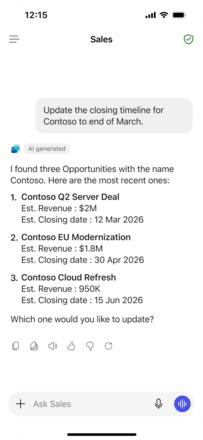
By using Sales agent in Outlook mobile, you can update opportunity fields in Dynamics 365 Sales by using natural language. You don't need to open Dynamics 365, search for a record, or type updates manually.
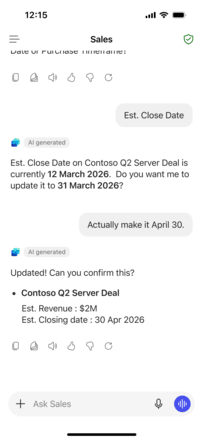
Hands-free field updates: Speak naturally to update fields such as stage, close date, amount, and next steps directly in Dynamics 365 Sales. You can review, confirm, and save updates in moments, right after a customer interaction while the details are fresh.
Accurate matching to the right opportunity: Sales agent uses conversational context, account details, and partial opportunity names to find the correct record. When multiple matches exist, it asks clarifying questions before saving, helping you avoid updating the wrong opportunity.
Intelligent field extraction: Sales agent interprets what you say, extracts the relevant values, and maps them to the correct fields automatically. You don't need to use exact field names or follow a specific format - just speak naturally, and the right fields get updated, keeping your opportunity records accurate and consistent with less manual effort.
Geographic areas
Visit the Explore Feature Geography report for Microsoft Azure areas where this feature is planned or available.
Language availability
Visit the Explore Feature Language report for information on this feature's availability.