Note
Access to this page requires authorization. You can try signing in or changing directories.
Access to this page requires authorization. You can try changing directories.
Microsoft 365 Copilot can answer user questions using Power BI reports and semantic models. Copilot will ground responses in Power BI data, including scenarios where users share a specific report and scenarios where Copilot finds the right report automatically. This feature is enabled by default.
Manage Fabric data in Microsoft 365 Copilot
Go to the Microsoft 365 admin center and select Copilot > Settings.
On the Copilot settings page, select View all.
Select Fabric data in Microsoft 365 Copilot.
Under Step 1, choose which users can access Fabric data in Microsoft 365 Copilot: No users, All users, or Specific groups.
Select Save.
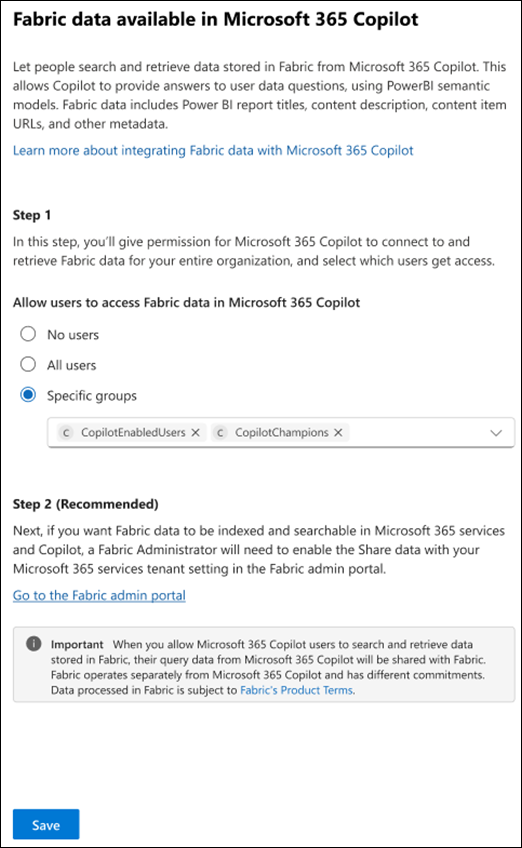
For more information about creating security groups, see Create a security group.
This setting allows Microsoft 365 Copilot to connect to Power BI enterprise data and return grounded answers based on Power BI reports and semantic models.
Turn on Fabric data in Microsoft 365 Copilot
If you want Fabric data to be indexed and searchable in Microsoft 365 services, a Fabric administrator will need to enable the Share data with your Microsoft 365 services tenant setting in the Fabric admin portal.
- Go to the Microsoft 365 admin center and select Copilot > Settings.
- On the Copilot settings page, select View all.
- Select Fabric data in Microsoft 365 Copilot.
- Under Step 2, choose Go to the Fabric admin portal.
- In Fabric, enable Share Fabric data with your Microsoft 365 services in Admin portal -> Tenant settings. This setting controls whether Fabric metadata is shared with Microsoft 365 services.
For more information, see Microsoft Fabric documentation.
Important
When you allow Microsoft 365 Copilot users to search and retrieve data stored in Fabric, their query data from Microsoft 365 Copilot will be shared with Fabric. Fabric operates separately from Microsoft 365 Copilot and has different commitments. Data processed in Fabric is subject to Fabric Product Terms.