Note
Access to this page requires authorization. You can try signing in or changing directories.
Access to this page requires authorization. You can try changing directories.
Appropriate roles: Report viewer | Executive report viewer
Use the Microsoft Commercial Incentives (MCI) Performance section of AI Business Solutions & Security Insights to review portfolio-level performance, eligibility, and status by stage. You can also track engagement progress, relevant customer usage, revenue, and licensing metrics where data sharing approval exists, and concurrent cap visibility to support engagement planning.
Note
To see engagement level progress against performance measurement, the partner must either have a claimed relationship with the customer tenant (for example, Claiming of Partner Record or Cloud Solution Provider) or receive approval from the customer for Microsoft to share performance measurement attainment data with the partner conducting the engagement. The customer provides approval to share this data with the partner through the customer attestation form, which is part of the proof of execution (PoE) process. If the customer doesn't agree to share data, the partner will see only aggregated, anonymized data at the engagement portfolio level.
MCI Performance data dictionary
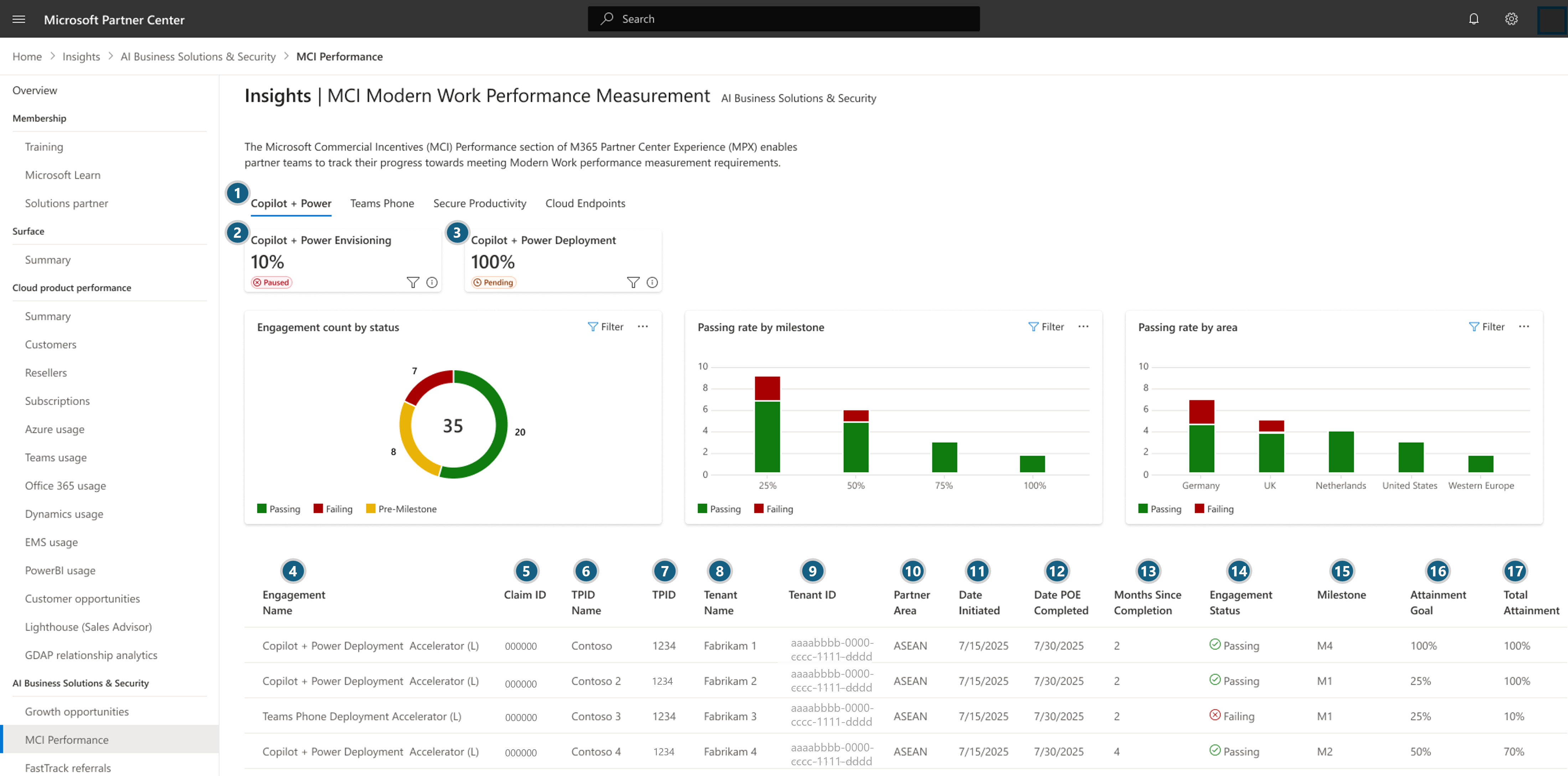
The following table describes each element of the MCI Performance report. Columns marked All solution plays appear on every tab (Copilot, Security, AI-Ready Productivity, and Business Processes). Goal and attainment columns that appear on only one tab are listed in the second table, Solution play-specific columns.
| Name | Applies to | Definition |
|---|---|---|
| Tab: Solution Play | All solution plays | The tab shows the relevant solution play, which determines the metrics relevant for performance measurement. Tabs: Copilot, Security, AI-Ready Productivity, Business Processes. |
| KPI Tile: Passing Rate and Eligibility Status by Stage | All solution plays (the stages shown vary by tab) | Given performance measurement is completed by stage (for example, envisioning vs. deployment), the passing rate metric is available at the stage level. This passing rate is a portfolio-level statistic, indicating the percentage of qualified engagements that are meeting performance measurement criteria. This status indicator provides an at-a-glance eligibility status of the stage. There can be one of three statuses: - Active: The performance requirement is met, a grace period applies, or insufficient claims exist to assess performance; you can continue creating claims and monitoring the report. - Active - Action Required: The performance requirement is unmet; you have 30 days to meet it before new claim creation is paused, subject to concurrent cap restrictions during this period. - Paused: New claim creation is paused for the specified engagement group and PartnerOne ID until the performance requirement is met and reinstatement occurs through the monthly review process. |
| KPI Tile: Concurrent Cap Status | All solution plays | The number of in-flight claims and concurrent cap amount, along with a status indicator that shows how close your organization is to the concurrent cap for the solution play. Select View to see a detailed flyout of in-flight claims and engagement statuses. Use this status to help plan engagement pacing before additional engagements are blocked or paused. |
| Engagement Name | All solution plays | Name of relevant MCI workshop |
| Claim ID | All solution plays | Relevant Claim ID for the MCI workshop |
| TPID Name | All solution plays | Customer Top Parent ID (TPID) name |
| TPID | All solution plays | Customer TPID |
| Tenant Name | All solution plays | Name of the specific customer tenant |
| Tenant ID | All solution plays | Relevant ID of the customer tenant |
| Partner Area | All solution plays | Geographical area (continent) of the partner that filed the claim |
| Date Initiated | All solution plays | Date of claim request |
| Date PoE Completed | All solution plays | Date proof of execution (PoE) is completed |
| Months Since Completion | All solution plays | Months since PoE completion (Calculation Month - Month of POE completion) |
| Performance Status | All solution plays | Passing status of the engagement. If the engagement isn't yet a qualified engagement (for example, it isn't long enough), the status is premilestone. Otherwise, the status is passing or failing based on program guidelines. |
| Milestone | All solution plays | Milestones are delineated M1, M2, M3, or M4 depending upon the months since completion. M1: four - six months since completion M2: seven - nine months since completion M3: nine - 11 months since completion M4: 12 months since completion |
| Goal Type | All solution plays | Shows whether the goal and attainment values in the row are measured for this engagement alone (Individual) or across all completed engagements for the customer (Cumulative). Individual goals are the default view; select expand all at the top of the table to see cumulative values. |
| Attainment Goal | All solution plays | The attainment target for the engagement at its current milestone (for example, 25% at M1, 50% at M2, 75% at M3 and 100% at M4). Shows Pre-Milestone if the engagement hasn't reached its first milestone. |
| Total Attainment | All solution plays | The total attainment of the relevant targets for this engagement. The relevant targets depend upon the milestone and engagement stage. This total attainment is the sum of the individual goal attainments. Shows not available when attainment data can't yet be calculated for the engagement. |
| Repeat Customer | All solution plays | Yes if the partner has completed a previous engagement for the same customer in this solution play; otherwise No. Repeat customers are measured against both individual and cumulative goals. |
| Metric: Goal | One solution play (see next table) | The target for the named metric at the engagement's current milestone. |
| Metric: Attainment | One solution play (see next table) | The percentage of the named metric's goal that the engagement has reached. Total Attainment is the sum of these individual goal attainments. |
Solution play-specific columns
| Solution play | Columns | Metric measured |
|---|---|---|
| Copilot | Copilot Studio annual recurring revenue (ARR) goal, Copilot Studio ARR Attainment | ARR for Copilot Studio |
| Copilot | Copilot Chat monthly active users (MAU) goal, Copilot Chat MAU Attainment | MAU of Microsoft 365 Copilot Chat |
| Copilot | Power Platform ARR goal, Power Platform ARR Attainment | ARR for Power Platform |
| Copilot | Power Platform MAU goal, Power Platform MAU Attainment | MAU of Power Platform |
| Copilot | M365 Copilot ARR goal, M365 Copilot ARR Attainment | ARR for Microsoft 365 Copilot |
| Copilot | Microsoft Agent 365 Copilot ARR goal, Agent 365 Copilot ARR Attainment | Azure consumed revenue (ACR) from agents |
| Copilot | Agent Azure consumed revenue (ACR) goal, Agent ACR Attainment | ACR from agents |
| Copilot | Agent MAU goal, Agent MAU Attainment | MAU of agents |
| Security | Security ACR goal, Security ACR Attainment | ACR for Security workloads |
| Security | Security ARR goal, Security ARR Attainment | ARR for Security products |
| Security | Security monthly protected users (MPU) goal, Security MPU Attainment | Security MPU |
| AI-Ready Productivity | Secure AI ARR goal, Secure AI ARR Attainment | ARR for Secure AI |
| AI-Ready Productivity | Windows 365 ARR goal, Windows 365 ARR Attainment | ARR for Windows 365 |
| AI-Ready Productivity | Windows 365 MAU goal, Windows 365 MAU Attainment | MAU of Windows 365 |
| AI-Ready Productivity | Microsoft Intune MAU goal, Intune MAU Attainment | MAU of Microsoft Intune |
| AI-Ready Productivity | Microsoft Entra MAU goal, Entra MAU Attainment | MAU of Entra ID |
| Business Process | Microsoft Dynamics 365 MAU goal, Dynamics 365 MAU Attainment | MAU for Dynamics 365 |
For certain solution plays, you're allowed to have multiple engagements per customer. However, with multiple engagements there are individual and cumulative performance requirements. The individual goal is specific to the engagement and is measured incrementally based on the proof of execution completion date. The cumulative goals are determined based on the previous engagements already completed for the customer. An engagement is considered passing only if both the individual and cumulative attainments are above 100%. For more information, visit https://aka.ms/MCI.
In the MCI performance report, you can see your engagement's individual and cumulative attainment values using the expand and collapse functionality. Individual goals are the default view, with an expand all capability available at the top of the table.

Enterprise Advisory Security Accelerate Advisory Fee Control
The Enterprise Advisory Security Accelerate (EASA) Advisory Fee Tenant Eligibility report helps partners determine whether the advisory fee for a customer tenant is still available before investing in delivery. A tenant appears in the report when another partner submits proof of execution, which means the advisory fee is no longer available for that tenant. However, the partner can still deliver the engagement and earn the Envisioning and Proof-of-Concept (PoC) engagement payment. Because engagements in progress don't appear until proof of execution is submitted, a tenant that isn't listed isn't guaranteed or reserved. Partners should confirm eligibility before engaging.
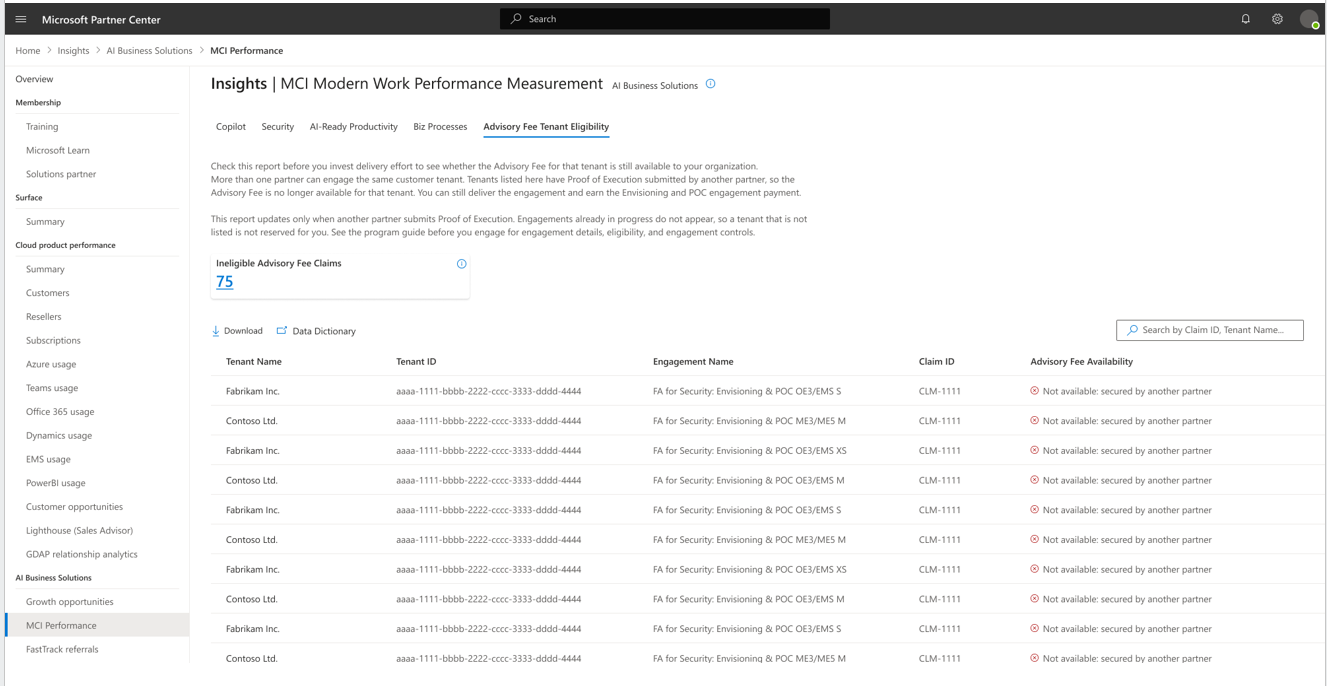
EASA Advisory Fee Control data dictionary
| Name | Definition |
|---|---|
| Tenant Name | Name of the customer tenant or customer organization associated with the advisory fee claim. |
| Tenant ID | Unique Microsoft Entra tenant identifier for the customer environment. |
| Engagement Name | Name of the MCI engagement associated with the tenant and advisory fee eligibility check. |
| Claim ID | Identifier for the submitted claim or proof of execution affecting advisory fee availability. |
| Advisory Fee Availability | Status that indicates whether the advisory fee is still available for the tenant. A tenant can become unavailable when another partner has secured the advisory fee by submitting proof of execution. |
Cloud Solution Provider Deployment Accelerator Status
The Cloud Solution Provider (CSP) Deployment Accelerator Status report helps partners understand whether nominated customer engagements meet the requirements for claim payout, including the applicable CSP seat-growth thresholds and qualified purchases. It provides customer and partner context alongside nomination and subscription timing so partners can identify which engagements are eligible to proceed and which engagements don't yet meet payout requirements. Partners should use the report to validate eligibility before delivering services and submitting claims. Using the report can help reduce claim issues caused by customers not meeting the required purchase criteria.
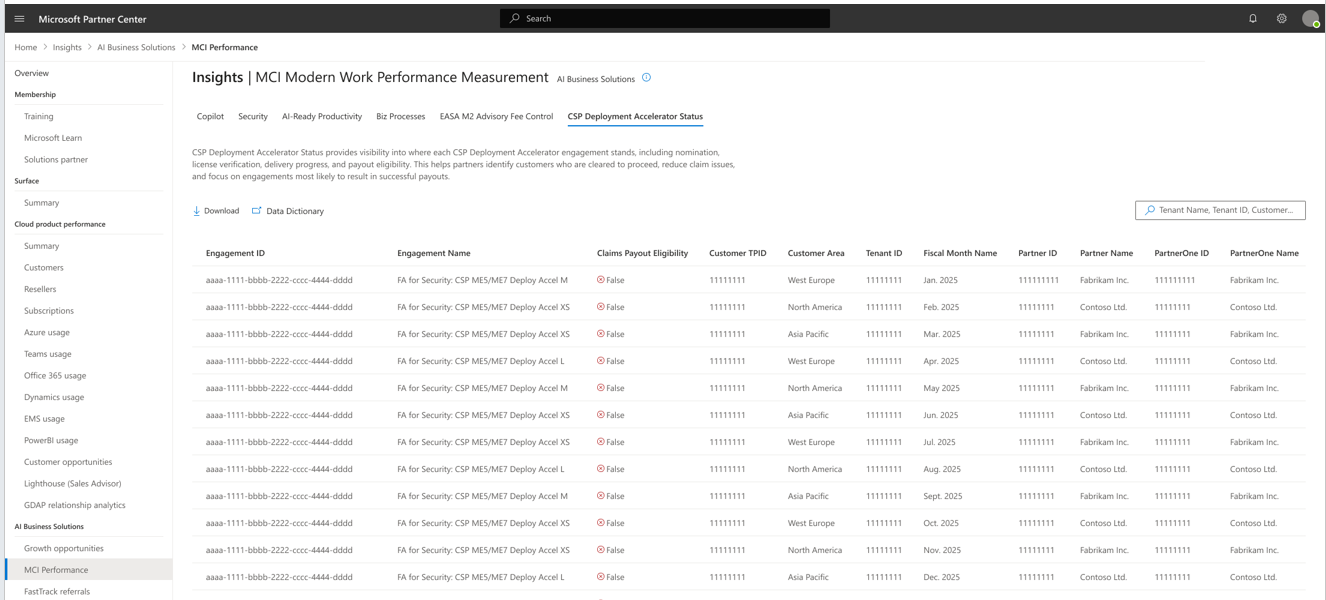
CSP Deployment Accelerator Status data dictionary
| Name | Definition |
|---|---|
| Engagement ID | Unique identifier for the CSP Deployment Accelerator engagement record. |
| Engagement Name | Name of the deployment accelerator engagement, such as FA for Security: CSP ME5/ME7 Deploy Accel. |
| Claims Payout Eligibility | True/False indicator that shows whether the engagement is currently eligible for claims payout. |
| Customer TPID | Top Parent ID that identifies the customer organization in Microsoft sales data. |
| Customer Area | Microsoft sales area or geography associated with the customer. |
| Tenant ID | Unique Microsoft Entra tenant identifier for the customer environment. |
| Tenant Name | Name of the customer tenant, including the associated MPN context when shown. |
| Fiscal Month Name | Fiscal month associated with the engagement status record. |
| Subscription Start Date | Start date of the qualifying customer subscription used for deployment accelerator eligibility. |
| Subscription End Date | End date of the qualifying customer subscription used for deployment accelerator eligibility. |
| Partner ID | Partner Center identifier for the partner associated with the engagement. |
| Partner Name | Name of the partner associated with the engagement. |
| PartnerOne ID | PartnerOne identifier for the partner organization. |
| PartnerOne Name | PartnerOne name for the partner organization. |
| Seats Threshold | Minimum qualifying seat threshold required for the deployment accelerator engagement. |
| Seats Eligibility Status | Status that indicates whether the customer meets the seat eligibility requirement. |
| ACV Threshold | Annual contract value threshold required for the deployment accelerator engagement. |
| Meets Threshold | True/False indicator that shows whether the record meets the applicable threshold requirement. |
| Claim ID | Identifier for the related claim or nomination record. |
| Nomination Date | Date when the customer or engagement was nominated. |
| Nomination Month | Month associated with the nomination date. |