Note
Access to this page requires authorization. You can try signing in or changing directories.
Access to this page requires authorization. You can try changing directories.
[This article is prerelease documentation and is subject to change.]
Work IQ is the context and intelligence layer for Microsoft 365 Copilot and agents. Business Applications in Work IQ adds data, processes, and operational context from Dynamics 365 and Power Apps. Users and agents can then work with business data while existing Dataverse permissions and application controls continue to apply.
Important
- This is a preview feature.
- Preview offerings are provided as-is and may be modified or discontinued at any time. For consumption-based services, usage of underlying application services may continue to incur license fees during the preview period.
- Preview features are subject to supplemental terms of use, and are available before an official release so that customers can get early access and provide feedback.
Important
Work IQ is the intelligence layer for Microsoft data and Dataverse intelligence is now part of Business Applications in Work IQ. Power Platform administrators can enable this intelligence layer in the Power Platform admin center. We recommend that you start using Work IQ instead of Dataverse intelligence because Dataverse intelligence as a separate service will no longer be available soon.
Business Applications in Work IQ helps you:
- Make business context available through supported Copilot and agent experiences.
- Reuse business-process instructions through business skills.
- Improve data understanding through Dataverse semantic models.
- Connect agents and development tools through Work IQ MCP, Dataverse MCP, APIs, and coding-agent tools.
- Apply existing environment, application, identity, and Dataverse security controls.
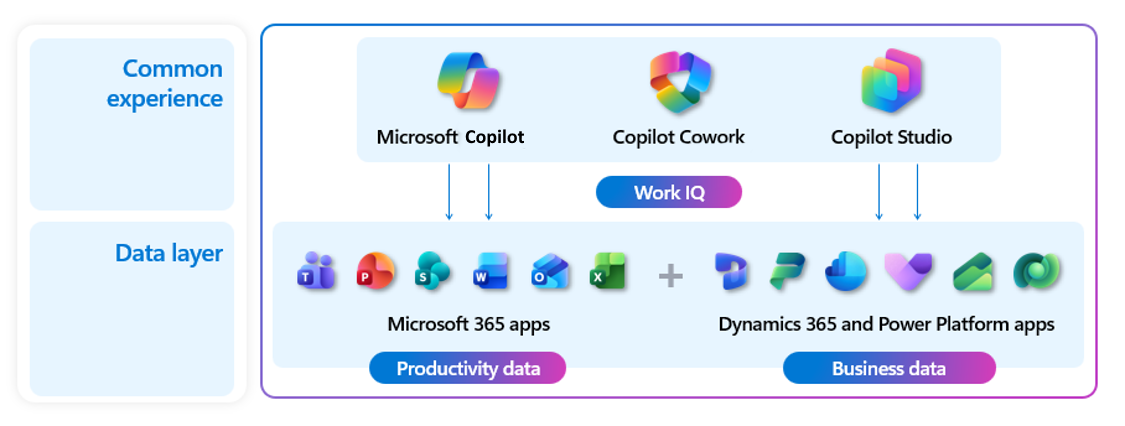
Choose how to use business context
Choose the connection based on the experience you're building and the data boundary you need.
| Option | Use it when | Scope and configuration |
|---|---|---|
| Microsoft 365 Copilot and Copilot Cowork | People need business context in a Microsoft 365 work experience. | Administrators configure the Microsoft 365 audience. Power Platform administrators and makers configure participating environments and apps. |
| Work IQ MCP | An agent or coding client needs Microsoft 365 and supported business applications context through one MCP server. | Administrators control availability for the entire Work IQ MCP server. Environment, app, and data permissions still determine accessible business context. |
| Dataverse MCP | An agent needs direct, environment-specific Dataverse tools or business skills without the broader Work IQ context layer. | Configure and authorize the Dataverse MCP server for each environment that the client uses. |
| Dataverse Ask API | Application code needs a response grounded in a selected Dataverse semantic model. | The request targets a Dataverse environment and semantic model. |
| Dataverse plugin for coding agents | A coding agent needs Dataverse development guidance and tools while building a solution. | Install and configure the plugin in the coding environment. This option is for solution development, not end-user business-data grounding. |
These options can coexist with other enterprise data sources. You don't need to move every data source into Dataverse. Connect each source through an appropriate tool or service, and use the agent or application as the orchestration layer when the scenario spans multiple systems.
Note
Work IQ MCP doesn't currently provide a retrieval-only parameter that bypasses response generation. If your architecture needs deterministic retrieval, use the source API or another targeted integration where available.
Business applications and existing apps
After you enable Business Applications in Work IQ, you can use them across existing app infrastructures, including Microsoft-provided apps like Dynamics 365 Sales or Dynamics 365 Service, and custom model-driven apps. The applications natively integrate into the apps to provide enhanced functionality with little to no user input.
As new features become available in Business Applications in Work IQ, they integrate with the existing infrastructure.
Supported line-of-business data
The following table lists the supported types of line-of-business data available in Business Applications in Work IQ.
| System of record | Description |
|---|---|
| Dynamics 365 Customer Service | Access Customer Service MCP tools through Business Applications in Work IQ. Learn more: Overview of Dynamics 365 Customer Service MCP tools |
| Dynamics 365 Sales | Access Sales MCP tools through Business Applications in Work IQ. Learn more: MCP tools and skills support |
| Power Apps model-driven apps | Reason over and work with data from model-driven apps using Business Applications in Work IQ. Learn more: Use Business Applications in Work IQ |
Core capabilities
Business Applications in Work IQ core capabilities include business skills and semantic model.
Business skills
Business skills let you define reusable business context that helps makers, users, and agents interpret data, follow processes, and make decisions. You define a skill once and reuse it across agents. For more information, see Business skills overview (preview).
Semantic model
The semantic model provides AI agents and Copilot experiences with a shared, business-aware understanding of your Dataverse data. For more information, see Overview of Dataverse semantic model (preview).
Use Business Applications in Work IQ
Information workers can query and reason over business data in natural language through the flow of their work with Microsoft Copilot. The following table lists the Copilot experiences currently supported as entry points to using Business Applications in Work IQ.
| Copilot experience | Description |
|---|---|
| Copilot Chat | Users can query, synthesize, and analyze line-of-business data in natural language conversation with Copilot and installed agents, once enabled by an administrator. Learn more: Set up Business Applications in Work IQ |
| MCP tools | Business applications MCP tools provide a standardized tool surface that enables AI clients such as Cowork, Copilot Studio, and coding agents to consistently discover, reason over, and execute work across business applications. Learn more: Work IQ MCP Tool reference |
Build agents that integrate with Business Applications in Work IQ
Build on existing business understanding and skills, and reuse it across the agents you build. The following table lists the agent building tools you can use to integrate your agents with Business Applications in Work IQ.
| Agent building tool | Description |
|---|---|
| Agent Builder in Copilot | Provide the agents you build with business context across your line-of-business systems. Learn more: Add Dynamics 365 and Power Apps data as a knowledge source |
| Copilot Studio | Add business context from Work IQ to Copilot Studio agents built with the Microsoft Copilot harness. Learn more: Work IQ in Copilot Studio |
| GitHub Copilot | Install the Work IQ plugin for GitHub Copilot to query and reason over your business data. Learn more: Connect GitHub Copilot CLI to the Work IQ MCP server |
| Other coding agents | Connect to Work IQ CLI through either CLI mode or MCP server mode. Learn more: Microsoft Work IQ CLI |
Additionally, you can use the Dataverse plugin for coding agents alongside Work IQ to code business needs into consistent actions using Dataverse, or call the Dataverse Ask API directly.
Licensing
For information and terms for Work IQ licensing, see Licensing requirements.
Prerequisites
Power Platform administrators must enable Work IQ in the environments that provide business context. AI administrators manage Microsoft 365 Copilot and Work IQ MCP availability, and makers manage model-driven app participation. For more information, see Set up Business Applications in Work IQ.