Note
Access to this page requires authorization. You can try signing in or changing directories.
Access to this page requires authorization. You can try changing directories.
This solution idea describes a centralized platform for managing Healthcare Professional (HCP), Healthcare Organization (HCO), and patient engagements using Microsoft Power Platform. The solution standardizes end-to-end workflows, including planning, approvals, execution, and tracking, by using automation, role-based access, and integration patterns.
Tip
This article describes a solution idea. Your cloud architect can use this guidance to help visualize the major components for a typical implementation of this architecture. Use this article as a starting point to design a well-architected solution that aligns with your workload's specific requirements.
Architecture diagram
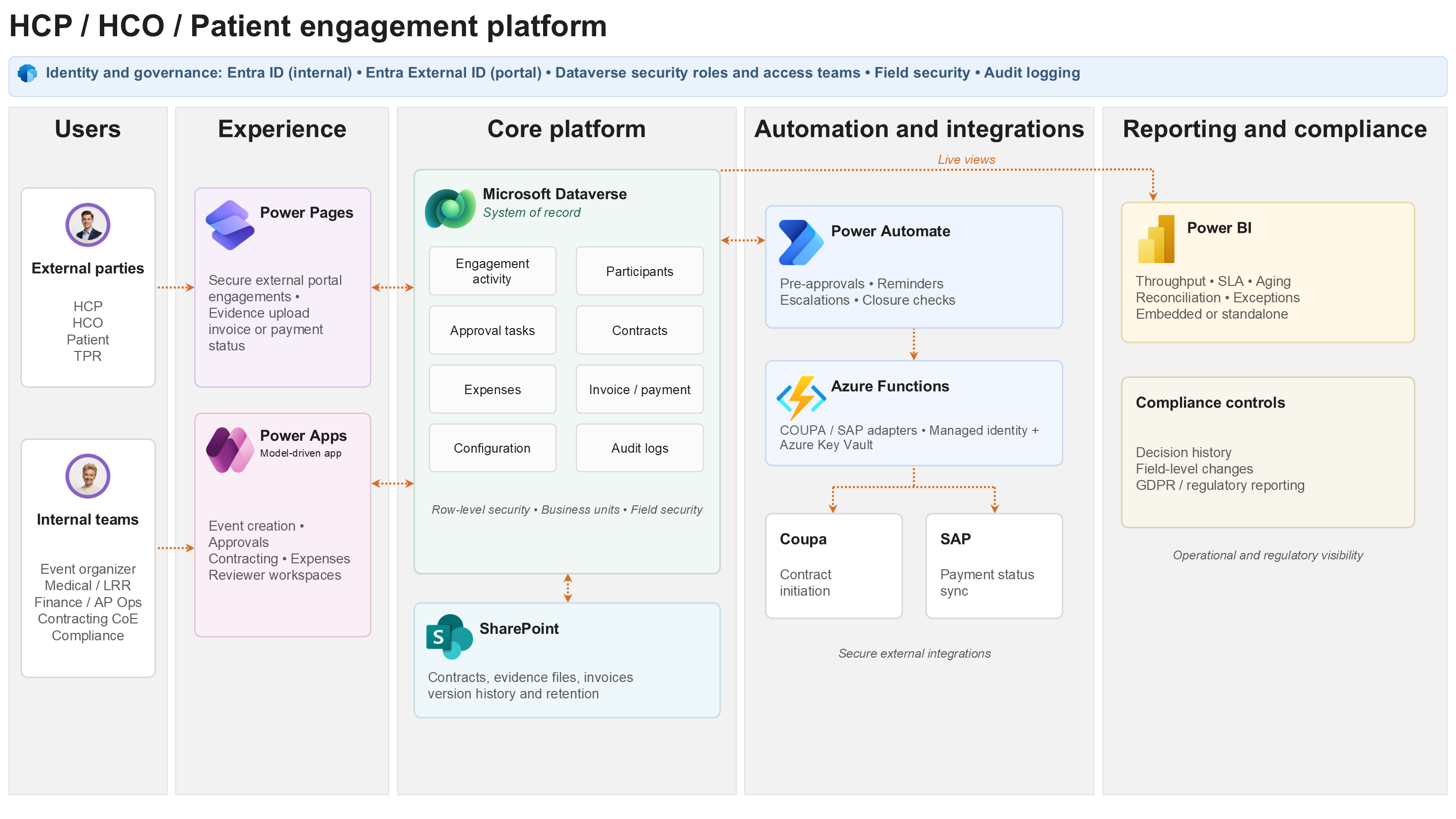
The following diagram illustrates the layered Power Platform architecture for managing end-to-end HCP, HCO, and patient engagements—from onboarding and event planning through approvals, contracting, proof-of-service capture, invoice and payment tracking, and compliance reporting. It shows the core Dataverse entity relationships at the heart of this architecture.
Workflow
The following workflow describes the end-to-end engagement lifecycle, from party onboarding through event execution to financial closure and compliance reporting. The workflow aligns with the architecture layers shown in the diagram.
Engagement initiation
An event organizer (internal user) creates an engagement activity record in the model-driven app. The user selects the activity type, country/region, therapeutic area, and product from the configuration control plane.
The system validates the request against configuration rules, such as engagement type catalog, country/region policies, and approval routing rules. It automatically assigns the area responsible owner.
The event organizer identifies and links HCPs, HCOs, or patients as activity participants. The system checks onboarding status, such as tiering, consent, and training completion before allowing progression.
Preapproval and contracting
An automated Power Automate preapproval flow routes the engagement to the relevant reviewers—Medical, Legal or LRR, and Finance—based on configurable routing rules stored in Dataverse.
Each reviewer receives a task in their model-driven workspace. Decisions are captured, including approve, reject, and request info, with rationale, timestamp, and actor for full audit traceability.
Upon approval, a contract initiation flow triggers the Coupa integration:
The correct contract template is selected based on activity attributes and configuration mapping rules.
Prefilled data, such as party details, engagement terms, and fee schedule, is pushed to Coupa via a custom connector or Azure Function.
Contract status is written back to Dataverse to keep the engagement record current.
Event execution and evidence capture
External parties (HCPs, HCOs, patients, external representatives) access the Power Pages portal to view their assigned engagements, upload proof-of-service evidence (attendance records, presentation files, sign-off forms), and track invoice and payment status.
Document artifacts are stored in SharePoint (or Dataverse file columns) in a structured folder hierarchy (per Activity, per Participant). Dataverse maintains metadata pointers and version references.
Power Automate automatically triggers reminders and escalations when service level agreements (SLAs) for document submission, approvals, or payment milestones are approaching or breached.
Finance, invoicing, and closure
Upon evidence acceptance, an Expense record is created or validated, and an invoice generation flow is triggered, pushing structured data to the finance team workflow.
A scheduled integration flow synchronizes SAP payment status back to Dataverse, reconciling invoices against payments. Discrepancies are flagged for Accounts Payable (AP) operations review.
Closure checks validate that all required evidence, approvals, contracts, invoices, and payments are in a terminal state before the engagement can be formally closed. Automated reminders prevent stale open engagements.
Reporting and compliance
Power BI dashboards (embedded or standalone) provide real-time visibility across throughput, approval SLAs, aging, payment reconciliation, and compliance exceptions for both operational teams and compliance officers.
Audit logs capture all state transitions, approval decisions, and field-level changes on sensitive entities (patient records, financial data), supporting GDPR and regulatory reporting obligations.
Scenario details
This section highlights the key business challenges and solution value of a centralized healthcare engagement platform built on Power Platform.
Business challenge
Pharmaceutical and life sciences organizations manage HCP, HCO, and patient engagements, including advisory boards, sponsored events, consulting arrangements, and patient support programs. These organizations face significant operational and compliance challenges.
Fragmented processes: Engagement lifecycle managed across email, spreadsheets, legacy tools, and disconnected systems, leading to inconsistent data quality and audit gaps.
Compliance exposure: Medical, Legal/LRR, and Finance approvals tracked manually with no enforceable routing rules or SLA governance.
External collaboration friction: HCPs and third-party representatives are required to upload evidence and track payments through manual email exchanges, with no self-service visibility.
Integration debt: Contract creation in Coupa and payment reconciliation with SAP are manual, error-prone, and slow, delaying financial closure and creating audit risk.
Reporting lag: Compliance and operational reporting relies on manual data extraction, creating latency and risk of inaccuracy.
Solution value
This Power Platform architecture addresses those challenges by delivering a governed, Dataverse-centred engagement platform that:
Standardizes the full engagement lifecycle—from party onboarding and event creation through approvals, contracting, evidence capture, invoicing, payment reconciliation, and closure—in a single, auditable system of record.
Enforces compliance-first workflows with configurable routing rules for medical, finance, legal/LRR, and local regulatory approvals, with decision audit trails stored at every step.
Enables secure external collaboration via Power Pages, giving HCPs, HCOs, patients, and third-party representatives self-service access to their engagements, evidence uploads, and payment status—without requiring Microsoft licenses.
Automates Coupa contract initiation and SAP payment reconciliation, eliminating manual integration touchpoints and accelerating financial close.
Delivers operational and compliance reporting through Power BI, embedded directly in the model-driven app experience.
Target users and personas
The platform serves a multi-persona user base across internal operations and external parties.
| Persona | Role | Primary interface |
|---|---|---|
| Event organizer | Creates and manages engagement activities, sessions, and participants | Model-driven app |
| Medical / LRR reviewer | Reviews and approves engagements for medical/regulatory compliance | Model-driven app |
| Finance / AP Operations | Manages expenses, invoices, payment reconciliation | Model-driven app |
| Contracting Center of Excellence (CoE) | Oversees contract creation and Coupa integration | Model-driven app |
| Compliance officer | Monitors audit trails, SLAs, and compliance dashboards | Power BI (embedded) |
| HCP / HCO / Patient | External parties—View engagements, upload evidence, check payments | Power Pages portal |
| TPR (third-party representative) | External vendor—Submits evidence and invoices on behalf of parties | Power Pages portal |
Production readiness guidance
This section covers the production-readiness considerations for the solution, including recovery planning, operational monitoring, licensing and capacity, scale and throttling, deployment governance, and accessibility for external users.
Production recovery objectives
Agree on recovery targets with the business during mobilization and validate them before go-live.
Indicative targets for this workload include:
| Component/Process | Indicative RTO | Indicative RPO | Recovery approach |
|---|---|---|---|
| Model-driven app and Dataverse core records | Four hours | 15 minutes | Restore through Microsoft platform recovery capabilities, environment backup/restore procedures, and validated support runbooks. |
| Power Pages external portal | Eight hours | 30 minutes | Redeploy portal configuration through managed solution pipelines; restore portal table configuration and validate external identity flows. |
| Power Automate approval and orchestration flows | Four hours | 15 minutes | Redeploy managed solution, re-enable flows through controlled release gates, and reprocess failed transactions from the Dataverse error log. |
| Coupa/SAP integrations | Eight hours | One hour | Use retry/back-off patterns, dead-letter logging, and manual reconciliation fallback for critical finance milestones. |
| SharePoint document repository | Eight hours | One hour | Restore document libraries using Microsoft 365 retention/versioning controls and reconcile metadata pointers in Dataverse. |
Operational ownership and monitoring
The support model should define named owners for each operational control, with service thresholds agreed before production cutover.
| Area | Primary owner | Monitoring/Alerting expectation |
|---|---|---|
| Application and Dataverse configuration | Power Platform CoE / Application Support | Daily exception review; audit and capacity checks; weekly open-engagement aging review. |
| Power Automate flows | Power Platform CoE / Integration Support | Failure alerts to Teams/Support mailbox; dead-letter queue reviewed daily; SLA breach alerts for approval and evidence tasks. |
| Coupa/SAP integrations | Integration Support / Finance Systems | Interface success/failure dashboard; retry exhaustion alerts; reconciliation exception report for AP Operations. |
| Security and DLP | Platform Admin / Security Team | Quarterly role review; data policy review for connectors; external access review for Power Pages users. |
| Power BI reporting | BI/Compliance Reporting Team | Datasets refresh monitoring; dashboard usage and exception trend review. |
Licensing and capacity assumptions
Power Apps: Provide internal users with the right Power Apps premium license to access model-driven apps that use Dataverse.
Power Automate: Evaluate process licensing for shared, business-critical orchestration flows such as approvals, contract initiation, SAP synchronization, and closure automation.
Power Pages: Plan external usage capacity based on authenticated user volumes, portal sessions, evidence upload patterns, and peak engagement periods.
Dataverse and SharePoint storage: Use Dataverse for transactional metadata and audit records. Use SharePoint for high-volume document storage to optimize cost and retention management.
API capacity: Evaluate integration workloads against Power Platform request limits, connector limits, SAP/Coupa API limits, and expected peak submission windows.
Scale, concurrency, and throttling guidance
Establish expected scale during discovery, including annual engagement volumes, average participants per activity, monthly invoice volume, evidence upload size, and regional concurrency peaks.
Test portal concurrency by using representative external user journeys: invitation access, evidence upload, invoice status check, and profile/consent update.
Keep long-running operations asynchronous and status-driven to avoid synchronous user waits for Coupa contract initiation, SAP reconciliation, or bulk document generation.
Implement integration patterns that include batching where supported, configurable concurrency controls, retry with exponential back-off, and dead-letter capture for reprocessing.
Use curated views and incremental refresh patterns for Power BI reporting when data volume warrants it, rather than querying high-volume transactional tables directly without filters.
Deployment gates and rollback strategy
Before user acceptance test (UAT) import, require each release to pass Solution checker analysis, automated unpack and export validation, environment variable checks, and connection reference validation.
For production deployments, use only managed solutions and require approval from the application owner, platform owner, security team, and business change lead where relevant.
For each release, plan rollback: Keep the previous managed solution version, export configuration data, document affected flows, and prepare smoke test scripts before deployment.
After deployment, test identity access, role-based data visibility, approval routing, portal access and upload, document storage, Coupa trigger, SAP sync, and Power BI refresh.
Accessibility and external user validation
Validate Power Pages journeys against WCAG 2.1 AA expectations, including keyboard navigation, screen-reader labels, color contrast, form error handling, and document upload feedback.
Ensure portal content supports plain-language instructions for occasional external users, with multilingual content where required by market or regulatory context.
Include HCP, HCO, patient, and third-party representative personas in user acceptance testing, not only internal operational teams.
Components
The following Microsoft Power Platform and Azure components form the architecture. Each component was selected based on its fit for the functional requirements, governance model, and integration patterns of the engagement platform.
Microsoft Dataverse
Dataverse is the system of record and data backbone for the platform. It stores all engagement activities, participant records, approval states, expenses, and audit trails. Dataverse was chosen for its native support for row-level security (business units, teams, access teams), field-level security profiles, built-in audit logging, and native integration with all Power Platform components. Alternatives considered—SharePoint lists and SQL Azure—were ruled out due to insufficient security granularity and lack of native approval and form capabilities.
Power Apps (model-driven)
Model-driven apps provide the primary internal workspace for Event Organizers, Reviewers, Finance, and Compliance operations. The model-driven pattern was selected because the platform is data-model-centric: views, forms, business process flows, and dashboards are all derived directly from the Dataverse schema, minimizing custom UI code. Canvas apps were evaluated but are more appropriate for task-specific consumer experiences rather than the complex, multi-entity governance workflows that this solution requires.
Power Pages
Power Pages provides the secure external portal for HCPs, HCOs, patients, and third-party representatives. It enables authenticated access (B2B/B2C via Microsoft Entra External ID) without requiring Microsoft 365 licenses for external parties. Power Pages supports row-level data visibility scoped to the individual party, file upload (evidence submission), and status visibility for invitations, invoices, and payments. Alternatives such as Azure Static Web Apps with custom API were considered but would require more custom development and ongoing maintenance.
Power Automate
Power Automate is the orchestration fabric, powering preapproval flows, reminders and escalations, contract initiation triggers, closure checks, and integration event handling. Cloud flows are used for all server-side automation, with approval actions capturing decision, rationale, timestamp, and actor. Flows are designed to be idempotent where practical, with centralized error handling, retry policies, and structured dead-letter notifications routed to a support mailbox or Teams channel.
Microsoft SharePoint
SharePoint serves as the governed document repository for contracts, evidence files, invoices, and financial artifacts. A consistent folder hierarchy (per Activity, per Participant) is established at engagement creation, with document metadata pointers and version references stored in Dataverse. SharePoint is chosen over Dataverse file columns for large document sets to avoid storage cost implications while retaining enterprise-grade version history and retention policies.
Power BI
Power BI delivers operational and compliance dashboards covering throughput, approval SLAs, aging, payment reconciliation, and exception reporting. Dashboards are embedded within the model-driven app experience for relevant personas (Compliance Officers, AP Operations) and also available as standalone reports. Dataverse views and virtual tables are used as the primary data source to avoid data duplication.
Microsoft Entra ID
Microsoft Entra ID provides identity and authentication for all internal users accessing model-driven apps, enforcing conditional access policies and multifactor authentication (MFA) requirements. External user authentication for the Power Pages portal is configured via Microsoft Entra External ID (B2B/B2C patterns). Security roles in Dataverse are mapped to Microsoft Entra groups for consistent, lifecycle-managed access provisioning.
Azure Functions
Azure Functions are used selectively for server-side integration logic that require secure secret handling, primarily the Coupa contract initiation and SAP payment synchronization integrations. Azure Functions enable separation of integration credentials from the Power Platform connection reference model and support more complex request/response transformation logic than native Power Automate HTTP connectors.
Coupa is the enterprise contracting platform. The integration automates contract creation by selecting the appropriate template based on engagement attributes and prefilling party and terms data from Dataverse. Contract status is written back via webhook or scheduled sync, ensuring the engagement record in Dataverse always reflects the current contracting state.
SAP is the enterprise ERP system used for payment processing. A scheduled Azure Function synchronizes payment status from SAP back to Dataverse, enabling invoice-to-payment reconciliation within the platform and eliminating the need for manual finance team lookups. The system automatically flags discrepancies for AP Operations review.
Considerations
These considerations implement the pillars of Power Platform Well-Architected, a set of guiding tenets that improve the quality of a workload. Learn more in Microsoft Power Platform Well-Architected.
Reliability
The Reliability pillar covers the ability of a workload to meet its uptime commitments and to recover from failures. The following design decisions address reliability for this engagement platform:
Power Automate flows implement idempotent patterns where practical. Reprocessing the same event produces the same outcome, which prevents duplicate approvals, contracts, or notifications in retry scenarios.
A centralized error handling approach is applied. All flows implement try/catch scopes with structured error notifications routed to a support mailbox and/or a dedicated Teams channel. A documented error taxonomy for validation errors, transient errors, and external dependency failures helps the support team triage issues quickly.
Integration flows (Coupa, SAP) implement configurable retry policies with exponential back-off to handle transient external system unavailability without manual intervention.
Dead-letter patterns are implemented for failed integration events. The system writes unprocessed records to a Dataverse error log table with full context, enabling reprocessing once the root cause is resolved.
Separate development, test, UAT, and production environments ensure that reliability issues surface and resolve before reaching production. Post-deployment smoke tests validate identity, approvals, portal permissions, document uploads, and integration calls after every deployment.
Security
The Security pillar covers protecting the confidentiality, integrity, and availability of data and the workload. This architecture implements a defense-in-depth security model:
Authentication: Internal users authenticate through Microsoft Entra ID with conditional access and MFA enforcement. External parties authenticate through Microsoft Entra External ID (B2B or B2C patterns) configured in Power Pages—no Microsoft 365 licenses are required for external access.
Authorization (defense-in-depth): Dataverse security roles and business units provide broad organizational segmentation, including HQ, region, area, and country/region. Team-based ownership is applied to operational records, such as activities, approvals, and expenses. Access Teams, or record sharing, are used for temporary, need-to-know access to sensitive records. Field security profiles are applied where sensitive attributes must be hidden from nonauthorized roles.
Patient data handling: Patient Voice Team owns and maintains patient main records. Event Organizers receive read-only access to specific patients and disease categories only after mandatory training completion. Medical and LRR reviewers receive scoped access limited to patients included in their current approval workload, with access automatically revoked upon decision. GDPR controls, such as personal data handling and right-to-erasure workflows, are applied for patient records.
Integration security: Coupa and SAP integration credentials are held exclusively in Azure Key Vault and accessed by Azure Functions using managed identities—never stored in Power Platform connection references or flow configuration.
Audit logging: Dataverse auditing is enabled for all sensitive entities and critical fields. Audit logs are retained in compliance with the organization's data retention policy and are accessible for regulatory review.
Operational Excellence
The Operational Excellence pillar covers the processes and tools that enable a team to run workloads reliably in production. The following practices are built into this architecture:
ALM discipline: Separate development, test, UAT, and production environments are maintained, with unmanaged solutions in the development environment and managed solutions in UAT and production. Azure DevOps (or GitHub Actions) pipelines automate export, unpack, Solution Checker quality gates, and controlled imports, preventing manual deployments and their associated risks.
Configuration over code: Approval routing rules, SLAs, engagement type catalogs, document template mappings, and integration parameters are all stored as configuration data in Dataverse, not hardcoded in flows or apps. This approach allows the support team to update business rules without requiring solution deployments.
Environment portability: All environment-specific values, including endpoints, template IDs, and integration parameters, are externalized through environment variables and connection references, enabling clean environment promotion without manual configuration changes.
Observability: Centralized logging for all flows and integration calls, with structured error notifications. Power BI operational dashboards cover throughput, approval SLAs, aging, payment reconciliation, and exception volumes, providing the operations team with continuous visibility.
Runbook-ready operations: A documented error taxonomy and support runbook are maintained, covering the most common failure patterns for flows and integrations. This approach enables frontline support to triage and resolve incidents without escalation to the development team.
Performance Efficiency
The Performance Efficiency pillar covers the ability of a workload to scale to meet demand efficiently. The following design decisions address performance for this architecture:
Dataverse query optimization: Model-driven app views and dashboards use filtered, indexed views instead of retrieving all records. Use custom pages and canvas components selectively for performance-critical screens where the default model-driven rendering isn't sufficient.
Asynchronous processing: Implement long-running operations, including Coupa contract initiation, SAP payment synchronization, and bulk document generation, as asynchronous flows that are decoupled from the user interaction path. Notify users of completion through in-app notifications or email rather than blocking the UI.
Integration call batching: When the external system API supports it (SAP, Coupa), design integration flows to process records in batches rather than record-by-record. This approach reduces API call volumes and minimizes throttling risk.
Power Pages performance: Configure the portal to use server-side caching for reference data that changes infrequently, like country/region lists and activity type catalogs. Apply lazy loading to document attachment lists to avoid full page reloads.
Environment right-sizing: Review Power Platform environment capacity quarterly, like Dataverse storage and API request limits, against actual usage data. Scale proactively to avoid throttling incidents during peak engagement seasons.
Experience Optimization
The Experience Optimization pillar covers the design of interfaces and interactions that are effective, efficient, and satisfying for users. This architecture serves multiple distinct persona groups, each with different interaction patterns:
Role-specific workspaces: Design internal model-driven app workspaces per role, including event organizer, medical reviewer, finance, and compliance, to surface only the records, views, and actions relevant to each persona. This design reduces cognitive load and minimizes navigation friction.
Task-list and dashboard-first navigation: Promote business process flows and active task views as the default landing experience for review personas. This approach reduces reliance on email-driven coordination and ensures reviewers always see their pending workload when they sign in.
External portal usability: Design the Power Pages portal for occasional, nontechnical users (HCPs, patients, TPRs). Simplify the UI to show only assigned engagements and required actions. Multi-language support and accessibility (WCAG 2.1 AA) are requirements for markets with diverse HCP demographics.
Progressive disclosure: Divide complex engagement forms into logical stages using business process flows. Ensure that users are only presented with the fields and decisions relevant to the current lifecycle stage, rather than a monolithic form.
Notification design: Review all automated notifications, such as approval requests, reminders, portal invitations, and payment confirmations, for tone, clarity, and actionability. Include deep links to the relevant record in all notifications to minimize navigation steps.
Next steps
Use the following phased roadmap when implementing this solution idea:
Foundation: Establish development, test, UAT, and production environments. Set up a security model with roles, business units, and field security. Create the core Dataverse schema. Add reference data such as activity types, countries/regions, and therapeutic areas. Implement the minimal viable engagement lifecycle, including onboarding, event creation, and basic approval.
Compliance and contracts: Implement full approval orchestration for medical, finance, LRR, and legal roles. Set up document template generation using Dataverse Word templates. Integrate Coupa for contract initiation. Add evidence capture through Power Pages.
Finance and reporting: Add expense management, invoice generation, SAP payment synchronization, payment reconciliation dashboards in Power BI, and compliance exception reporting.
Hardening: Perform performance tuning. Configure monitoring and alerting. Validate RTO and RPO. Rehearse backup and restore. Test rollback runbook. Validate licensing and capacity. Automate data retention and GDPR. Provide adoption and training assets. Handover formal operational support model.
Contributors
Microsoft maintains this article. The following contributors wrote this article.
Principal authors:
- Sumit Kumar, Delivery Director, Power Platform & Dynamics 365