Note
Access to this page requires authorization. You can try signing in or changing directories.
Access to this page requires authorization. You can try changing directories.
Important
As of October 2026, this content is archived and no longer maintained. Information on this page may not reflect the latest product plans, features, or guidance. For current roadmap information across Dynamics 365, Power Platform, Dataverse, Microsoft 365, and Copilot, visit the roadmap. Continue to use Microsoft Learn for authoritative product guidance and documentation.
| Enabled for | Public preview | General availability |
|---|---|---|
| Users by admins, makers, or analysts |  May 29, 2025 |
Oct 10, 2025 |
Business value
To meet the rising expectations of customers, brands constantly look for new ways to connect so they can stand out among the sea of messages. By integrating Customer Insights - Journeys with Contact Center, you can go beyond traditional marketing tactics by leveraging Copilot Studio agents to deliver meaningful, hyper-personalized experiences that boost customer satisfaction and engagement.
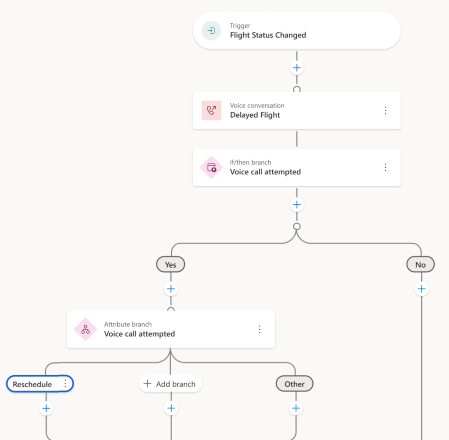
Rather than overwhelming your customers with marketing content and passively waiting for an interaction to trigger the next best step, you can now engage in real-time personalized voice conversations, offering alternative solutions based on ongoing dialog. For example, you can create a Copilot Studio agent that alerts a customer about a product recall, offering them solutions around replacements or a refund. The results of the conversation then drive the next action in the journey, whether that’s sending the replacement, issuing the refund, or sending an email because there was no response.
Feature details
With the Copilot-powered voice conversations feature, you can:
- Enable seamless integration with Contact Center Proactive Engagement.
- Manage the audience configuration and compliance profiles for your voice channel.
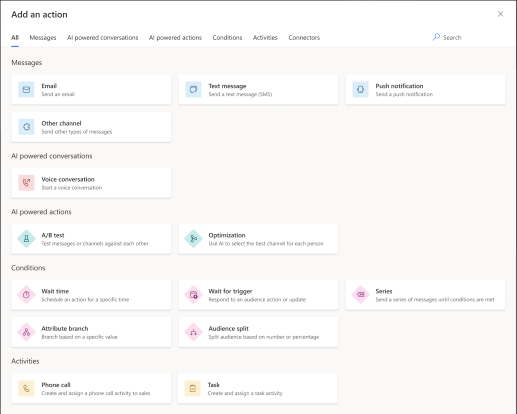
- Choose a Conversational Voice message in a journey by selecting a Contact Center Proactive Engagement.
- Design your journey to include Conversational Voice messages and react to message outcomes.
- View detailed engagement metrics, such as the number of attempts, outcomes, and specific results for each call interaction in the out-of-the-box journey reporting.
- Access all voice and engagement interaction data in storage and build custom reports using Microsoft Fabric integration.
Geographic areas
Visit the Explore Feature Geography report for Microsoft Azure areas where this feature is planned or available.
Language availability
Visit the Explore Feature Language report for information on this feature's availability.