Note
Access to this page requires authorization. You can try signing in or changing directories.
Access to this page requires authorization. You can try changing directories.
Important
As of October 2026, this content is archived and no longer maintained. Information on this page may not reflect the latest product plans, features, or guidance. For current roadmap information across Dynamics 365, Power Platform, Dataverse, Microsoft 365, and Copilot, visit the roadmap. Continue to use Microsoft Learn for authoritative product guidance and documentation.
| Enabled for | Public preview | General availability |
|---|---|---|
| Users by admins, makers, or analysts |  Oct 1, 2025 |
May 8, 2026 |
Business value
The excise taxes feature helps businesses by automating the complex process of calculating excise tax amounts. With this feature, businesses follow specific tax regulations for different products and regions. It reduces the risk of errors and lowers the chance of penalties.
Feature details
Excise taxes apply to specific goods and services, and manufacturers or retailers often include these taxes in the product price. Governments use excise duties to generate revenue and to discourage the consumption of goods that negatively affect public health or the environment.
The new Excise Taxes feature automates the calculation of excise duties by applying specific rules and rates for different products and regions.
Scope of the initial release
The initial release doesn't include compliance or statutory reports. Instead, it introduces a flexible excise tax calculation framework. The framework supports different calculation models and can be adapted to meet various regulatory requirements through configuration.
Setup
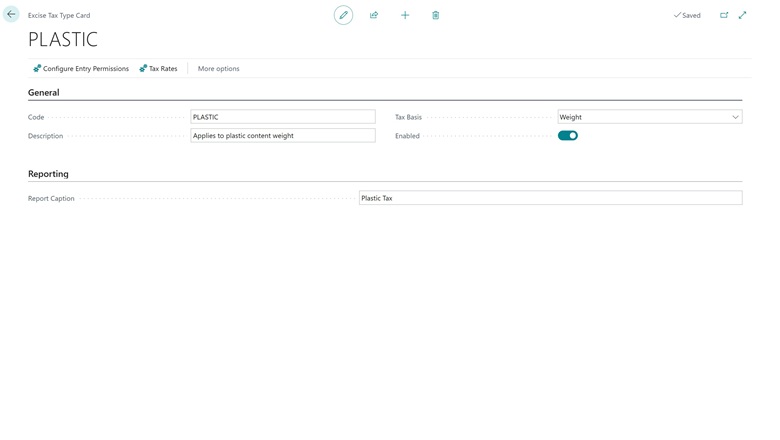
Before calculating excise taxes, you must configure excise tax types. For each excise tax type, you can define a tax basis as Weight, Volume, Quantity, Sugar Content, Alcohol Volume (ABV), or Active Content.
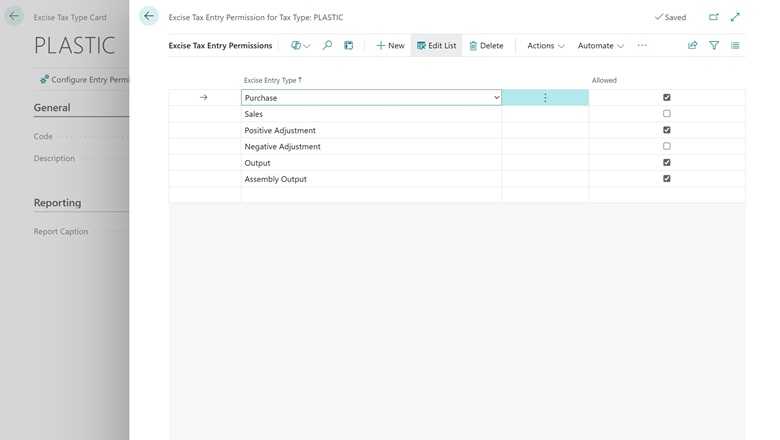
You also need to configure excise entry types, and specify which item ledger entry types contribute to the excise‑liable quantity. The following options are available: Purchase, Sale, Positive Adjustment, Negative Adjustment, Output, or Assembly Output.
As the last step, set up excise duty rates for each excise tax type to calculate the final tax amount based on the selected basis and the accumulated excise‑liable quantity. You also need to configure the items and fixed assets you want to include in excise tax calculations.
Geographic areas
Visit the Explore Feature Geography report for Microsoft Azure areas where this feature is planned or available.
Language availability
Visit the Explore Feature Language report for information on this feature's availability.
Related content
Register excise tax (docs)