Configure resource accounts
Resource accounts are disabled objects in Microsoft Entra ID. A resource account is required for each auto attendant or call queue that directly answers calls. Nested auto attendants and call queues that receive calls transferred from a parent auto attendant or call queue don't require their own resource account—nesting without resource accounts is the recommended approach because it reduces the number of licenses needed and simplifies exception handling flows.
Resource accounts can be assigned licenses and phone numbers. Agents see the resource account name when they receive an incoming call.
Note
All resource accounts must be assigned a Microsoft Teams Phone Resource Account license, regardless of whether they'll be assigned a phone number.
In the Teams Admin Center, under call queues, Select Add accounts.
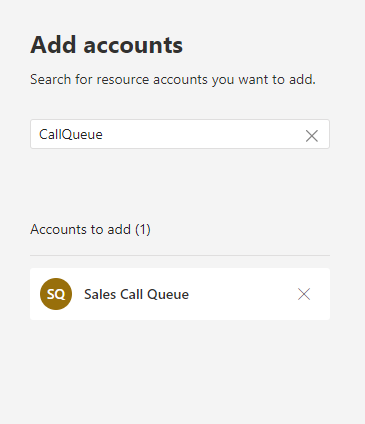
Search for the resource account that you want to use with this call queue, select Add, and then select Add again.
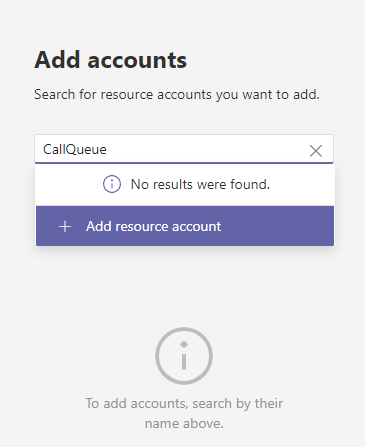
Select +Add Resource Account if account isn't found.
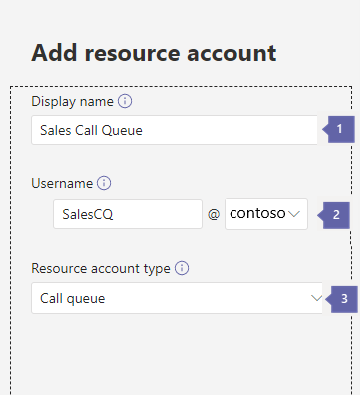
Display name - Input the display name.
Username and domain - Input the username and the domain from the drop-down menu
Resource type - Select the Resource account type, either a call queue or auto attendant
Assign a license
For each resource account, you must assign a Teams Phone Resource Account license.
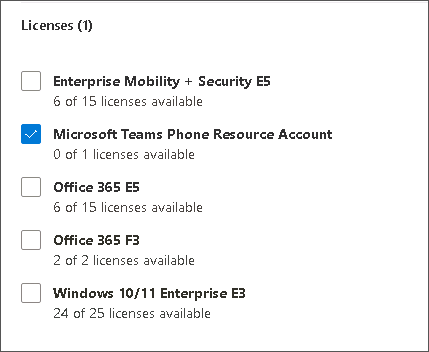
In the Microsoft 365 admin center, select the resource account to which you want to assign a license.
On the Licenses and Apps tab, under Licenses, select Teams Phone Resource Account license.
select Save changes.
Assign calling ID
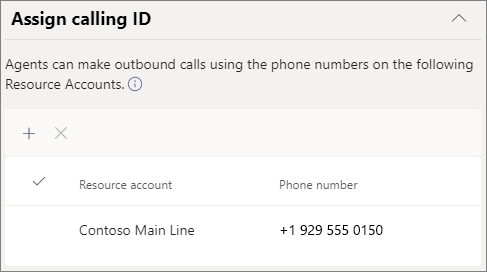
If you plan to use a Teams channel for your call agents, you can assign an outbound caller ID number for the agents by specifying one or more resource accounts with a phone number. Select Add, search for the resource accounts that you want to allow agents to for calling ID purposes when making outbound calls, select Add, and then select Add.
If you aren't using a Teams channel to control agent membership, consider directly setting the caller ID for members of the call queue to the service number of the call queue or the appropriate auto attendant.
Additional licensing for outbound calls
Resource accounts that make outbound PSTN calls require an additional license beyond the Teams Phone Resource Account license. Assign a funded pay-as-you-go Calling Plan license or Communications Credits to resource accounts used for:
- On-behalf-of outbound calls - agents making outbound calls on behalf of the call queue.
- Callback - call queues with the callback feature enabled.
- External transfers - call queues or auto attendants where exception handling (overflow, timeout, no agents) redirects calls to an external phone number.
Important
Without this additional license, outbound calls from these resource accounts will fail. Review all call queues and auto attendants that involve external transfers or callback and ensure their resource accounts have the appropriate license assigned.