Introduction - Set up currencies
As companies increasingly operate in more countries and regions, it becomes more important that they are able to trade and report financial results in more than one currency. If you buy or sell in currencies other than your own local currency, have receivables or payables in other currencies, or record G/L transactions in different currencies, then you must set up a code for each currency that you use.
Companies can complete the initial setup for multicurrency functionality in Business Central by using the Currency Card and Currency Exchange Rates pages.
The currency card is where the basic parameters for the various currencies that are used by a company are established. The Currency Exchange Rates page is used to set up the exchange rates for a selected currency on specific dates.
Important
Don't create the local currency code in both General Ledger Setup and the Currencies page. Doing so can cause confusion between the blank currency and the local currency (LCY) code when you set up bank accounts, customers, or vendors.
If you want to set up a new currency, follow these steps:
Select the search icon (Alt+Q) in the upper-right corner of the page, enter currencies, and then select the related link.
Open the desired currency, for example the Canadian dollar (CAD).
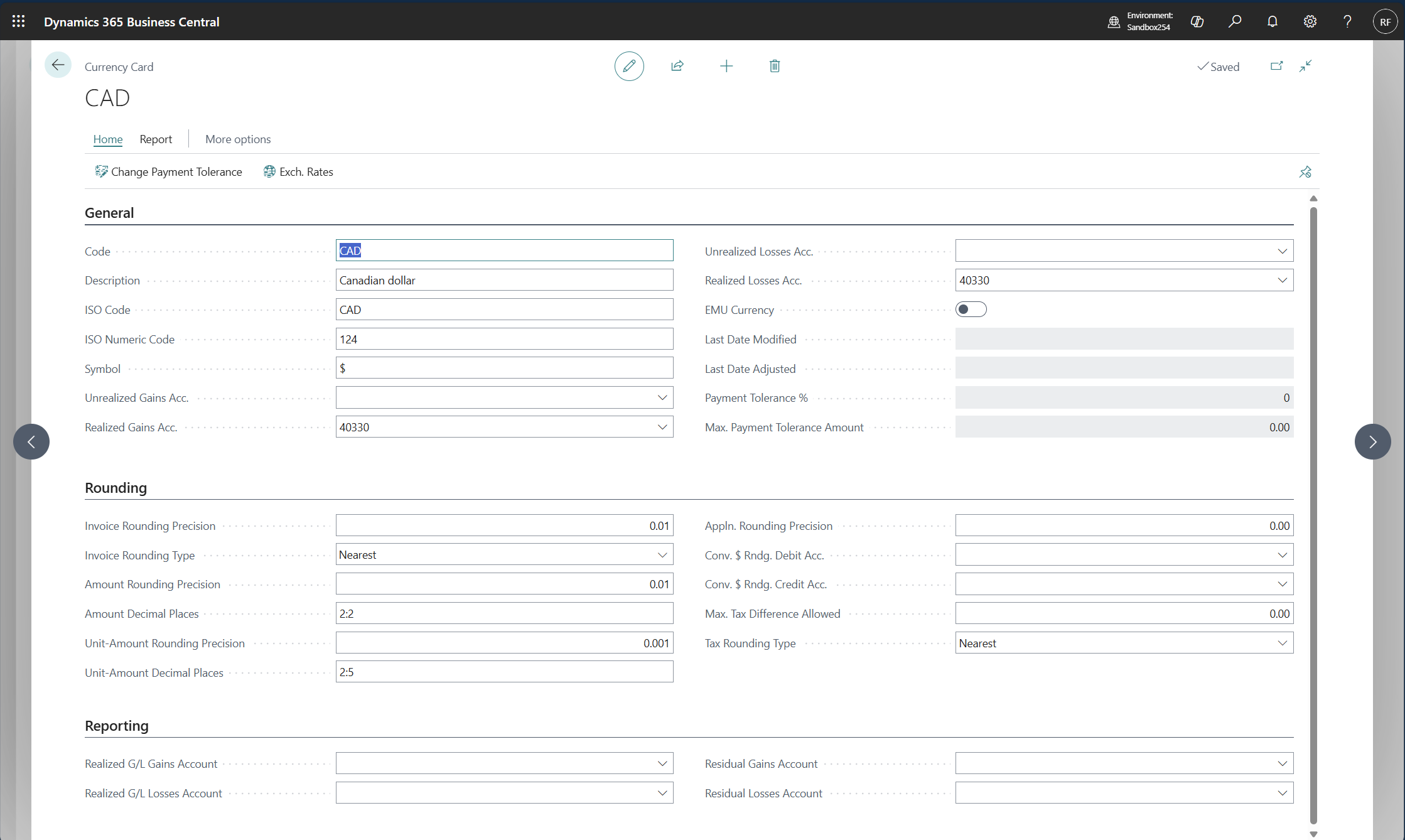
The General FastTab includes basic information about the currency, including accounts that are used for posting unrealized and realized gains and losses.
Code - Displays a unique identifier for the currency.
Description - Provides a short description of the currency.
ISO Code - Specifies the international three-letter code for the currency that is defined in ISO 4217. Create currencies by using the ISO code as the Code to simplify working with the currency later.
ISO Numeric Code - Specifies the international numeric reference for the currency that is defined in ISO 4217.
Symbol - Specifies the symbol for the currency that you want to appear on checks and charts.
Exchange Rate Date - Displays the date of the latest exchange rate for the currency.
Currency Factor - Specifies the relationship between the currency and the local currency, based on the current exchange rate.
Unrealized Gains Acc. and Unrealized Losses Acc. - Displays the G/L account number that is used to post unrealized exchange rate gains or losses when the Adjust Exchange Rates batch job is run to adjust customers, vendors, and bank accounts.
Realized Gains Acc. and Realized Losses Acc. - Displays the G/L account that is used to post realized exchange rate gains or losses when the customer or vendor ledger entry is applied. If an unrealized gain or loss was previously posted, the entry is reversed when the realized gain or loss is posted. To copy the most frequently used accounts from currencies that are already set up, select the Process action and then select Suggest Accounts.
EMU Currency - When this option is selected, it indicates that currency is an Economic and Monetary Union (EMU) currency.
Last Date Modified - This field is automatically populated and displays when the last changes were made to the fields for the currency.
Last Date Adjusted - This field is automatically populated and displays when the Adjust Exchange Rates batch job was last run.
Payment Tolerance % - Indicates the percentage that a payment or refund can vary from the amount on a credit memo or invoice. Update the field by selecting Change Payment Tolerance.
Max. Payment Tolerance Amount - Indicates the maximum amount that a payment or refund can vary from the amount on a credit memo or invoice. Update the field by selecting Change Payment Tolerance.
The Rounding FastTab contains rules for rounding amounts, invoices, and unit amounts for multicurrency transactions.
Invoice Rounding Precision - Specifies the rounding precision that is used for the currency on invoices.
Invoice Rounding Type - Determines the rounding method that is used for invoices. The options in this drop-down menu are Nearest, Up, or Down. This field works with the Invoice Rounding Precision field. For example, invoices might be rounded to the nearest whole number.
Amount Rounding Precision - Specifies the rounding precision that is used for the currency.
Amount Decimal Places - Specifies the number of decimal places that are displayed for the currency. The minimum and maximum number of decimal places are separated by a colon.
Unit-Amount Rounding Precision - Specifies the rounding precision that is used for unit prices for items on sales and purchase invoices.
Unit-Amount Decimal Places - Identifies the minimum and maximum number of decimal places that are used for the sales and purchase price of items and sales price of resources. The minimum and maximum number of decimal places are separated by a colon, for example 2:5.
Appln. Rounding Precision - Specifies the amount that is allowed for rounding differences when a payment entry in one currency is applied to entries in a different currency.
Conv. LCY Rndg. Debit Acc. - Identifies the debit account to use for rounding differences when the Insert Conv. LCY Rndg. Lines function is used in a general journal.
Conv. LCY Rndg. Credit Acc. - Identifies the credit account to use for rounding differences when the Insert Conv. LCY Rndg. Lines function is used in a general journal.
Max. VAT Difference Allowed - Specifies the maximum amount allowed for VAT differences in this currency.
VAT Rounding Type - Specifies the rounding method for manually correcting VAT amounts in sales and purchase documents. The options are Nearest, Up, or Down.
On the Reporting FastTab, you can select one of the following accounts for posting realized gains and losses when an additional reporting currency is implemented:
Realized G/L Gains Account and Realized G/L Losses Account - Specifies the G/L account that is used to post exchange rate gains or losses for currency adjustments between the local currency (LCY) and the additional reporting currency. The exchange rate gains are calculated when the Adjust Exchange Rates batch job is run to adjust general ledger accounts.
Residual Gains Account and Residual Losses Account - Indicates the G/L account that is used to post residual gain or loss amounts (rounding differences) when an additional reporting currency is used in the general ledger application area.