| # |
RDP method |
FQDN |
IP address |
Protocol/port |
Description |
| 1 |
TCP-based RDP |
N/A |
20.159.80.0/24 |
TCP 443 |
TCP-based RDP connection. The initial connection to every session host or Cloud PC uses this connection. |
| 2 |
UDP-based RDP via TURN |
N/A |
20.140.236.0/22 |
UDP 3478 |
Relayed UDP-based RDP connection using TURN servers. |
| 3 |
UDP-based RDP using STUN |
N/A |
20.140.236.0/22 |
UDP 1024-65535
Default: 49152-65535 |
Direct one-to-one UDP connection between the user device and the session host. |
Enable RDP Shortpath for public networks
To enable RDP Shortpath for public networks, visit the following Azure Virtual Desktop documentation page and follow the instructions:
Enable RDP Shortpath for public networks.
Verify UDP connectivity
UDP connectivity can be checked within the “Connection Information” section of a Remote session. For more information, see Verify RDP Shortpath is working.
RDP Shortpath benefits
The default connectivity to a Windows 365 Cloud PC is through a TCP connection that traverses a gateway using the reverse connect transport. The reverse transport means that there’s no need for inbound connectivity to the Cloud PC (session host) to connect RDP traffic.
RDP Shortpath enhances the TCP connection by providing an additional direct or relay-based connection between the Remote Desktop client and the Windows 365 Cloud PC using UDP. This improves connection reliability, reduces latency, and increases available bandwidth.
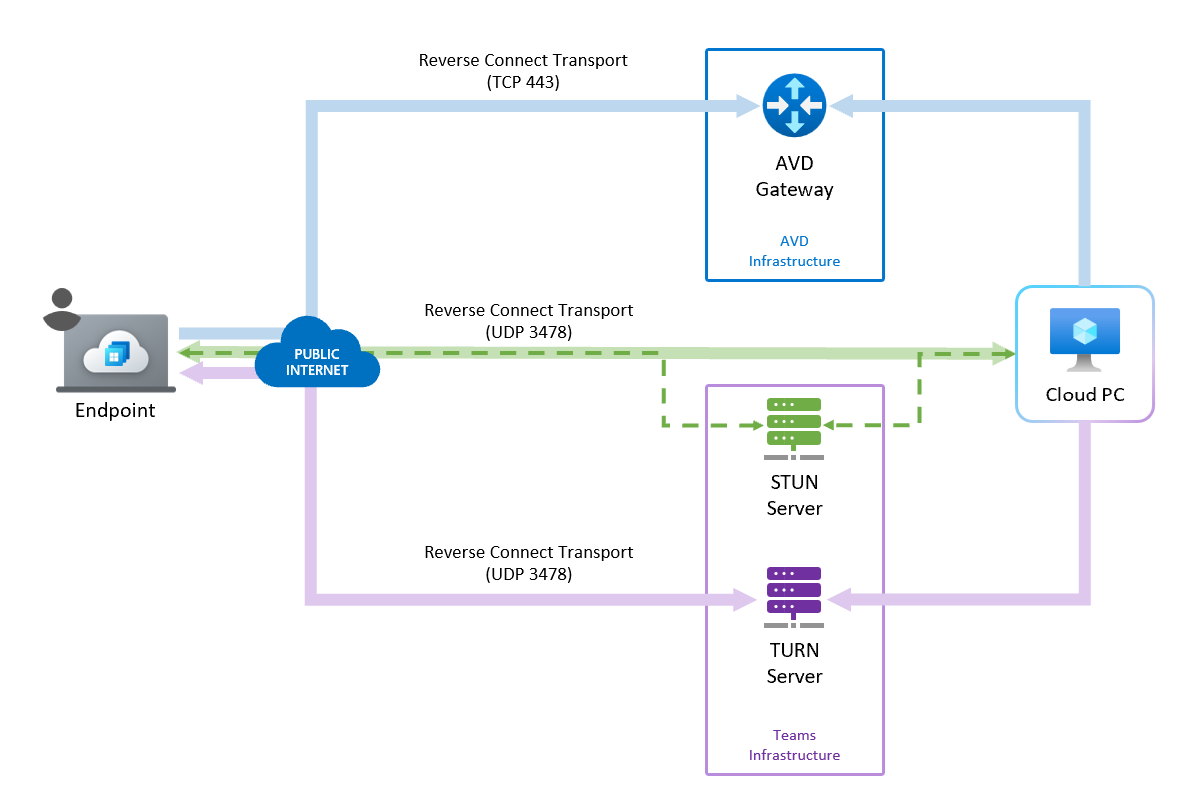
For more information about RDP Shortpath benefits, see Key benefits.
RDP Shortpath connection process
When you use RDP Shortpath, the connection with the Cloud PC proceeds as follows:
- The RDP connection establishes a TCP-based connection using the reverse connect transport through the Gateway (in the same way as it does for connectivity without RDP Shortpath).
- If RDP Shortpath is enabled on the Cloud PC (session host), the service creates a UDP socket on all viable network interfaces.
- To test connectivity, the service attempts to connect to a Windows 365 STUN server on the public internet through UDP port 3478. This step also establishes the external IP address of the NAT router.
- The Cloud PC's candidate table lists the public IP and listener port that it has reachable connectivity on. This information is provided to the connecting client through the established TCP session.
- The client sends its list of reachable public IP addresses/ports to the Cloud PC.
- Both parties attempt a connection at the same time. Because both are creating outbound connections, it often allows connectivity to be established through firewalls because no inbound initiated connectivity occurs. If this connection is not established, then an indirect UDP connection is attempted using relay.
- If connectivity is successful, the service evaluates if the connection is the fastest path. If it is, all dynamic virtual channels (such as graphics, input, device redirection, and more) switch to the new transport flow.
Indirect UDP connection using TURN
By default, Indirect UDP connections using TURN is turned on for everyone. You can turn off UDP connections for public (and private) RDP Shortpath as described in POlicy CSP - ADMX_TerminalServer and set ADMX_TerminalServer/TS_SELECT_TRANSPORT to Use only TCP.
Known issues
The RDP Shortpath for public networks may not work with Cloud PCs where:
Double NAT is in place. For example, if the traffic is routed through a Secure Web Gateway (SWG) or proxy where the connection uses a NAT twice (first, on egress from Azure and, second, from the VPN/SWG endpoint.)
The connection is routed through an internet proxy or other inspection device.
Any network that restricts UDP access or limits access to specific ports or IP ranges.
Carrier Grade NAT (CGN) is used. Where the network shares a public IP address with other networks.
TURN‑based connections are susceptible to connection drops during TURN relay updates. These updates typically occur during planned maintenance windows but may occasionally occur outside the planned window due to urgent Azure infrastructure fixes. In all of the above scenarios, the client automatically reconnects within a few seconds.
For more technical details on these scenarios, see How RDP Shortpath works.
Next steps
For complete information, see Azure Virtual Desktop RDP Shortpath for public networks.