开发人员技术 | VB
Microsoft开发的可在.NET中使用的面向对象的编程语言。
' cx='32' cy='32' r='32' /%3E%3Ctext x='50%25' y='55%25' dominant-baseline='middle' text-anchor='middle' fill='%23FFF' %3EHL%3C/text%3E%3C/svg%3E)
我将以下输出到图片框中,我想将其归入图像的特定部分,以便我可以放大该部分。我对 Transform 属性不太熟悉,我想知道我是否正在接近我试图正确实现的目标。如果你看下面的图片,整个图像都在图片盒表面上,而我放在那里的方形黑框,我想把焦点放在它上面,让它填满图片盒,本质上是放大的。希望我能把自己说清楚。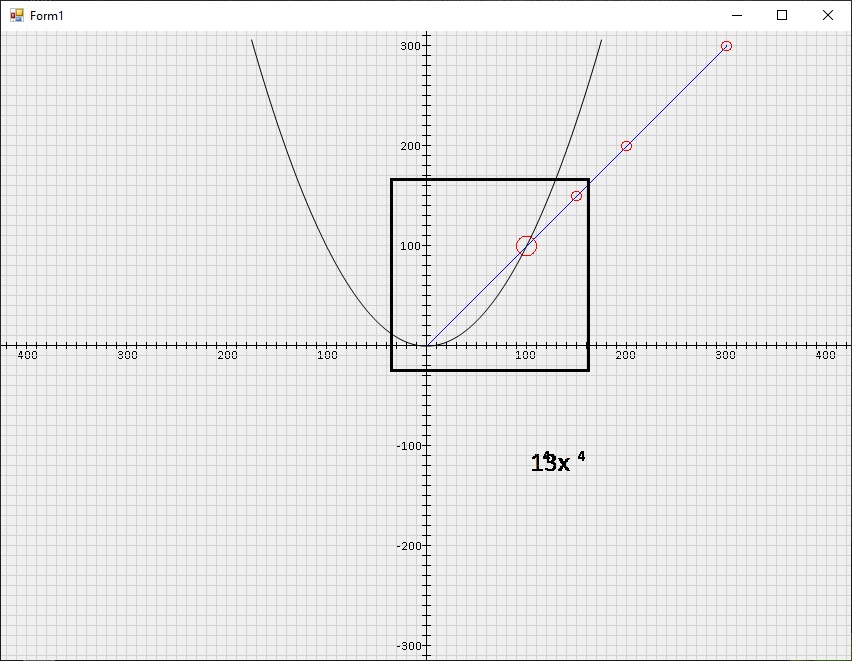
' cx='32' cy='32' r='32' /%3E%3Ctext x='50%25' y='55%25' dominant-baseline='middle' text-anchor='middle' fill='%23FFF' %3EA%3C/text%3E%3C/svg%3E)
我们如何像旧网站一样找到我在这里发布的所有帖子?
您可以在“活动”中看到它们。 
对于图片缩放,还要检查: https://www.codeproject.com/Articles/21097/PictureBox-Zoom 在 Visual Basic 中,代码如下所示:
复制
    Private _ZoomFactor As Integer
    Private Sub Form1_Load(sender As Object, e As EventArgs) Handles MyBase.Load
        TrackBar1.Minimum = 1
        TrackBar1.Maximum = 3
        TrackBar1.Value = 2
        _ZoomFactor = TrackBar1.Value
        PictureBox2.SizeMode = PictureBoxSizeMode.StretchImage
        PictureBox1.Image = Image.FromFile("your picture path")
    End Sub
    Private Sub TrackBar1_ValueChanged(sender As Object, e As EventArgs) Handles TrackBar1.ValueChanged
        _ZoomFactor = TrackBar1.Value
        Label1.Text = String.Format("x{0}", _ZoomFactor)
    End Sub

    Private Sub PictureBox1_MouseMove(sender As Object, e As MouseEventArgs) Handles PictureBox1.MouseMove
        If PictureBox1.Image Is Nothing Then Return
        UpdateZoomedImage(e)
    End Sub
    Private Sub UpdateZoomedImage(ByVal e As MouseEventArgs)
        Dim zoomWidth As Integer = PictureBox2.Width / _ZoomFactor
        Dim zoomHeight As Integer = PictureBox2.Height / _ZoomFactor
        Dim halfWidth As Integer = zoomWidth / 2
        Dim halfHeight As Integer = zoomHeight / 2
        Dim tempBitmap As Bitmap = New Bitmap(zoomWidth, zoomHeight, PixelFormat.Format24bppRgb)
        Dim bmGraphics As Graphics = Graphics.FromImage(tempBitmap)
        bmGraphics.InterpolationMode = InterpolationMode.HighQualityBicubic
        bmGraphics.DrawImage(PictureBox1.Image, New Rectangle(0, 0, zoomWidth, zoomHeight), New Rectangle(e.X - halfWidth, e.Y - halfHeight, zoomWidth, zoomHeight), GraphicsUnit.Pixel)
        PictureBox2.Image = tempBitmap
        bmGraphics.DrawLine(Pens.Black, halfWidth + 1, halfHeight - 4, halfWidth + 1, halfHeight - 1)
        bmGraphics.DrawLine(Pens.Black, halfWidth + 1, halfHeight + 6, halfWidth + 1, halfHeight + 3)
        bmGraphics.DrawLine(Pens.Black, halfWidth - 4, halfHeight + 1, halfWidth - 1, halfHeight + 1)
        bmGraphics.DrawLine(Pens.Black, halfWidth + 6, halfHeight + 1, halfWidth + 3, halfHeight + 1)
        bmGraphics.Dispose()
        PictureBox2.Refresh()
    End Sub
我的测试结果。 希望对您有所帮助。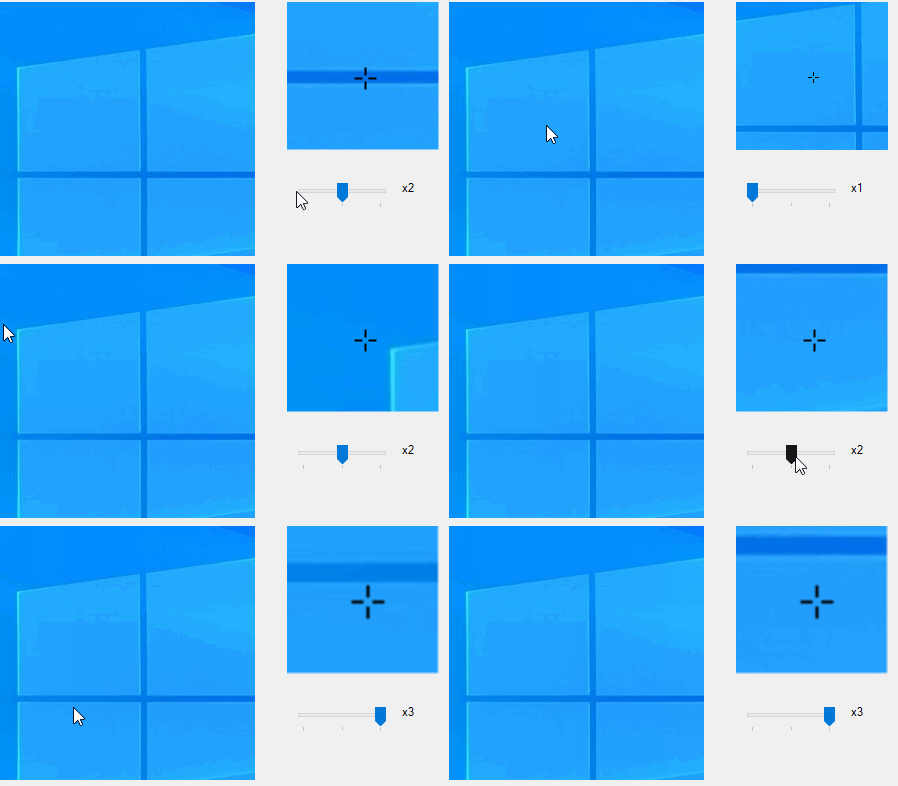
如果答案是正确的,请点击“接受答案”并点赞。 如果您对此答案还有其他疑问,请点击“评论”。
注意:如果您想接收相关电子邮件,请按照我们的文档中的步骤启用电子邮件通知 此线程的通知。