你当前正在访问 Microsoft Azure Global Edition 技术文档网站。 如果需要访问由世纪互联运营的 Microsoft Azure 中国技术文档网站,请访问 https://docs.azure.cn。
重要
本文中标记为预览的项目目前为预览版。 此预览版在没有服务级别协议的情况下提供,Microsoft不建议将其用于生产工作负荷。 某些功能可能不受支持,或者可能具有受限功能。 有关详细信息,请参阅 Microsoft Azure 预览版的使用条款。
随着代理的增长超越简单的原型,团队会累积行为准则,这些准则必须在整个对话中保持一致。 支持代理遵循固定升级策略。 代码评审代理每次都应用相同的清单。 销售智能体会遵守设定的消息传递约束。 在每个代理的系统提示或代码中嵌入这些准则时,将创建重复项。 如果策略发生更改,请更新并重新部署使用该策略的每个代理。
技能通过将行为准则与代理代码分离来解决此问题。 技能是根目录中有 SKILL.md 文件的文件夹,可以包含脚本、参考材料、资产和其他支持文件。 技能遵循开放的 Agent Skills 格式,并通过版本化的 Skills API 集中存储在 Foundry 中。 你可以从使用 Microsoft Copilot 工具的提示智能体引用技能,将其附加到工具箱,以便兼容的 MCP 客户端与工具一起发现它,或者将其下载到托管或本地智能体项目中。 技能采用版本控制:每次更新都会生成一个新的不可变版本,父技能会跟踪一个 default_version。 若要更新技能,请创建一个新版本,对其进行测试,然后将其提升为默认值。
在本文中,您将学到如何:
- 编写一个
SKILL.md文件,并将其作为带版本的技能上传。 - 从使用 Copilot 工具的提示智能体引用技能。
- 将技能添加到供 MCP 客户端使用的工具箱中。
- 下载和使用托管代理中的技能内容。
- 在部署后管理技能及这些技能的不可变版本。
Caution
客户负责了解部署的任何技能的行为以及接收数据的任何外部终结点的数据处理实践。
先决条件
正在进行的Microsoft Foundry 项目。
RBAC:Foundry 项目上的 Foundry 用户角色。
重要
Foundry RBAC 角色最近已更名。 Foundry 用户、Foundry 所有者、Foundry 帐户所有者和 Foundry 项目经理之前的名称分别为“Azure AI 用户”、“Azure AI 所有者”、“Azure AI 帐户所有者”和“Azure AI 项目经理”。 在重命名推出时,你仍可能会在某些位置看到以前的名称。重命名后,角色 ID 和核心权限保持不变。
从 Visual Studio Code 市场安装 Microsoft Foundry Toolkit for Visual Studio Code 扩展。
创建和使用技能
首先,创建并上传技能。 然后从提示代理中引用它,将其附加到工具箱,或将其下载后用于托管或本地代理。
还可以从录制的坐席对话中生成技能。 技能优化功能会发布包含独立结果和证据的技能版本,供你审查。 它不会自动将它们附加到代理或工具箱。
| 阶段 | 任务 |
|---|---|
| Author |
创建SKILL.md文件,并验证其名称、描述和操作说明。 |
| Upload |
创建技能版本,来源可以是内联内容、SKILL.md文件或 ZIP 压缩包。 |
| Generate | 优化技能,并审查已确认发布的版本,而无需手动编写。 |
| 参考 | 通过将技能引用添加到智能体定义,将技能与使用 Copilot 工具的提示智能体一起使用。 |
| 附上 | 将技能附加到工具箱, 以便兼容的 MCP 客户端可以发现它。 |
| Use | 如果要将其与代理项目捆绑在一起,请下载并使用托管代理中的技能。 |
| Manage | 在第一个工作流成功后列出、检索、版本或删除技能。 |
创作技能
技能遵循 代理技能 规范格式。 每个技能文件夹都有一个必需的 SKILL.md 文件,其中包含一个 YAML front matter 块:
---
name: greeting
description: Generate a personalized greeting for the user.
---

# Greeting Skill

You're a friendly greeting assistant for Foundry Hosted Agents.

## Instructions

- Include the user's name if they provided one.
- Keep greetings concise, 1 to 2 sentences.
- Thank the user for trying out Foundry Hosted Agents and this sample skill.
| 领域 | 必填 | 规则 |
|---|---|---|
name |
是的 | 用作 URL 路径密钥的技能名称。 仅小写字母、数字和连字符。 不得以连字符开头或结尾,不得包含连续连字符。 最多 64 个字符。 模式:^[a-z0-9]([a-z0-9\-]*[a-z0-9])?$。 必须在 YAML 中不加引号。 |
description |
是的 | 技能列表中显示的单行文本。 最多 1,024 个字符。 必须在 YAML 中不加引号。 |
| 身体 | 是的 | 免费 Markdown。 成为技能的嵌入指令。 |
重要
-
name和description值必须在 YAML 前端信息中去掉引号。 - 技能名称遵循模式
^[a-z0-9]([a-z0-9\-]*[a-z0-9])?$(小写、数字和连字符,无前导/尾随连字符,最大 64 个字符)。 无效名称会在版本创建时导致invalid_payload错误。
将每个技能放在代理根目录下的各自子目录中。 例如,greeting/SKILL.md 而不是根目录下的 SKILL.md。
将技能添加到工具箱(预览)
创建技能版本后,将它们附加到工具箱版本,以便任何 MCP 客户端都可以发现它们并将其与同一终结点中的工具一起加载。 基于工具箱的技能发现处于预览阶段,并遵循模型上下文协议的技能扩展规范 (SEP-2640)。
重要
附加到工具箱的技能必须存在于同一 Foundry 项目中。 不支持跨项目引用。
当兼容的代理或 MCP 客户端连接到工具箱终结点时,技能将显示为 MCP 资源。 实现 MCP 资源并调用技能发现扩展的客户端会调用 resources/list 来发现附加技能,然后调用 resources/read 来下载内容。 没有此支持的 MCP 客户端仍可以使用工具箱的工具,但不会自动加载其 skills。
创建一个引用你先前创建的 greeting 技能的工具箱版本。 省略 version 即遵循技能的 default_version,或固定一个 version 字符串以将引用锁定到一个不可变快照。
POST {endpoint}/toolboxes/my-toolbox/versions?api-version=v1
Authorization: Bearer {token}
Content-Type: application/json
Accept: application/json
Foundry-Features: Skills=V1Preview

{
  "description": "Toolbox with a skill reference",
  "tools": [],
  "skills": [
    {
      "type": "skill_reference",
      "name": "greeting"
    }
  ]
}
from azure.ai.projects.models import ToolboxSkillReference

# Reuse the AIProjectClient (project) from the previous step.
toolbox_version = project.toolboxes.create_version(
    name="my-toolbox",
    description="Toolbox with a skill reference",
    tools=[],
    skills=[ToolboxSkillReference(name="greeting")],  # add version="1" to pin
)
print(f"Created toolbox version: {toolbox_version.version}")
#pragma warning disable AAIP001
// Reuse the AgentToolboxes client (toolboxClient) from the previous step.
ToolboxSkillReference skillRef = new("greeting");  // add { Version = "1" } to pin

ToolboxVersion toolboxVersion = toolboxClient.CreateVersion(
    name: "my-toolbox",
    tools: [],
    skills: [skillRef],
    description: "Toolbox with a skill reference"
);
Console.WriteLine($"Created toolbox version: {toolboxVersion.Version}");
// Reuse the AIProjectClient (project) from the previous step.
const toolboxVersion = await project.toolboxes.createVersion(
  "my-toolbox",
  [],
  {
    description: "Toolbox with a skill reference",
    skills: [{ type: "skill_reference", name: "greeting" }],  // add version: "1" to pin
  },
);
console.log(`Created toolbox version: ${toolboxVersion.version}`);
在 azd ai toolbox create --from-file YAML 中声明技能,或使用 azd ai toolbox skill add 将其附加到现有工具箱。
# my-toolbox.yaml
description: Toolbox with a skill reference
skills:
  - name: greeting              # follows the skill's default version
  # - name: greeting
  #   version: "1"              # pin to a specific skill version (string)
azd ai toolbox create my-toolbox --from-file ./my-toolbox.yaml --no-prompt
在 Microsoft Foundry Toolkit for Visual Studio Code 扩展中,通过两种方式将技能附加到工具箱:
在工具箱创建过程中:在“生成自定义工具箱”选项卡上,选择“+ 添加技能>”。 在 “选择技能 ”对话框中,选择一个或多个配置的技能,然后选择“ 添加”。
从现有技能开始:在工具视图中,打开技能选项卡,然后在该技能所在行中选择在工具箱中使用。
只有在 Foundry 项目中配置的技能才会显示在 “选择技能 ”对话框中。 若要首先创建技能,请参阅 “创建技能版本”。
有关完整的工具箱工作流(包括连接、版本控制以及azd ai toolbox skill add命令azd ai toolbox skill listazd ai toolbox skill remove),请参阅工具箱文章中的“将技能附加到工具箱”部分。 来自命令式 azd 技能命令的更改,在您使用 azd ai toolbox publish 发布新版本之前,对 MCP 客户端不会生效。
在 Microsoft Agent Framework 中使用工具箱技能
将技能附加到工具箱后,代理可以在运行时发现并从工具箱 MCP 终结点中加载它们,而不是在本地捆绑 SKILL.md 文件。 有关完整的 C# 示例,请参阅 工具箱中的技能示例。 该示例运行了一个基于 Microsoft Agent Framework Responses 托管层的智能体,并使用 AgentSkillsProvider(由 AgentSkillsProviderBuilder.UseMcpSkills 构建)来应用智能体技能的渐进式披露模式:
- 播发:提供程序将技能名称和描述注入系统提示中,以便智能体知道哪些技能可用。
- 加载:代理确定技能相关时,它会从工具箱中检索完整的技能正文。
- 读取资源:如果技能包含补充内容(例如引用文档或资产),代理会按需读取它们。
代理仅在需要时才会从工具箱中获取完整的技能主体和资源,从而减少令牌用量。 该示例使用现有工具箱中的技能;它不会创建或预配它们。
将技能与提示词代理配合使用(预览版)
使用 Copilot harness 的提示代理可以引用同一 Foundry 项目中的现有技能。 技能引用是提示代理定义中的字段。
当代理必须使用不可变快照时固定技能版本。 如果省略版本,Foundry 将解析技能的当前默认版本,并将该不可变版本存储在新的代理版本上。
有关 azure.yaml 配置和特定于工具包的注意事项,请参阅向使用 Copilot 工具的提示智能体添加技能。
功能支持
技能支持专用网络。 有关设置说明,请参阅 为 Foundry 代理服务设置专用网络。
| 功能 | REST API | Python | .NET | JavaScript | VS Code | 工具箱 | 托管代理 |
|---|---|---|---|---|---|---|---|
| 创建技能版本(JSON 内联内容) | ✔️ | ✔️ | ✔️ | ✔️ | ✔️ | N/A | N/A |
| 创建技能版本 (ZIP 文件上传) | ✔️ | ✔️ | ✔️ | ✔️ | ✔️ | N/A | N/A |
| 列出、获取和删除技能和版本 | ✔️ | ✔️ | ✔️ | ✔️ | ✔️ | N/A | N/A |
| 下载技能内容 | ✔️ | ✔️ | ✔️ | ✔️ | ✔️ | N/A | N/A |
| 更新技能默认版本 | ✔️ | ✔️ | ✔️ | ✔️ | ✔️ | N/A | N/A |
| 将技能添加到工具箱 | ✔️ | ✔️ | ✔️ | ✔️ | ✔️ | ✔️ | N/A |
使用 REST API 管理技能
Skills API 采用版本控制:如果技能尚不存在,创建技能版本时会自动创建该技能。 每个更新都会创建一个新的不可变 SkillVersion。 父 Skill 对象跟踪 default_version (活动版本) 和 latest_version。
技能终结点:{FOUNDRY_PROJECT_ENDPOINT}/skills
认证:持有者令牌DefaultAzureCredential,作用域为https://ai.azure.com/.default。
预览标头: 所有技能 API 调用都需要 Foundry-Features: Skills=V1Preview。
| 对象 | 关键字段 | Description |
|---|---|---|
Skill |
id、name、description、created_at、default_version、latest_version |
技能容器。
default_version 指向活动版本。 |
SkillVersion |
id、skill_id、name、version、description、created_at |
技能内容的不可变快照。 |
提示
如需端到端的 Python CRUD 演练 — 创建两个版本、切换 default_version、获取、列出、删除 — 请参阅 sample_skills_crud.py SDK 中的 azure-ai-projects 示例。
创建技能版本
创建版本时,如果父技能不存在,系统会自动创建该父技能。 创建版本后,调用 更新默认版本 使其成为活动版本。
可以通过两种方式创建版本:直接 inline_content以 JSON 形式提交内容,或者上传包含 SKILL.md 文件的 ZIP 存档。
选项 1:从内嵌内容创建(JSON)
如果要直接提供技能 instructions 的文本而不打包文件,请使用此选项。
POST {endpoint}/skills/greeting/versions?api-version=v1
Authorization: Bearer {token}
Content-Type: application/json
Accept: application/json
Foundry-Features: Skills=V1Preview

{
  "inline_content": {
    "description": "Generate a personalized greeting for the user.",
    "instructions": "You are a friendly greeting assistant. Keep greetings brief and warm."
  },
}
from azure.identity import DefaultAzureCredential
from azure.ai.projects import AIProjectClient
from azure.ai.projects.models import SkillInlineContent

# Create Foundry project client
endpoint = "https://<your-foundry-account>.services.ai.azure.com/api/projects/<your-project>"

with (
    DefaultAzureCredential() as credential,
    AIProjectClient(
        endpoint=endpoint, credential=credential, allow_preview=True
    ) as project,
):
    # Create skill version from inline content
    created = project.beta.skills.create(
        name="greeting",
        inline_content=SkillInlineContent(
            description="Generate a personalized greeting for the user.",
            instructions="You are a friendly greeting assistant. Keep greetings brief and warm.",
        ),
    )
    print(
        f"Created skill: {created.name} version: {created.version}"
    )
#pragma warning disable AAIP001
using Azure.AI.Projects.Agents;
using Azure.Core.Pipeline;
using Azure.Identity;

var projectEndpoint = Environment.GetEnvironmentVariable("FOUNDRY_PROJECT_ENDPOINT");
AgentAdministrationClientOptions options = new();
options.AddPolicy(new FeaturePolicy("Skills=V1Preview"), PipelinePosition.PerCall);
AgentAdministrationClient agentsClient = new(endpoint: new Uri(projectEndpoint), tokenProvider: new DefaultAzureCredential(), options: options);
ProjectAgentSkills skillsClient = agentsClient.GetAgentSkills();

AgentsSkill created = skillsClient.CreateSkill(
    name: "greeting",
    description: "Generate a personalized greeting for the user.",
    instructions: "You are a friendly greeting assistant. Keep greetings brief and warm.");
Console.WriteLine($"Created skill: {created.Name}, Id: {created.SkillId}");

// FeaturePolicy: inject the preview feature header on every request.
internal class FeaturePolicy(string feature) : PipelinePolicy
{
    public override void Process(PipelineMessage msg, IReadOnlyList<PipelinePolicy> pipeline, int idx)
    {
        msg.Request.Headers.Add("Foundry-Features", feature);
        ProcessNext(msg, pipeline, idx);
    }
    public override async ValueTask ProcessAsync(PipelineMessage msg, IReadOnlyList<PipelinePolicy> pipeline, int idx)
    {
        msg.Request.Headers.Add("Foundry-Features", feature);
        await ProcessNextAsync(msg, pipeline, idx);
    }
}
import { DefaultAzureCredential } from "@azure/identity";
import { AIProjectClient } from "@azure/ai-projects";

// Create Foundry project client
const projectEndpoint = "https://<your-foundry-account>.services.ai.azure.com/api/projects/<your-project>";
const project = new AIProjectClient(projectEndpoint, new DefaultAzureCredential());

const skillVersion = await project.beta.skills.create("greeting", {
  inlineContent: {
    description: "Generate a personalized greeting for the user.",
    instructions: "You are a friendly greeting assistant. Keep greetings brief and warm.",
  },
});
console.log(`Created skill: ${skillVersion.name} version: ${skillVersion.version}`);
先决条件:
azd extension install microsoft.foundry
azd auth login

azd ai project set "https://<account>.services.ai.azure.com/api/projects/<project>"
创建第一个版本,使用内联元数据:
azd ai skill create greeting `
  --description "Generate a personalized greeting for the user." `
  --instructions "You are a friendly greeting assistant. Keep greetings brief and warm." `
  --no-prompt
或者从 SKILL.md 文件导入。
name:文件中的字段必须等于位置参数:
---
name: greeting
description: Generate a personalized greeting for the user.
---
# Greeting assistant

You are a friendly greeting assistant. Keep greetings brief and warm.
azd ai skill create greeting --file ./SKILL.md --no-prompt
为现有技能添加新版本(自动提升为 default_version):
azd ai skill update greeting --file ./SKILL.md --no-prompt

# Or with inline flags:
azd ai skill update greeting `
  --description "Updated description." `
  --instructions "Updated instructions." `
  --no-prompt
Microsoft Foundry Toolkit for Visual Studio Code 扩展提供了两种无代码添加技能的方法:浏览预生成目录或在编辑器中创作新技能。
从目录中添加预生成技能
- 在活动栏中选择 Foundry Toolkit 。
- 在 “开发人员工具>代理开发工具”下,选择 “工具目录”。
- 在“技能”部分中,在技能卡上选择“添加”,将其添加到 Foundry 项目中。
该目录显示按类别分组的现成技能:
| 类别 | 技能 |
|---|---|
| Office 文档 |
docx、pptx、xlsx、pdf |
| 设计与创意 |
canvas-design、algorithmic-art、brand-guidelines、theme-factory |
| 写作与沟通 |
doc-coauthoring、internal-comms、slack-gif-creator |
创作新技能
- 在 “工具” 视图中,打开“ 技能 ”选项卡。
- 选择 “添加技能>创建技能”。
- 在创作面板中,编辑
SKILL.md模板。 在 YAML 前置元数据中设置name和description,并在正文中定义指令。 - 选择“创建”。
示例响应(SkillVersion 对象):
{
  "id": "skillver_abc123",
  "skill_id": "skill_abc123",
  "name": "greeting",
  "version": "1",
  "description": "Generate a personalized greeting for the user.",
  "created_at": 1741305600
}
选项 2:从 SKILL.md ZIP 文件创建
有 SKILL.md 文件时,请使用多部分表单方式上传。 技能名称来自 {name} 路径参数。 上传单个 ZIP 文件或多个单个文件。 会解析 SKILL.md 以填充版本说明和操作说明。
POST {endpoint}/skills/greeting/versions?api-version=v1
Authorization: Bearer {token}
Content-Type: multipart/form-data
Accept: application/json
Foundry-Features: Skills=V1Preview

--boundary
Content-Disposition: form-data; name="files"; filename="SKILL.md"
Content-Type: text/markdown

<SKILL.md content>
--boundary--
from pathlib import Path
from azure.identity import DefaultAzureCredential
from azure.ai.projects import AIProjectClient
from azure.ai.projects.models import CreateSkillVersionFromFilesBody

# Create Foundry project client
endpoint = "https://<your-foundry-account>.services.ai.azure.com/api/projects/<your-project>"

with (
    DefaultAzureCredential() as credential,
    AIProjectClient(
        endpoint=endpoint, credential=credential, allow_preview=True
    ) as project,
):
    # Create skill version from ZIP / SKILL.md file
    skill_zip_path = Path("greeting.zip")
    imported = project.beta.skills.create_from_files(
      "greeting",
      content=CreateSkillVersionFromFilesBody(
        files=[(skill_zip_path.name, skill_zip_path.read_bytes())]
      ),
    )
    print(
        f"Created skill: {imported.name} version: {imported.version}"
    )
#pragma warning disable AAIP001
// See the FeaturePolicy class definition and client setup in the Create a skill section above.

// CreateSkillFromPackage accepts a local directory containing a SKILL.md file.
AgentsSkill imported = skillsClient.CreateSkillFromPackage("path/to/greeting-directory");
Console.WriteLine($"Created skill from directory: {imported.Name}, Id: {imported.SkillId}");
import { readFileSync } from "fs";

const zipBytes = readFileSync("greeting.zip");
const skillVersion = await project.beta.skills.createFromFiles("greeting", {
  files: [{ contents: zipBytes, filename: "greeting.zip", contentType: "application/zip" }],
});
console.log(`Created skill: ${skillVersion.name} version: ${skillVersion.version}`);
CLI 接受 .zip 存档,或其根目录包含 SKILL.md 的目录,以及任何同级资产。 目录输入会自动打包:
azd ai skill create greeting --file ./skill-src --no-prompt
若要发布更新的内容而不丢失以前的版本,请使用 update。 它接受与 SKILL.md 相同的四种输入形式:内联说明和说明、create 文件、ZIP 存档或目录:
azd ai skill update greeting --file ./greeting-v2.zip --no-prompt
新版本将成为默认值。 若要在不上传内容的情况下选择早期版本,请使用 azd ai skill update greeting --set-default-version <version>。
仅当你打算在重新创建之前删除现有技能及其所有版本时,才使用 create --force。
若要在项目的部署配置中保留技能,而不是立即创建技能,请使用:
azd ai skill add greeting --file ./skill-src
azd deploy greeting
skill add 仅更新 azure.yaml 中的 azure.ai.skill 声明;部署会将其与 Foundry 协调。
- 在 “工具” 视图中,打开“ 技能 ”选项卡。
- 选择 “添加技能>上传技能”。
- 选择 “浏览”,然后选择技能文件(
.md)或.zip包含SKILL.md文件的文件夹。 - 选择“创建”。
若要将现有技能替换为新版本,请选择技能行中的 ...(更多 操作)菜单,然后选择“ 替换”。 上传更新的文件。 有关详细信息,请参阅 “删除技能”。
注意
对于 ZIP 上传,服务器提取并验证 SKILL.md 内容。 对于单个文件上传,文件会按原样进行验证。
示例响应(SkillVersion 对象):
{
  "id": "skillver_def456",
  "skill_id": "skill_def456",
  "name": "greeting",
  "version": "1",
  "description": "Generate a personalized greeting for the user.",
  "created_at": 1741305600
}
列出技能
GET {endpoint}/skills?api-version=v1&limit=20&order=desc
Authorization: Bearer {token}
Accept: application/json
Foundry-Features: Skills=V1Preview
from azure.identity import DefaultAzureCredential
from azure.ai.projects import AIProjectClient

# Create Foundry project client
endpoint = "https://<your-foundry-account>.services.ai.azure.com/api/projects/<your-project>"

with (
    DefaultAzureCredential() as credential,
    AIProjectClient(
        endpoint=endpoint, credential=credential, allow_preview=True
    ) as project,
):
    # List all skills in the project
    skills = list(project.beta.skills.list())
    print(f"Found {len(skills)} skill(s)")
    for skill in skills:
        print(f"  {skill.name} (default: {skill.default_version})")
#pragma warning disable AAIP001
// See the FeaturePolicy class definition and client setup in the Create a skill section above.

List<AgentsSkill> skills = [.. skillsClient.GetSkills()];
Console.WriteLine($"Found {skills.Count} skill(s).");
foreach (AgentsSkill item in skills)
{
    Console.WriteLine($"  - {item.Name} (default: {item.DefaultVersion})");
}
const skills = project.beta.skills.list({ limit: 20, order: "desc" });
for await (const skill of skills) {
  console.log(`${skill.name} (default: ${skill.default_version})`);
}
azd ai skill list -o table
在 “工具 ”视图中,打开“ 技能 ”选项卡以列出项目中的每一个技能。 每行显示技能名称、说明和默认版本,以及用于在工具箱中使用技能、查看或管理技能的操作。
示例响应:
{
  "data": [
    {
      "id": "skill_abc123",
      "name": "greeting",
      "description": "Generate a personalized greeting for the user.",
      "created_at": 1741305600,
      "default_version": "1",
      "latest_version": "1"
    }
  ],
  "has_more": false,
  "first_id": "skill_abc123",
  "last_id": "skill_abc123"
}
使用 last_id 并配合 after 查询参数进行基于游标的向前分页。
获取技能
GET {endpoint}/skills/{name}?api-version=v1
Authorization: Bearer {token}
Accept: application/json
Foundry-Features: Skills=V1Preview
from azure.identity import DefaultAzureCredential
from azure.ai.projects import AIProjectClient

# Create Foundry project client
endpoint = "https://<your-foundry-account>.services.ai.azure.com/api/projects/<your-project>"

with (
    DefaultAzureCredential() as credential,
    AIProjectClient(
        endpoint=endpoint, credential=credential, allow_preview=True
    ) as project,
):
    # Get skill by name
    skill = project.beta.skills.get(name="greeting")
    print(f"{skill.name}: default version {skill.default_version}")
#pragma warning disable AAIP001
// See the FeaturePolicy class definition and client setup in the Create a skill section above.

AgentsSkill skill = skillsClient.GetSkill(skillName: "greeting");
Console.WriteLine($"Retrieved skill: {skill.Name}, description: {skill.Description}");
const skill = await project.beta.skills.get("greeting");
console.log(`${skill.name}: ${skill.description}`);
azd ai skill show greeting
“ 技能 ”选项卡显示每个技能的元数据,包括其名称、说明和默认版本。 若要打开技能内容,请选择技能行中的 “查看技能 ”。
返回技能元数据。 如果技能不存在,则返回 HTTP 404。
下载技能内容
将技能内容下载为 ZIP 存档。 使用默认版本端点获取当前生效的版本,或使用特定版本端点获取特定版本。
# Download default version content
GET {endpoint}/skills/{name}/content?api-version=v1
Authorization: Bearer {token}
Accept: application/zip
Foundry-Features: Skills=V1Preview

# Download a specific version's content
GET {endpoint}/skills/{name}/versions/1/content?api-version=v1
Authorization: Bearer {token}
Accept: application/zip
Foundry-Features: Skills=V1Preview
import tempfile
from datetime import datetime
from pathlib import Path
from azure.identity import DefaultAzureCredential
from azure.ai.projects import AIProjectClient

# Create Foundry project client
endpoint = "https://<your-foundry-account>.services.ai.azure.com/api/projects/<your-project>"
download_folder = Path(tempfile.gettempdir()).resolve()

with (
    DefaultAzureCredential() as credential,
    AIProjectClient(
        endpoint=endpoint, credential=credential, allow_preview=True
    ) as project,
):
    # Download skill package
    timestamp = datetime.now().strftime("%Y%m%d_%H%M%S")
    download_path = download_folder / f"greeting_{timestamp}.zip"
    download_path.write_bytes(
        b"".join(project.beta.skills.download_content("greeting"))
    )
    print(f"Downloaded skill package to: {download_path}")
#pragma warning disable AAIP001
// See the FeaturePolicy class definition and client setup in the Create a skill section above.

string savePath = Path.GetFullPath("saved_skill");
skillsClient.DownloadSkill("greeting", savePath);
Console.WriteLine($"Skill saved to: {savePath}");
const response = await project.beta.skills.download("greeting");
const blob = await response.blobBody;
// blob is the ZIP archive (default version). For a specific version, use downloadVersion(name, version).
默认模式将技能提取到目录中(默认值为 ./.agents/skills/<name>/):
# Default version
azd ai skill download greeting --output-dir ./downloaded --no-prompt

# A specific version
azd ai skill download greeting --version 2 --output-dir ./downloaded-v2 --no-prompt
原始模式使原始 .zip 存档保持不变:
azd ai skill download greeting --raw --output-dir ./downloaded-raw --no-prompt
传递 --force 以覆盖输出目录中的现有文件。
在“ 技能 ”选项卡中,选择技能行中的 “查看技能 ”。 多文件技能下载为 .zip 存档;单文件技能直接在编辑器中打开。
注意
响应正文是二进制 ZIP 存档(Content-Type: application/zip)。
删除技能
DELETE {endpoint}/skills/{name}?api-version=v1
Authorization: Bearer {token}
Accept: application/json
Foundry-Features: Skills=V1Preview
from azure.identity import DefaultAzureCredential
from azure.ai.projects import AIProjectClient

# Create Foundry project client
endpoint = "https://<your-foundry-account>.services.ai.azure.com/api/projects/<your-project>"

with (
    DefaultAzureCredential() as credential,
    AIProjectClient(
        endpoint=endpoint, credential=credential, allow_preview=True
    ) as project,
):
    # Delete skill
    deleted = project.beta.skills.delete(name="greeting")
    print(f"Deleted skill: {deleted}")
#pragma warning disable AAIP001
// See the FeaturePolicy class definition and client setup in the Create a skill section above.

skillsClient.DeleteSkill("greeting");
Console.WriteLine("Skill deleted.");
const result = await project.beta.skills.delete("greeting");
console.log(`Deleted: ${result.name} (${result.deleted})`);
azd ai skill delete greeting --force
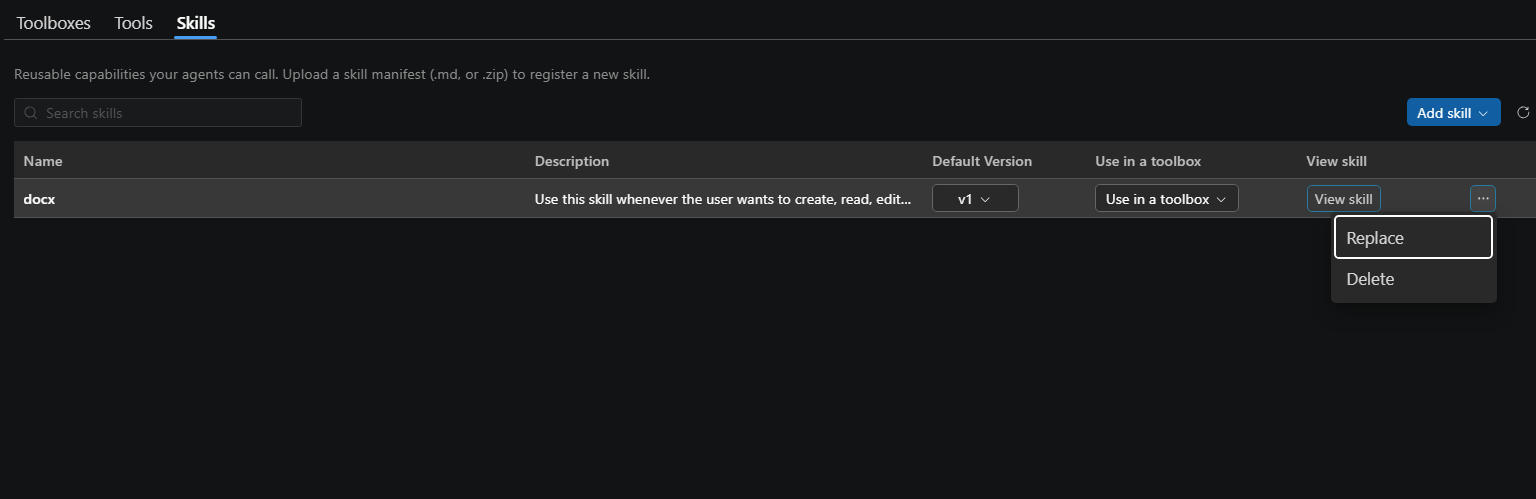
在“ 技能 ”选项卡中,选择技能行中的 ...(更多 操作)菜单,然后选择“ 删除”。 同一菜单包括 “替换”,用于上传新版技能。
成功时返回 HTTP 200:
{
  "id": "skill_abc123",
  "name": "greeting",
  "deleted": true
}
列出技能版本
GET {endpoint}/skills/{name}/versions?api-version=v1
Authorization: Bearer {token}
Accept: application/json
Foundry-Features: Skills=V1Preview
versions = list(project.beta.skills.list_versions("greeting"))
for v in versions:
    print(f"  {v.name} version: {v.version}")
#pragma warning disable AAIP001
List<AgentsSkillVersion> versions = [.. skillsClient.GetSkillVersions("greeting")];
foreach (var v in versions)
    Console.WriteLine($"  {v.Name} version: {v.Version}");
const versions = project.beta.skills.listVersions("greeting");
for await (const v of versions) {
  console.log(`  ${v.name} version: ${v.version}`);
}
“技能”选项卡中的默认版本下拉列表列出了技能的可用版本。 对于完整版本元数据,请使用 REST API、Python、.NET 或 JavaScript 选项卡。
示例响应:
{
  "data": [
    {
      "id": "skillver_abc123",
      "skill_id": "skill_abc123",
      "name": "greeting",
      "version": "1",
      "description": "Generate a personalized greeting for the user.",
      "created_at": 1741305600
    }
  ],
  "has_more": false
}
获取技能版本
GET {endpoint}/skills/{name}/versions/1?api-version=v1
Authorization: Bearer {token}
Accept: application/json
Foundry-Features: Skills=V1Preview
v = project.beta.skills.get_version(name="greeting", version="1")
print(f"{v.name} version: {v.version}, description: {v.description}")
#pragma warning disable AAIP001
AgentsSkillVersion v = skillsClient.GetSkillVersion("greeting", "1");
Console.WriteLine($"{v.Name} version: {v.Version}, description: {v.Description}");
const v = await project.beta.skills.getVersion("greeting", "1");
console.log(`${v.name} version: ${v.version}`);
若要检查特定技能版本,请使用 REST API、Python、.NET 或 JavaScript 选项卡。
删除技能版本
若要检查特定技能版本,请使用 REST API、Python、.NET 或 JavaScript 选项卡。
DELETE {endpoint}/skills/{name}/versions/1?api-version=v1
Authorization: Bearer {token}
Accept: application/json
Foundry-Features: Skills=V1Preview
result = project.beta.skills.delete_version("greeting", "1")
print(f"Deleted version: {result.version} ({result.deleted})")
#pragma warning disable AAIP001
skillsClient.DeleteSkillVersion("greeting", "1");
Console.WriteLine("Skill version deleted.");
const result = await project.beta.skills.deleteVersion("greeting", "1");
console.log(`Deleted version: ${result.version} (${result.deleted})`);
若要删除特定技能版本,请使用 REST API、Python、.NET 或 JavaScript 选项卡。
成功时返回 HTTP 200:
{
  "id": "skillver_abc123",
  "name": "greeting",
  "deleted": true,
  "version": "1"
}
更新默认版本
更改默认情况下技能解析为哪个版本。 引用技能而不固定版本的工具箱和智能体使用 default_version。
POST {endpoint}/skills/{name}?api-version=v1
Authorization: Bearer {token}
Content-Type: application/json
Accept: application/json
Foundry-Features: Skills=V1Preview

{
  "default_version": "2"
}
result = project.beta.skills.update("greeting", default_version="2")
print(f"New default version: {result.default_version}")
#pragma warning disable AAIP001
AgentsSkill updated = skillsClient.UpdateSkillDefaultVersion("greeting", "2");
Console.WriteLine($"New default version: {updated.DefaultVersion}");
const result = await project.beta.skills.update("greeting", "2");
console.log(`New default version: ${result.default_version}`);
azd ai skill update greeting --set-default-version 2 --no-prompt
--set-default-version 是一次仅涉及元数据的重新指向——无需上传,也不会生成新版本。 使用它可以回滚(或前进)而无需触及技能内容。
在“ 技能 ”选项卡中,使用技能行中的 “默认版本 ”下拉列表将技能重新指向其他版本。 此更改仅涉及元数据 — 引用该技能但未固定版本的工具箱和智能体会自动获取新默认值。
在托管智能体中使用技能。
在 直接注入 模式下,你将技能从 Foundry 技能 API 下载到代理项目目录中。 代理在启动时读取 SKILL.md 文件,并将其内容作为每个会话的额外系统说明注入。 此模式在没有工具箱的情况下工作。 如果要将特定技能版本与代理代码捆绑在一起,请使用它。
对于替代模式(其中技能和工具共享任何 MCP 客户端可以访问的单个可发现终结点),请参阅将技能附加到工具箱(预览版)。
以下演练使用一个GitHub Copilot SDK 示例,该示例从本地SKILL.md目录读取skills/文件。 使用 下载技能内容 操作将技能从 Foundry 拉取到此目录中。
注意
此示例需要具有 Copilot 请求:只读权限的 GitHub 精细化个人访问令牌 (PAT)。
在 github.com/settings/personal-access-tokens/new 创建一个。 不支持经典令牌(ghp_)。 将 PAT 存储在已批准的机密存储中,从不提交或记录它、设置最短的实际过期时间,并在完成测试时撤销它。
初始化代理项目
从示例的 azure.yaml 中搭建项目脚手架:
azd ai agent init -t https://github.com/microsoft-foundry/foundry-samples/blob/main/samples/python/hosted-agents/bring-your-own/invocations/github-copilot/azure.yaml
设置所需的GitHub令牌:
azd env set GITHUB_TOKEN="<github-fine-grained-pat>"
搭建好的项目包含根 azure.yaml、智能体代码、配置文件和示例 joke 技能:
|-- azure.yaml
`-- src/
    `-- <agent-name>/
        |-- main.py          # agent code that loads skills via CopilotClient
        |-- requirements.txt
        `-- skills/
            `-- joke/
                `-- SKILL.md # bundled sample skill
在 main.py 中,skill_directories 参数告知Copilot SDK 在何处查找技能文件。 会话开始时,位于 SKILL.md 子目录中的任何 skills/ 都会作为额外指令加载。
从 Foundry 填充技能
使用 下载技能内容 操作从 Foundry 中提取问候技能。 从下载的 ZIP 中提取 SKILL.md 并将其保存到 skills/greeting/SKILL.md:
mkdir skills/greeting
如果您尚未在 Foundry 中存储问候技能,请将技能内容从 创作技能 直接复制到 skills/greeting/SKILL.md 中。
该项目现在包括这两种技能:
|-- azure.yaml
`-- src/
    `-- <agent-name>/
        |-- main.py
        |-- requirements.txt
        `-- skills/
            |-- greeting/
            |   `-- SKILL.md # your greeting skill
            `-- joke/
                `-- SKILL.md
在本地运行和测试
启动代理:
azd ai agent run
在单独的终端中,测试问候技能:
azd ai agent invoke --local '{"input": "Hi, my name is Alex!"}'
提示
在 PowerShell 中,转义内部引号:azd ai agent invoke --local '{\"input\": \"Hi, my name is Alex!\"}'
远程部署和测试
创建Azure资源并部署代理:
azd provision
azd deploy
在 Foundry 上测试已部署的代理:
azd ai agent invoke '{"input": "Hi, my name is Alex!"}'
Troubleshooting
| 問题 | 解决方案 |
|---|---|
| 技能创建提示负载无效。 | 确认 SKILL.md 包含未加引号的 name 和 description 值。
name 使用小写字母、数字和连字符。 使文件名与提供给 CLI 的技能名称匹配。 |
| 上传的压缩包或文件格式不受支持。 | 上传包含 SKILL.md 文件的 ZIP 文件,或上传支持的各个文件。 对于 CLI,在上传之前压缩文件夹。 使用 create --force 而不是 update 替换 ZIP 文件中的技能。 |
| 创建或更新操作与现有版本冲突。 | 将版本视为不可变对象。 创建新版本,使用数字版本字符串,例如 "1" 和 "2",并将 default_version 设置为现有版本。 |
| 无法删除某个版本,因为它是默认版本或正在使用的版本。 | 将另一个版本设置为 default_version,然后在重试删除之前删除或更新对版本的工具箱和代理引用。 |
| Skills API 操作无法访问该项目。 | 查看网络设置。 有关专用网络,请参阅 为 Foundry 代理服务设置专用网络。 |
| 工具箱客户端不会发现附加技能。 | 确认技能和工具箱位于同一 Foundry 项目中,在命令性 azd 更改后发布工具箱版本,并使用支持 MCP 资源的客户端。 |
| 托管代理无法加载已下载的技能。 | 提取包,以便每个技能位于其自己的子目录中,例如 skills/greeting/SKILL.md,并重启代理,以便在启动时读取技能。 |