Shutting down my PC was normal until the past 2-3 days.
When I try to shutdown my computer, Windows says that "Microsoft .NET Framework" This app is preventing shutdown or restart. I can choose between "Shutdown anyways" and "Cancel". "Shutdown anyways" can ignore the error and shutdown. However I would like
to shutdown m PC normally as before. When I press "Cancel", I see an error message.
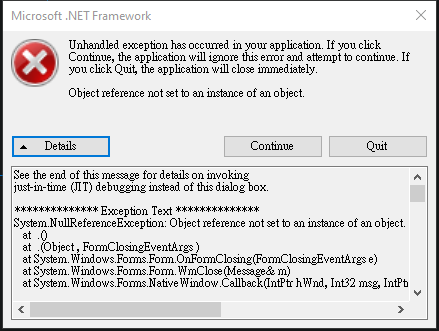
I have tried to uninstall the programs in Control Panel starting with "Microsoft .NET ...", I have also uncheck and check the boxes for Microsoft .NET Framework in "Turn Windows Feature on or off", but none of these work. I have no idea why this happened
as I didn't try to modify anything related to .NET Framework.
I also tried to install Microsoft .NET after all this, the installation manager claims that my installation will not occur as ".NET Framework 4.6.2 or a later update is already installed on this computer." I guess uninstalling Microsoft .NET related softwares
can't completely remove Microsoft .NET Framework from my computer.
Update: Problem solved. It was an error from WinRAR Auto Update program.
' cx='32' cy='32' r='32' /%3E%3Ctext x='50%25' y='55%25' dominant-baseline='middle' text-anchor='middle' fill='%23FFF' %3EA%3C/text%3E%3C/svg%3E)
