本文會說明如何建立和刪除 Azure 監視器工作區。 例如,設定 Prometheus 的 Azure 監視器受控服務時,您可以選取現有的 Azure 監視器工作區或建立新的工作區。
備註
當您建立 Azure 監視器工作區時,表單 <azure-monitor-workspace-name> 中的資料收集規則和資料收集端點預設會自動在表單 MA_<azure-monitor-workspace-name>_<location>_managed 中的資源群組中建立。 如果有任何 Azure 原則對資源或資源群組的名稱有限制,建立豁免來將這些資源排除在評估之外。
Prerequisites
- Azure 訂用帳戶。 如果您沒有 Azure 訂用帳戶,請在開始前建立免費帳戶。
- 一個用來持有 Azure 監視器 工作空間的資源群組。
- 資源小組中的 貢獻者 角色。 你需要這個角色來建立或刪除 Azure 監視器 工作區。
建立 Azure 監視器工作區
在 Azure 入口網站中開啟 [Azure 監視器工作區] 功能表。
選取 ,創建。
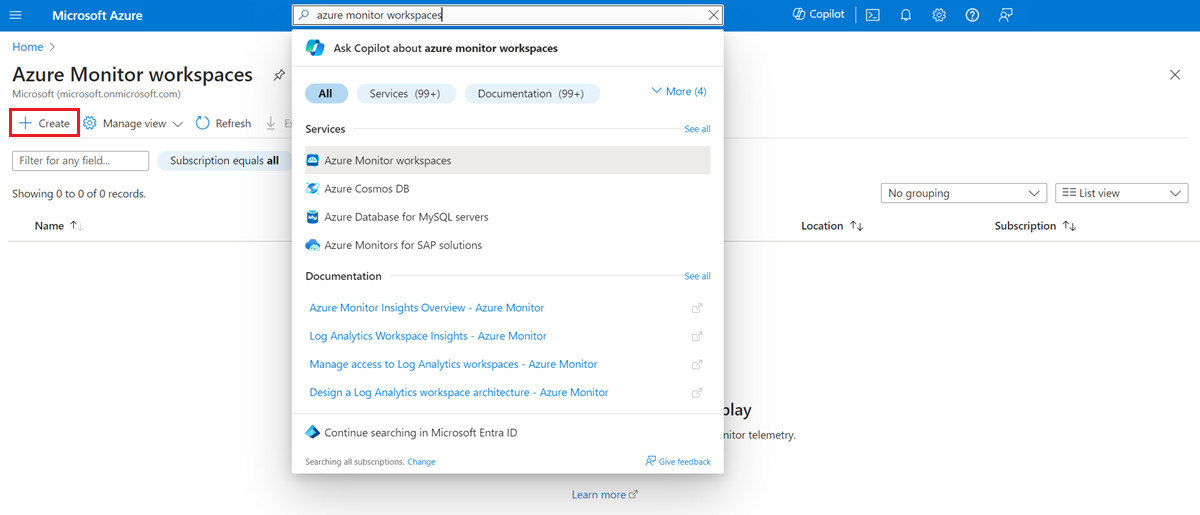
在「建立 Azure 監視器 工作區」時,選擇你想建立工作區的訂閱與資源群組。
提供工作區的名稱和區域。
選取 [檢閱 + 建立] 以建立工作區。
使用下列命令,使用 Azure CLI 建立 Azure 監視器工作區。
az monitor account create --name <azure-monitor-workspace-name> --resource-group <resource-group-name> --location <location>
關於 Azure CLI 命令詳情,請參閱 Azure CLI for Azure 監視器 workspace.
若要建立 Azure 監視器工作區,請使用下列其中一個 Resource Manager 範本搭配任何 標準部署選項。
{
"$schema": "http://schema.management.azure.com/schemas/2019-04-01/deploymentTemplate.json#",
"contentVersion": "1.0.0.0",
"parameters": {
"name": {
"type": "string"
},
"location": {
"type": "string",
"defaultValue": ""
}
},
"resources": [
{
"type": "microsoft.monitor/accounts",
"apiVersion": "2023-04-03",
"name": "[parameters('name')]",
"location": "[if(empty(parameters('location')), resourceGroup().location, parameters('location'))]"
}
]
}
備註
$schema ARM 範本中的值(schema.management.azure.com)是 ARM 範本結構參考,而非部署端點。 你不需要針對 Azure Government 或其他主權雲端進行變更。 要部署到 Azure Government,請在部署前設定啟用的雲端:
az cloud set --name AzureUSGovernment
Azure 監視器 workspace 喺 Azure Government 區域提供。 關於 Azure Government 中的網路端點需求,請參見 Network 防火牆要求以監控 Kubernetes 叢集 以及 Azure 監視器端點存取與防火牆配置。
@description('Specify the name of the workspace.')
param workspaceName string
@description('Specify the location for the workspace.')
param location string = resourceGroup().location
resource workspace 'microsoft.monitor/accounts@2023-04-03' = {
name: workspaceName
location: location
}
當您建立 Azure 監視器工作區時,會建立新的資源群組。 資源群組名稱的格式如下: MA_<azure-monitor-workspace-name>_<location>_managed,其中經過「標記化」(tokenized)的元素會小寫。 資源群組同時包含資料收集端點和與工作區同名的資料收集規則。 當您刪除工作區時,資源群組和其資源都將會自動刪除。
若要將 Azure 監視器 的 Prometheus 受管服務連接到 Azure 監視器 工作區,請參閱 從 AKS 叢集收集 Prometheus 指標
配置資源-上下文存取模式
與 Log Analytics 工作空間類似,Azure 監視器 工作空間提供資源-上下文存取模式,讓使用者在工作空間中查詢資料時能取得更細緻的 Azure RBAC 資源權限。 此存取模式提供以下好處:
- 使用者不需要知道要查詢哪個工作區,以取得他們已將查詢範圍限定為的計量
- 使用者不需要直接存取儲存其資源度量的工作區
欲了解更多資訊,請參閱管理 Azure 監視器 工作空間的存取。
刪除 Azure 監視器工作區
當您刪除 Azure 監視器 工作區時,與 Log Analytics 工作區不同,沒有軟刪除作業。 工作區中的資料會立即被刪除,且沒有復原選項。
在 Azure 入口網站中開啟 [Azure 監視器工作區] 功能表。
選取您的工作區。
選擇 刪除。
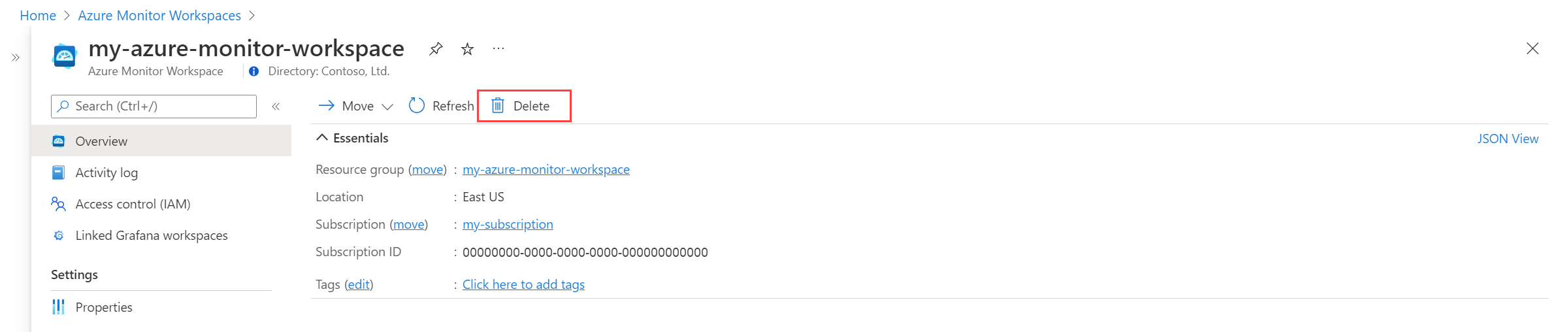
要刪除 Azure 監視器 工作區,請使用 az monitor account delete.
例如:
az monitor account delete --name <azure-monitor-workspace-name> --resource-group <resource-group-name>
關於 Azure CLI 命令詳情,請參閱 Azure CLI for Azure 監視器 workspace.
確認刪除
當你刪除 Azure 監視器 工作區時,Azure 也會移除表單MA_<azure-monitor-workspace-name>_<location>_managed中的管理資源群組。 要確認刪除,請確認此資源群組已不存在:
az group show --name MA_<azure-monitor-workspace-name>_<location>_managed
指令會回傳錯誤,表示找不到資源群組,確認管理資源已被移除。
連結 Grafana 工作區
將 Azure 監視器工作區連線至 Azure 受控 Grafana 工作區,以允許 Grafana 在 Grafana 儀表板中使用 Azure 監視器工作區。 你可以將 Azure 監視器 工作區連接到多個 Grafana 工作區,也可以將 Grafana 工作區連接到多個 Azure 監視器 工作區。 Azure 託管 Grafana 和您的 Azure 監控工作區可以位於不同的地區。
若要將自我管理 Grafana 實例連結至 Azure 監視器工作區,請參閱 將 Grafana 連線至 Azure 監視器 Prometheus 計量
備註
當您將 Azure 監視器工作區新增為資料來源至 Grafana 時,其會列為 Prometheus_<azure monitor workspace query endpoint>。
- 在 Azure 入口網站中開啟 [Azure 監視器工作區] 功能表。
- 選取您的工作區。
- 選取 [已連結的 Grafana 工作區]。
- 選取 Grafana 工作區。
藉由更新您要監視的 Azure Kubernetes Service 叢集,建立 Azure 監視器工作區與 Grafana 工作區之間的連結。
如果您的叢集已設定為將資料傳送至適用於 Prometheus 的 Azure 監視器受控服務,您必須先使用下列命令將其停用:
az aks update --disable-azure-monitor-metrics -g <cluster-resource-group> -n <cluster-name>
然後,使用下列命令來啟用或重新啟用:
az aks update --enable-azure-monitor-metrics -n <cluster-name> -g <cluster-resource-group> --azure-monitor-workspace-resource-id
<azure-monitor-workspace-name-resource-id> --grafana-resource-id <grafana-workspace-name-resource-id>
以下命令輸出中的 JSON 片段確認 Prometheus 的 Azure 監視器 管理服務已被啟用:
{
"azureMonitorProfile": {
"metrics": {
"enabled": true,
"kubeStateMetrics": {
"metricAnnotationsAllowList": "",
"metricLabelsAllowlist": ""
}
}
}
}
後續步驟