My Windows Security shows a list of Threats that I can't remove, or fix.

Ramiro Cibrian 25 Reputation points
2025-07-22T13:37:00.7733333+00:00

Good day.

2 days ago I got hacked with a trojan by opening a file a friend sent me. The individual did some damage like buying things. I went ahead and changed all the passwords and ran a full scan of the PC.

The thing is, the PC says that it has detected threats, but I can't get rid of them. I'm not sure if it's fixed and it's the program failing to remove the threats, or if it's failing to remove them.

Thanks a lot in advance.

Windows for home | Windows 10 | Security and privacy
0 comments No comments

Answer accepted by question author
Ramesh 183.5K Reputation points Volunteer Moderator
2025-07-22T14:01:21.41+00:00

Hi Ramiro,

The system is clean. To clear the Defender threat history and the obsolete firewall rules, please run this fixlist. The fixlist also empties the browser cache, history, and cookies.

  • Download fixlist.txt
  • Save Fixlist.txt to the same folder as FRST64English.exe.
  • Close all programs.
  • Launch the Farbar Scanner tool and click "Fix".
  • Restart Windows when prompted.
  • Upload the output log file (FixLog.txt) to your OneDrive.

NOTE: The fixlist.txt script was written specifically for this user and for use on that particular machine. It is not recommended to run it on another machine, and don't run the same fixlist.txt more than once.
Was this answer helpful?


2 additional answers

Sort by: Most helpful
  1. Ramiro Cibrian 25 Reputation points
    2025-07-22T13:53:24.57+00:00

    Thanks for the prompt response.

    Here you have a link with the Scan files.

    Let me know if it works.

    https://1drv.ms/f/c/35a77c0f67b440f2/Er7-SlTQ_RtCsCNE-6M1tiQBgbMyrWNkQfgAghGZf_HQ1Q?e=a0hSUc

    Was this answer helpful?

    0 comments No comments

  2. Ramesh 183.5K Reputation points Volunteer Moderator
    2025-07-22T13:42:45.1866667+00:00

    Please share your Farbar scan logs for analysis.

    1] Download Farbar Recovery Scan Tool 64-bit (FRST64.exe)

    https://www.bleepingcomputer.com/download/farbar-recovery-scan-tool/

    2] If the OS language is not English, rename FRST64.exe to FRST64English.exe.

    3] Run the program. Don't check or uncheck any options. Click "Scan".

    4] Add the two logs, FRST.txt and Addition.txt, to a Zip archive, share them on OneDrive or GoFile.io, and post the link here.


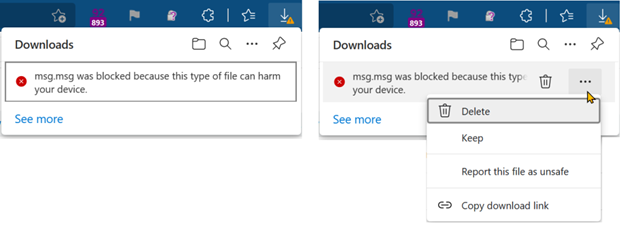
    Note: If Microsoft Edge or Chrome mislabels the Farbar Scanner executable as PUA/malware, choose to keep it by tapping … in the bottom bar, choosing Keep, and then choosing Keep anyway in the dialog that appears.

    See this screenshot: https://learn.microsoft.com/en-us/deployedge/media/microsoft-edge-security-download-interruptions/dowload-was-blocked.png. It's a safe tool used in most antimalware forums.

    Was this answer helpful?

    0 comments No comments

Your answer

Answers can be marked as 'Accepted' by the question author and 'Recommended' by moderators, which helps users know the answer solved the author's problem.