Microsoft Security | Microsoft Entra | Microsoft Entra ID
A cloud-based identity and access management service for securing user authentication and resource access

This browser is no longer supported.
Upgrade to Microsoft Edge to take advantage of the latest features, security updates, and technical support.
' cx='32' cy='32' r='32' /%3E%3Ctext x='50%25' y='55%25' dominant-baseline='middle' text-anchor='middle' fill='%23FFF' %3EAS%3C/text%3E%3C/svg%3E)
Hi Azure team,
I’m having trouble with my Azure for Students subscription. It shows as active, but I don’t have any role assigned so I can’t create resources or register providers. I accidently deleted something when i was running resource deletion scripts. In Access Control (IAM) my account isn’t listed at all.
Here are the details:
Could you please help me get the Owner role back on this subscription? it's very important for me.
Right now only my “Students Starter” subscription works, but it’s too limited.
edited PII information
A cloud-based identity and access management service for securing user authentication and resource access
' cx='32' cy='32' r='32' /%3E%3Ctext x='50%25' y='55%25' dominant-baseline='middle' text-anchor='middle' fill='%23FFF' %3ESM%3C/text%3E%3C/svg%3E)
Hello Athithya Sakthivel,
Could you confirm whether you are Global Administrator in that tenant directory or not?
Thanks for replying!. yes i have Global administrator in that default directory.
Hello Athithya Sakthivel,
Let's continue our discussion in Private messages tab
This answer was helpful, and it solved my problem
Hello Athithya Sakthivel,
As discussed offline, the issue resolved by elevating the access for a Global Administrator using the Azure portal.
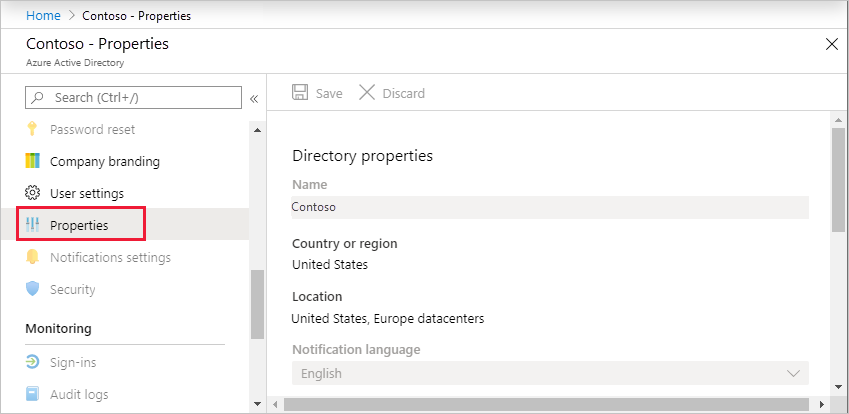
Initially, sign in to the Azure portal as a Global Administrator and browse to Microsoft Entra ID > Manage > Properties.
Under Access management for Azure resources, set the toggle to Yes.
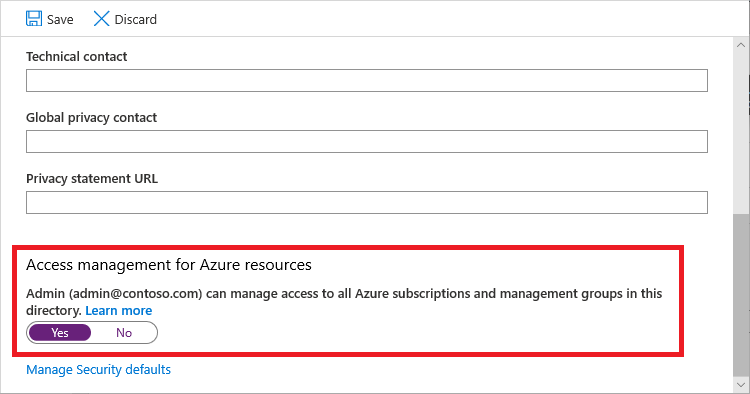
This adds you as User Access Administrator role in Azure RBAC at root scope (/). With that role, you can now assign Owner role to you under subscription and create resources successfully.
Hope this helps! Feel free to reach out for further queries.
If this answers your query, do click Accept Answer and Yes for was this answer helpful, which may help members with similar questions.
Hello Athithya Sakthivel,
If all your concerns have been resolved, I would greatly appreciate it if you could mark the answer as "Accepted" by clicking Accept Answer and Yes for was this answer helpful. This helps both us and others in the community.
This answer is helpful, and it solved my problem