PART A:
I'm using two monitors plus a laptop, and each has its own speakers. I've tried disabling the speakers for the monitors (as they are dreadful), but they pop back up the next time I restart.
Is there a way to permanently get them off the list? It makes the selection list unnecessarily long. I will never need them because even if I have a problem with my preferred sound device (Studio 2, referenced below), I can use the speakers in the HP Omnibook laptop, which are not too bad (tolerable).
PART B:
I have two other devices for sound output. The first is a Harmon Kardon Studio 2 that I use for general sound output. There is a wee little Cambridge Audio DAC on a USB cable from the USB hub in the monitor (Dell 40" U4025QW) to the DAC, and then by a 3.5mm cable to the Studio 2. Even if the Studio 2 is powered off, the computer recognises the DAC (which it shows as "Speakers (2- CA DacMagic XS)". I believe there may be a driver installed for the DacMagic.
That's great, as it's always in the list, but this leads to my primary question. I also have a high-end sound system that I fire up either for listening to my hi-res flac music files, or if the sound quality from (e.g.) YouTube is worthwhile. This system is known to the computer by the name of the external DAC "Speakers (Schiit BiFrost 2 Unison USB)". The feed is out of the USB-A port in the laptop, to the DAC.
The problem is that if the DAC is not powered up when I start the computer, it is not on the list, and I have to restart while the Schiit is powered on. This is in contrast to the Cambridge Audio DAC (which doesn't have a power on/off switch). This is a real pain in the neck! So then, even if I turn off the Schiit, it remains on the list even after the laptop sleeps (useful) – it only disappears if I shut down. I do not leave the Schiit on when I'm not using it because of power consumption, plus it gets hot.
Is there a way to have the Schiit permanently in the list to avoid having to restart?
Here is a screenie of the Device Manager (with Schiit off):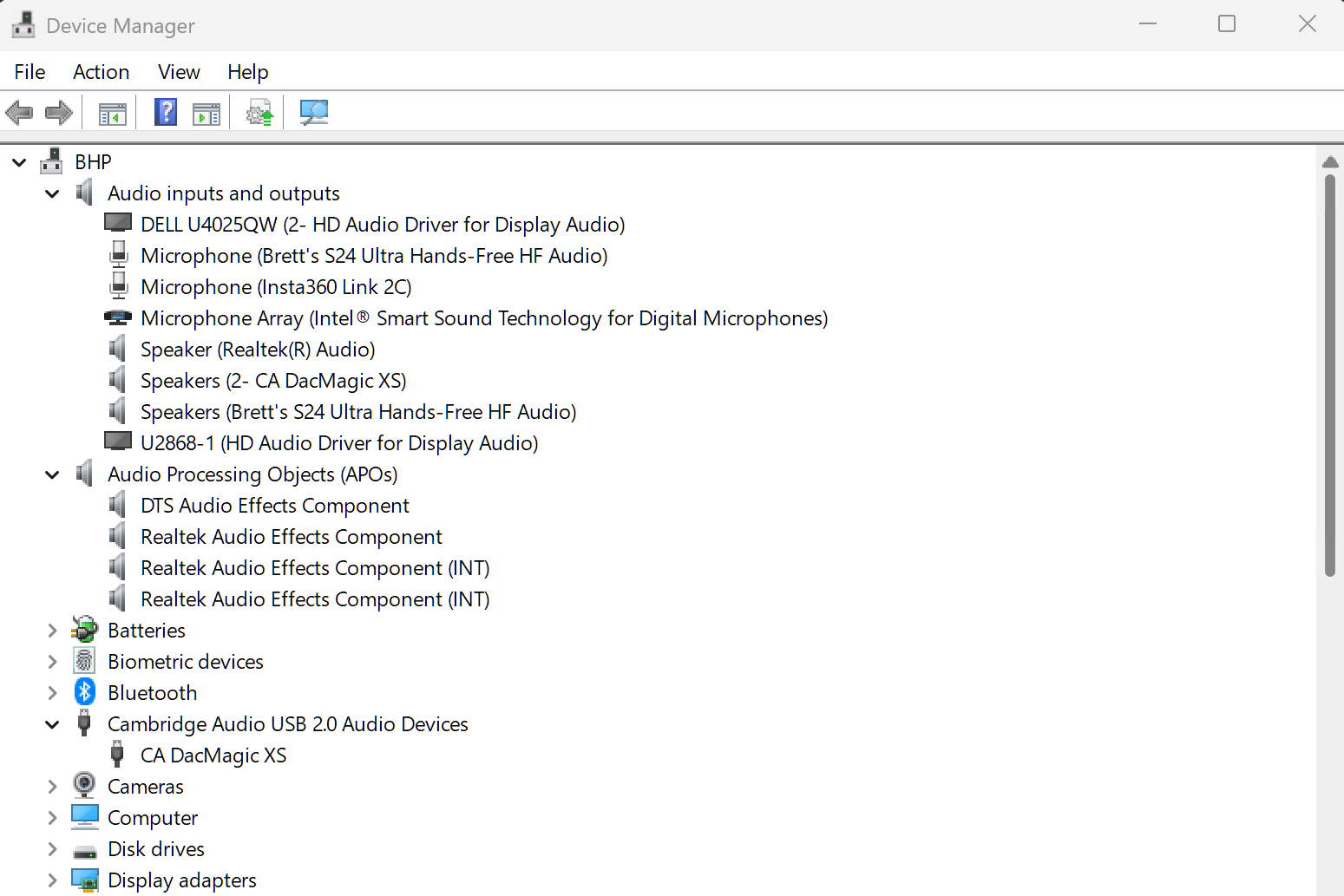
The first one (DELL) is the rubbish monitor speakers,
Speaker (Realtek(R) Audio) is the halfway decent laptop sound
U2868 is the rubbish speakers from the second Monitor
After a restart Speakers (Schiit BiFrost 2 Unison USB) is at the bottom of the list, if it was powered on.
' cx='32' cy='32' r='32' /%3E%3Ctext x='50%25' y='55%25' dominant-baseline='middle' text-anchor='middle' fill='%23FFF' %3EBG%3C/text%3E%3C/svg%3E)

' cx='32' cy='32' r='32' /%3E%3Ctext x='50%25' y='55%25' dominant-baseline='middle' text-anchor='middle' fill='%23FFF' %3ETN%3C/text%3E%3C/svg%3E)