Hello!
Recently I did a reinstall of Windows on my PC and these past few days I have been updating drivers and installing new ones. Since yesterday I have been getting these Event 1001, Windows Error Reporting pop ups in Event viewer. They seem to be logged when I restart my PC. It will also log another one a few hours later if I keep my PC on for a few hours.
The only way I know that my PC has been logging these in is because I have been looking though Event Viewer due to reinstalling Windows and making sure I am not getting any bad pop ups that it throws out. My PC doesn't Blue Screen, there is no freezing. My computer runs great and if I wasn't looking at event viewer I would have never known these where going on.
I looked around Event Viewer to see what might cause it by looking at all the other events that were listed around that time and I can't seem to see what caused it. There is no BugCheck event listed around that time as well.
Here is a screenshot of the event:
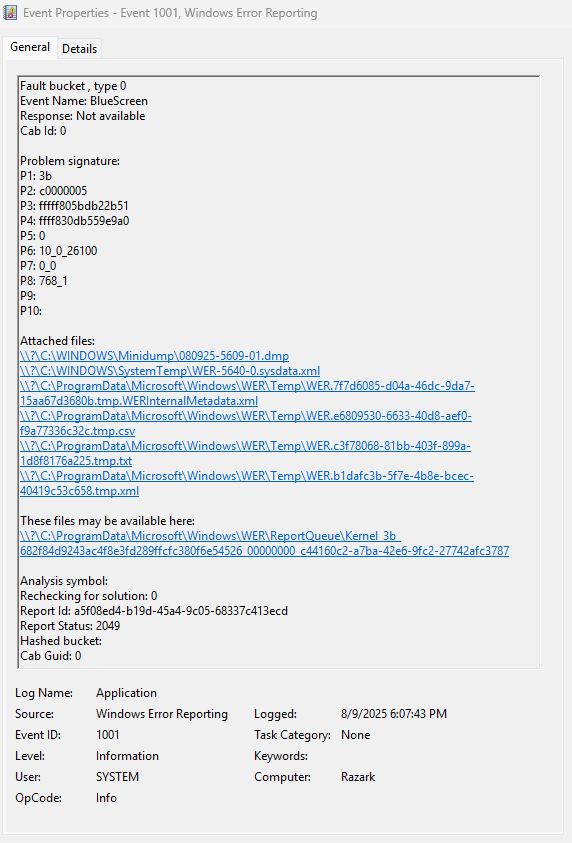
I would also post the Minidump as well but when I checked there was no Minidump that was made. I also checked the Startup and Recovery settings and everything there looks like it should make one if something does go wrong.
I did take a few steps and tried to solve the problem by running sfc /scannow and DISM though elevated command prompt and both of those saw no corruption with window files. My drivers are up to date and I checked my memory with Windows Memory Diagnostic and that also didn't report any errors.
Thanks for the help!
' cx='32' cy='32' r='32' /%3E%3Ctext x='50%25' y='55%25' dominant-baseline='middle' text-anchor='middle' fill='%23FFF' %3EJS%3C/text%3E%3C/svg%3E)

' cx='32' cy='32' r='32' /%3E%3Ctext x='50%25' y='55%25' dominant-baseline='middle' text-anchor='middle' fill='%23FFF' %3EMH%3C/text%3E%3C/svg%3E)
' cx='32' cy='32' r='32' /%3E%3Ctext x='50%25' y='55%25' dominant-baseline='middle' text-anchor='middle' fill='%23FFF' %3EJK%3C/text%3E%3C/svg%3E)
' cx='32' cy='32' r='32' /%3E%3Ctext x='50%25' y='55%25' dominant-baseline='middle' text-anchor='middle' fill='%23FFF' %3EOO%3C/text%3E%3C/svg%3E)
' cx='32' cy='32' r='32' /%3E%3Ctext x='50%25' y='55%25' dominant-baseline='middle' text-anchor='middle' fill='%23FFF' %3EIL%3C/text%3E%3C/svg%3E)