Azure Synapse Analytics
An Azure analytics service that brings together data integration, enterprise data warehousing, and big data analytics. Previously known as Azure SQL Data Warehouse.
This browser is no longer supported.
Upgrade to Microsoft Edge to take advantage of the latest features, security updates, and technical support.
' cx='32' cy='32' r='32' /%3E%3Ctext x='50%25' y='55%25' dominant-baseline='middle' text-anchor='middle' fill='%23FFF' %3EEK%3C/text%3E%3C/svg%3E)
I keep on getting this error when i try to create an azure synapse analytics resource. I tried multiple different regions but still the same error. Maybe something is wrong with my subscription. This is the error message i get: {"code":"ValidationFailed","message":"Workspace request validation failed, check error details for more information","details":[{"code":"SqlServerRegionDoesNotAllowProvisioning","message":"Location 'westcentralus' is not accepting creation of new Windows Azure SQL Database servers for the subscription '4fbd8cc9-3f45-422d-a5cd-c81439b905b9' at this time."}]}
Before that I created successfully one azure synapse analytics resource for test purposes but deleted it.
Any ideas why this error occurs and how to solve this problem? Thank you.
An Azure analytics service that brings together data integration, enterprise data warehousing, and big data analytics. Previously known as Azure SQL Data Warehouse.
The problem got automatically solved.
' cx='32' cy='32' r='32' /%3E%3Ctext x='50%25' y='55%25' dominant-baseline='middle' text-anchor='middle' fill='%23FFF' %3EGG%3C/text%3E%3C/svg%3E)
Hi @Elena Kovacheska
Register with SQL RP:
To deploy Azure SQL resources, register your subscription with the SQL resource provider (RP).
You can register your subscription using the Azure portal, the Azure CLI, or Azure PowerShell.
To register your subscription in the Azure portal, follow these steps:
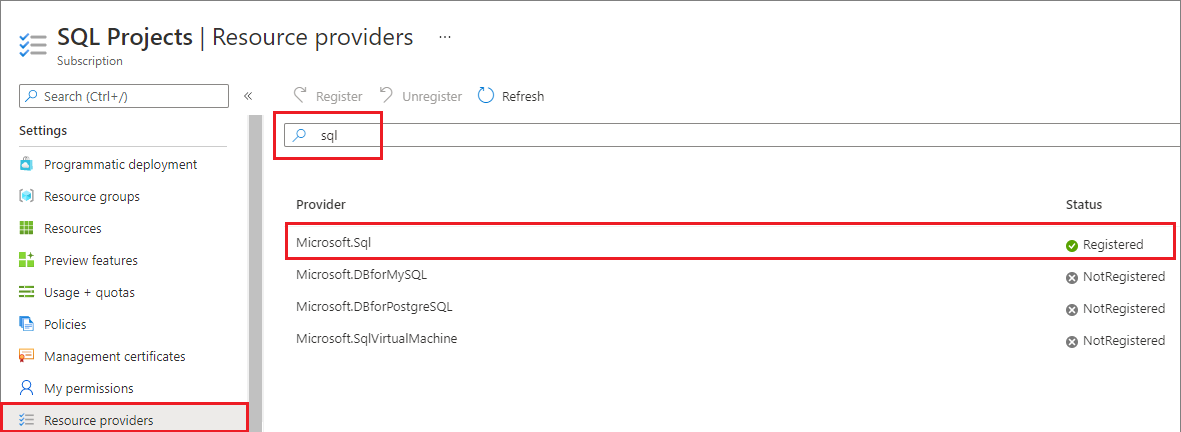
Additional provisioning issues:
If you're still experiencing provisioning issues, please open a Region access request under the support topic of SQL Database and specify the DTU or vCores you want to consume on Azure SQL Database or Azure SQL Managed Instance.
Similar issues: https://learn.microsoft.com/en-us/answers/questions/1360141/deploying-synapse-workspace-subscription-error
For more details refer: https://learn.microsoft.com/en-us/azure/azure-sql/capacity-errors-troubleshoot?view=azuresql&tabs=portal
Hope this helps. Do let us know if you have any further queries.
If this answers your query, do click Accept Answer and Yes for was this answer helpful. And, if you have any further query do let us know.