My Windows Defender works absolutely fine and no issues.
Thank you for your guidance throughout the process.
Glad it's resolved, and thank you for the feedback.
Regards,
This browser is no longer supported.
Upgrade to Microsoft Edge to take advantage of the latest features, security updates, and technical support.
' cx='32' cy='32' r='32' /%3E%3Ctext x='50%25' y='55%25' dominant-baseline='middle' text-anchor='middle' fill='%23FFF' %3EA%3C/text%3E%3C/svg%3E)
Hello,
I've recently installed a malware my mistake and it destroyed my Windows Defender's Virus and Threat protection completely. All the files related to it is completely erased. I tried all possible commands in Command Prompt and Powershell. I tried to reinstall my windows using update and it didn't work. I'm not able to download updates related to defender . My version of windows is Windows 11 Home. Can someone give a solution to this? Most importantly I don't want my files and apps to be deleted.
Locked Question. This question was migrated from the Microsoft Support Community. You can vote on whether it's helpful, but you can't add comments or replies or follow the question.

My Windows Defender works absolutely fine and no issues.
Thank you for your guidance throughout the process.
Glad it's resolved, and thank you for the feedback.
Regards,
' cx='32' cy='32' r='32' /%3E%3Ctext x='50%25' y='55%25' dominant-baseline='middle' text-anchor='middle' fill='%23FFF' %3ERS%3C/text%3E%3C/svg%3E)
Great, please open an admin Command Prompt and run:
"C:\Program Files\Windows Defender\MpCmdRun.exe" -SignatureUpdate -MMPC

sc.exe qc windefend

sc.exe qc WdNisSvc & sc.exe query WdNisSvc

dir C:\Windows\System32\drivers\wd /a

powershell -command "get-mpcomputerstatus; get-mppreference"
Post the output.
The "Program Files\Windows Defender" folder seems to be intact. However, the Microsoft Defender Antivirus drivers are missing.
If Defender doesn't launch after rebooting the system, please do the following.
https://go.microsoft.com/fwlink/?linkid=2156295
(Your files, settings and applications will be preserved if you use the ISO recommended for your system by the Media Creation Tool.)
Microsoft Defender has been entirely removed by malware. A repair installation using the ISO is necessary. Before doing so, please run the fixlist below to fix the UAC settings.
Download fixlist.txt (https://www.winhelponline.com/fixlist/dharshand...)
Save Fixlist.txt to the folder where FRST64English.exe is located.
Close all programs.
Launch the Farbar Scanner tool and click "Fix".
Restart Windows when prompted.
Upload the output log file (FixLog.txt) to your OneDrive.
NOTE: Don't run the same fixlist.txt more than once. The fixlist.txt script was written specifically for this user, for use on that particular machine. Running this on another machine is not recommended.
Standard Disclaimer: There is a link to a non-Microsoft website. The page appears to provide accurate, safe information, and it's a trusted MVP (2003-2012) site. Watch out for ads on the site that may advertise products frequently classified as PUPs (Potentially Unwanted Products). Thoroughly research any product advertised on the site before you decide to download and install it.
Hi Dharshan, This is Ramesh.
Please run the Farbar Scanner and share your logs to inspect the Defender-related services and check for malware.
https://www.bleepingcomputer.com/download/farba...
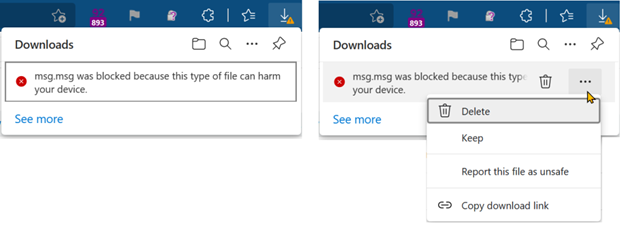
Note: If Microsoft Edge or Chrome mislabels the Farbar Scanner executable as PUA/malware, choose to keep it by tapping … in the bottom bar, choosing Keep, and then choosing Keep anyway in the dialog that appears.
See this screenshot: https://learn.microsoft.com/en-us/deployedge/me.... It's a safe tool used in most antimalware forums.
References:
How-To: Share OneDrive files and folders - Microsoft Support
https://support.microsoft.com/en-us/office/shar...
OneDrive sharing options - screenshot
How to Run a Scan using Farbar Recovery Scan Tool » Winhelponline:
https://www.winhelponline.com/blog/farbar-recov...
Standard Disclaimer: There is a link to a non-Microsoft website. The page appears to provide accurate, safe information. Watch out for ads on the site that may advertise products frequently classified as PUPs (Potentially Unwanted Products). Thoroughly research any product advertised on the site before you decide to download and install it.

Hello,
Try to reset Windows Security:
https://www.kapilarya.com/reset-windows-security-in-windows-11
Let us know if this helps!
Note: Included link in this reply refers to blog post by a trusted Microsoft MVP.