Azure Databricks
An Apache Spark-based analytics platform optimized for Azure.
This browser is no longer supported.
Upgrade to Microsoft Edge to take advantage of the latest features, security updates, and technical support.
' cx='32' cy='32' r='32' /%3E%3Ctext x='50%25' y='55%25' dominant-baseline='middle' text-anchor='middle' fill='%23FFF' %3EA%3C/text%3E%3C/svg%3E)
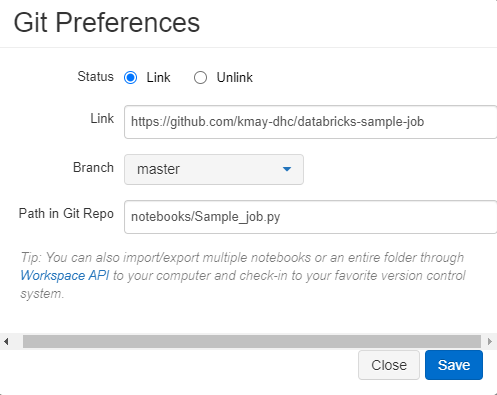
I have followed the instructions to integrate Databricks with GitHub, found here: https://docs.databricks.com/notebooks/github-version-control.html
However, I continue to get the following failure error upon trying to sync my notebooks: "Error while syncing Git history: Response from GitHub: status code: 404, reason phrase: Not Found"
The GitHub token with repo permissions has been saved in my Databricks account, and the repository is public.
Any idea what could be causing this?
' cx='32' cy='32' r='32' /%3E%3Ctext x='50%25' y='55%25' dominant-baseline='middle' text-anchor='middle' fill='%23FFF' %3EBM%3C/text%3E%3C/svg%3E)
I'm having the exact same issue. The GitHub token with repo permissions has been saved in my Databricks account, and the repository is public.
Has someone come up with a solution for this issue?
Thanks.
' cx='32' cy='32' r='32' /%3E%3Ctext x='50%25' y='55%25' dominant-baseline='middle' text-anchor='middle' fill='%23FFF' %3EUF%3C/text%3E%3C/svg%3E)
Go to the branch dropdown and select "main". This issue is occurring in many environments because GitHub has recently renamed its master branch as main. Hence, when trying to sync with master branch, it throws a 404 error. Hope this helps!

Hello @Anonymous ,
Welcome to Microsoft Q&A platform.
Why am I getting a 404 error on a repository that exists?
Typically, GitHub send a 404 error when your client isn't properly authenticated.
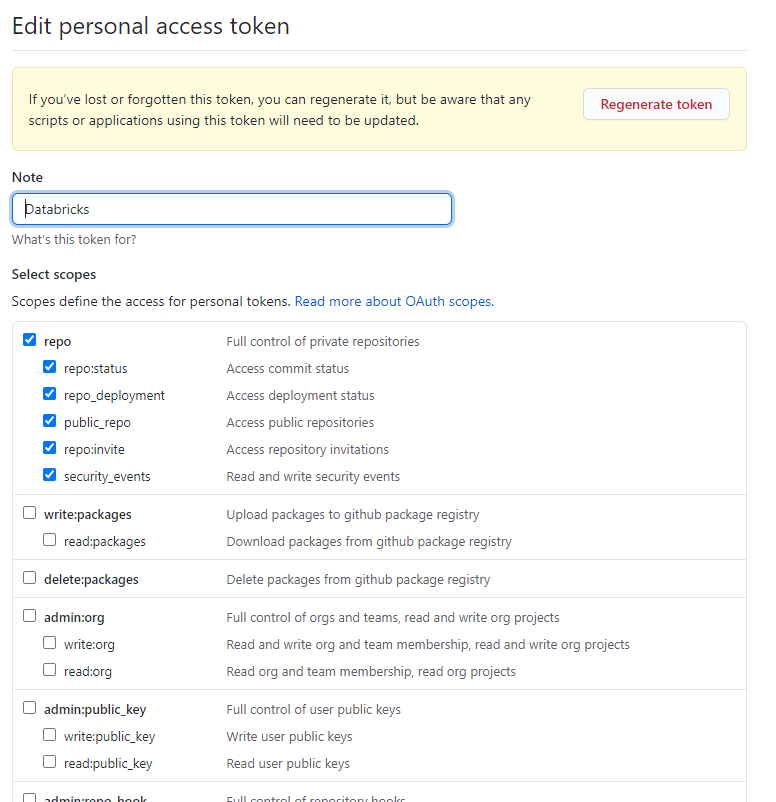
Make sure you have proper permissions on GitHub personal access token.
To generate a GitHub personal access token, follow the GitHub documentation. The token must have the “repo” permission.
Reference: Azure Databricks - GitHub version control
Hope this helps. Do let us know if you any further queries.
----------------------------------------------------------------------------------------
Do click on "Accept Answer" and Upvote on the post that helps you, this can be beneficial to other community members.
@PRADEEPCHEEKATLA Thank you for the reply.
My GitHub personal access token is set up with "repo" permission (see screenshot). I have tried multiple times, following the reference documentation, but still no luck.
Hello @Anonymous ,
This issue looks strange. For a deeper investigation and immediate assistance on this issue, if you have a support plan you may file a support ticket.
' cx='32' cy='32' r='32' /%3E%3Ctext x='50%25' y='55%25' dominant-baseline='middle' text-anchor='middle' fill='%23FFF' %3ESG%3C/text%3E%3C/svg%3E)
Did you resolve the issue?
' cx='32' cy='32' r='32' /%3E%3Ctext x='50%25' y='55%25' dominant-baseline='middle' text-anchor='middle' fill='%23FFF' %3EGS%3C/text%3E%3C/svg%3E)
UmamahFatima-1698 answered • Feb 16 2022 at 1:57 AM
Go to the branch dropdown and select "main". This issue is occurring in many environments because GitHub has recently renamed its master branch as main. Hence, when trying to sync with master branch, it throws a 404 error. > Hope this helps!
This resolved the issue for me, thanks!