Microsoft Security | Microsoft Entra | Microsoft Entra ID
A cloud-based identity and access management service for securing user authentication and resource access

This browser is no longer supported.
Upgrade to Microsoft Edge to take advantage of the latest features, security updates, and technical support.
' cx='32' cy='32' r='32' /%3E%3Ctext x='50%25' y='55%25' dominant-baseline='middle' text-anchor='middle' fill='%23FFF' %3ES%3C/text%3E%3C/svg%3E)
Dear Sir,
When I log in my work account , I need the approve a request on my Microsoft Authenticator app or use a verification code from my mobile app. But the question is I have already uninstalled the Microsoft Authenticator app before, now I install the app again, but I can't add the work account so that i can't get the verification code.
Please help me to solve the problem asap and i need to log in the work account.
Best wishes,
Steven
A cloud-based identity and access management service for securing user authentication and resource access

You must tell your organization administrator to forget and unregister the old device. Then register the new device
To remove the app from a device using a work or school Microsoft account. Go to the two-step verification area of either your MyApps page or your organization's custom portal to turn off verification for your old device.
' cx='32' cy='32' r='32' /%3E%3Ctext x='50%25' y='55%25' dominant-baseline='middle' text-anchor='middle' fill='%23FFF' %3EVS%3C/text%3E%3C/svg%3E)
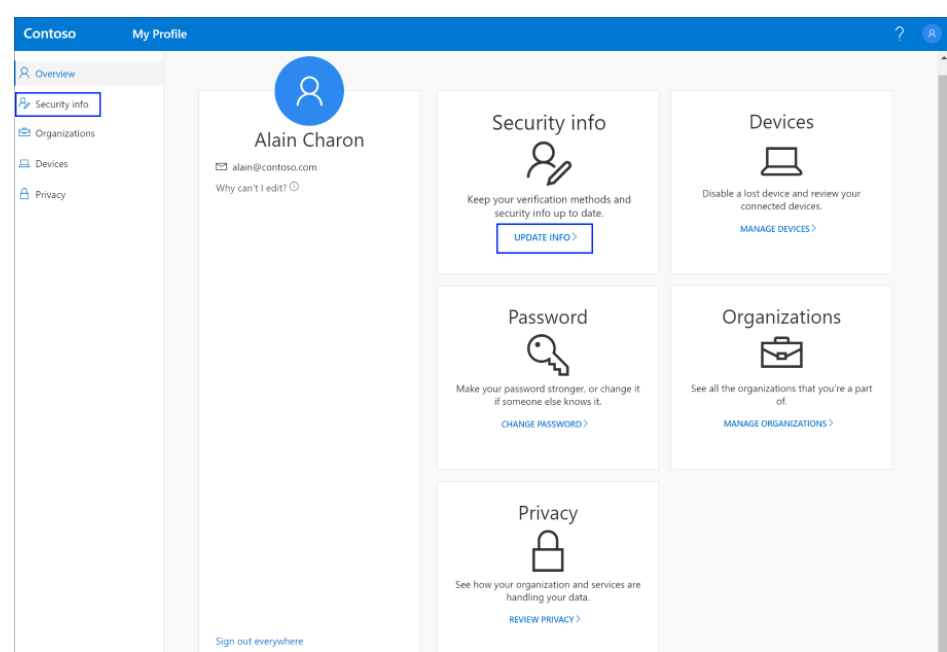
@Steven You must add the Authenticator App to approve the sign in request. you must follow this link in order to add the Authenticator App to your device and your account : https://learn.microsoft.com/en-us/azure/active-directory/user-help/security-info-setup-auth-app#to-set-up-the-microsoft-authenticator-app
It all starts with https://myaccount.microsoft.com/
-----------------------------------------------------------------------------------------------------------------
If the suggested response helped you resolve your issue, please do not forget to accept the response as Answer and "Up-Vote" for the answer that helped you for benefit of the community.
It doesn't work. Because I can't log in my work account.
Your only options is to contact your organization Admin then, they can help you out.